9
Using the Tuner
TheMINI3'stunerfunctionenablesyoutotuneaguitar
connectedtotheINPUTjack.Thetunerdetectsthepitch
oftheinputsound,thenindicatesthedierencefromthe
standardpitchofE.
1. PressandholddowntheTAPswitchformorethanone
second.
Alleectswillbebypassed,andthetunerfunctionwill
turn on.
All effects are bypassed.
(No valid signal is being input.)
2. Playtheopen6thstring.
NOTE:
Becarefulnottotouchanyotherstrings.
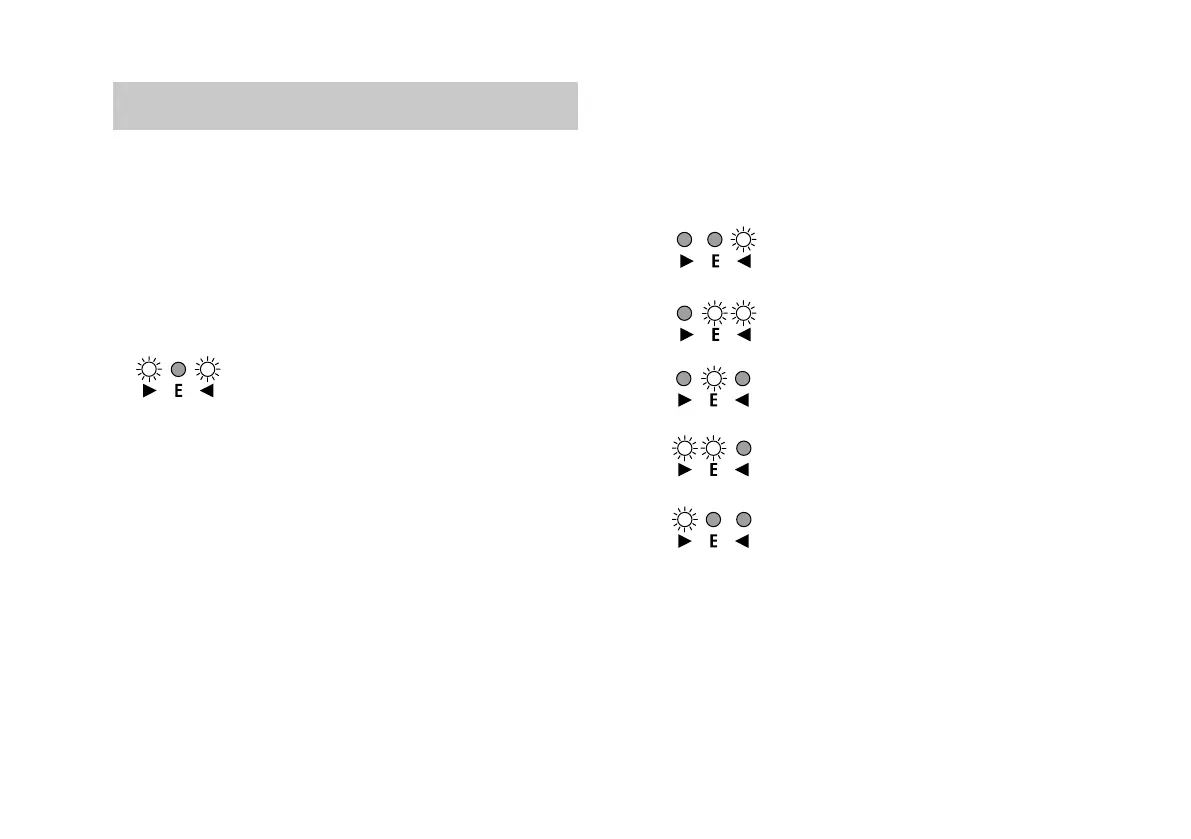
3.TunetheguitarsothatonlythecentergreenLEDindica-
torlightsup,asshownontheright.
TIP: TheMINI3recognizespitchEinanyoctave.This
isusefulifyouwanttotunetoharmonicsortune
other musical instruments, such asa bass gui-
tar.
4. To exit the tuner function, press the TAP switch. The
eectbypasswillbecanceled.
TIP: Onceyoutunethe6thstringusingthetunerfunc-
tion,tunetheotherstringsinreferencetothe6th
string.
The pitch is sharp.
The pitch is slightly sharp.
In tune.
The pitch is slightly flat.
The pitch is flat.



 To Next Page