Need help?
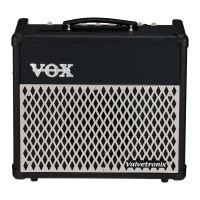
Do you have a question about the Vox VALVETRONIX AD10VT and is the answer not in the manual?
Warning regarding compliance with FCC rules for digital devices and potential interference.
Explanation of CE mark conformity to various EU directives for apparatus.
Advice on verifying product intended use country and retaining proof of purchase for warranty.
Overview of key features including Valve Reactor technology, amp models, effects, and connectivity.
Step-by-step instructions for initial power-up, guitar connection, and volume adjustment.
Detailed explanation of the controls and sections on the amplifier's top panel.
Location for plugging in the guitar.
Explanation of AMP selector, GAIN, and VOLUME controls.
How to select effects and use EDIT 1, TAP, and BYPASS buttons for adjustment.
Details on using the EDIT 1 knob with other buttons for parameter adjustments and noise reduction.
How to enter and use Preset mode to select pre-configured amp and effect settings.
How to enter Manual mode where knob positions directly control sound.
How to switch between and recall saved programs using CH1/CH2.
Where to connect the included power cord to the amplifier.
How to connect the optional VFS2 dual foot switch for program or bypass control.
Explanation of the POWER LEVEL control for adjusting output wattage.
Connecting the SEND jack to the input of an external effect unit.
Connecting the output of an external effect unit to the RETURN jack.
How to select preset programs using the AMP selector in Preset mode.
Steps to activate Preset mode by pressing the PRESET button.
Details on using the AMP selector to choose programs when in Preset mode.
How to recall saved programs using the CH button in Channel Select mode.
Steps to activate Channel Select mode by pressing the CH button.
Step-by-step guide to creating a custom sound from scratch using amp and effect settings.
How to use the VFS2 left switch (Switch 1) to alternate between CH1 and CH2.
How to assign and use the VFS2 right switch (Switch 2) for effect bypass.
How to assign and use the VFS2 right switch (Switch 2) to activate Manual mode.
Introduction to the eleven modeled amp types, covering their tonal characteristics.
How amp controls adjust to mimic original amp circuitry and offer flexibility.
Explanation of the Auto Wah effect and its parameters (SENS, ATTACK, POLARITY).
Checks for issues when the amplifier does not power on.
Steps to diagnose and resolve issues where no sound is produced by the amp.
Lists number of amp types, effects, noise reduction, and programs.
Details of the input and output connectors on the top and rear panels.
Output power ratings for each amplifier model (AD15VT, AD30VT, AD50VT, AD100VT).
Information on the speaker size and impedance for each amplifier model.
Specifications for A/D, D/A conversion and sampling frequency.
Details on power supply type and voltage.
Power consumption wattage for each amplifier model.
Dimensions in millimeters and inches for each amplifier model.
Weight in kilograms and pounds for each amplifier model.
List of items included with the amplifier.
List of optional accessories available for purchase.
Instructions on marking knob positions on the cheat sheet.
Instructions on marking used effects by coloring LEDs on the cheat sheet.
Guidance on making notes for NR, TAP TEMPO, and POWER LEVEL on the cheat sheet.
 General
| Power Output | 10W |
|---|---|
| Valve Type | 12AX7 |
| Amp Models | 11 |
| Inputs | 1 x Instrument |
| Outputs | 1 x Headphone |
| Amplifier Type | Modeling Amplifier |
| Speaker Size | 6.5 inches |
| Speaker | Custom Vox speaker |

 To Next Page