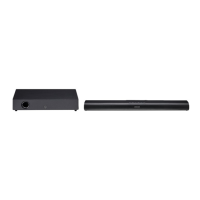
This document is a user manual for the VOXICON SOUNDBAR 2.0, model VXA-220. It provides important safety instructions, details about the product's components, setup procedures, operational guidelines, troubleshooting tips, and technical specifications.
The VOXICON SOUNDBAR 2.0 is an audio device designed to enhance the sound experience of a TV or other external audio sources. It features multiple connectivity options including optical and AUX inputs, and Bluetooth for wireless audio streaming. The soundbar is designed for both tabletop placement and wall mounting.
Important Safety Instructions:
The manual emphasizes several critical safety precautions. Users are warned about the risk of electric shock and are advised not to open the device's cover or back. The lightning flash symbol indicates the presence of uninsulated "dangerous voltage," while the exclamation point alerts users to important operating and maintenance instructions. Users must read and follow all safety and operating instructions, keep the manual for future reference, and heed all warnings. The apparatus should not be used near water or moisture and should only be cleaned with a dry cloth. Ventilation openings must not be blocked, and the unit should not be installed near heat sources. The safety purpose of the polarized or grounding plug should not be defeated. The power cord must be protected from being walked on or pinched. Only manufacturer-specified attachments and accessories should be used. The apparatus should be unplugged during lightning storms or when unused for long periods. All servicing should be referred to qualified personnel.
The manual also includes specific warnings regarding battery usage, particularly for the remote control's coin/button cell battery. It states, "DO NOT INGEST BATTERY, CHEMICAL BURN HAZARD." If a battery is swallowed, immediate medical attention is required. Batteries should be kept away from children, and if the battery compartment does not close securely, the product should not be used. The battery (batteries or battery pack) should not be exposed to excessive heat. Danger of explosion exists if the battery is incorrectly replaced, and it should only be replaced with the same or equivalent type.
Technical Specifications:
Soundbar:
- Power requirements: AC 220-240V 50/60Hz
- Output power: 8W x 2
- Power consumption: 10W
- Frequency response: 40Hz - 20kHz
- Audio input sensitivity (AUX): 700mV
- Speaker impedance: 4Ω x 2
- Total Harmonic Distortion: 1% (1kHz, 1W)
- Unit Dimension (W x H x D): 802.3 x 63 x 66.8 mm
Bluetooth:
- Version: V4.2
- Maximum power transmitted: <20 dbm
- Frequency bands: 2402MHz ~ 2480MHz
Remote Control:
- Distance: 6 m
- Angle: 30°
- Battery Type: CR2025
Usage Features:
The soundbar offers several operational modes and features:
- Standby/ON: The unit enters Standby mode when first connected to the mains. It can be switched ON by pressing the power button on the soundbar or remote control. Holding the power button again switches it back to Standby (red indicator). The unit can also switch on automatically if a connected TV or external device is turned on. It will automatically switch to Standby mode if there is no input signal for over 15 minutes (ERPII standard requirement for saving power).
- Mode Selection: Users can select desired modes (AUX, BT, OPTICAL) using the power button on the soundbar or dedicated buttons on the remote control. LED indicators on the front of the soundbar show the current mode: Red for Standby, Green for AUX, Blue for Bluetooth, and White for Optical.
- Volume Adjustment: Volume can be adjusted using the vol+/vol- buttons on the soundbar or remote control. The status indicator flashes quickly during adjustment. It flashes once when maximum or minimum volume is reached.
- Mute Function: The sound can be muted by pressing the mute button on the remote control. Pressing it again or adjusting the volume resumes normal listening.
- AUX/Optical Operation: The soundbar connects to external audio devices via optical or AUX sockets. For optical input, users might need to activate PCM signal output on their source device if there's no sound.
- Bluetooth Operation:
- Pairing: To connect a Bluetooth device, select Bluetooth mode (Blue indicator lights up). Activate the Bluetooth search mode on the device and select "VXA-220." If the soundbar is not found, press and hold the Play/Pause/Pair button on the remote control to initiate device search (Blue indicator flashes rapidly). Once paired, the "Paired" voice prompt will sound, and the Blue indicator will light up solidly.
- Music Playback: Music can be played from a connected Bluetooth device that supports Advanced Audio Distribution Profile (A2DP). If the device supports Audio Video Remote Control Profile (AVRCP), the soundbar's remote control can be used for playback control (play, pause, skip tracks).
- Disconnecting: Bluetooth can be disconnected by switching to another function on the soundbar, disabling Bluetooth on the connected device, or pressing and holding the pause/play/pair button on the remote control. The "Disconnected" voice prompt will confirm disconnection.
- Operational Range: The effective operational range between the soundbar and a Bluetooth device is approximately 8 meters without obstacles. Obstacles or weak signal strength can reduce this range. If the connection is lost, the device will re-enter pairing mode automatically.
Maintenance Features:
- Battery Replacement (Remote Control): The remote control uses a CR2025, 3V Lithium battery. To replace it, push the tab on the side of the battery tray, slide the tray out, remove the old battery, insert a new CR2025 battery with correct polarity, and slide the tray back into the slot.
- Battery Precautions: Remove the battery if the remote control will not be used for a long time (over a month) to prevent leakage. If leakage occurs, clean the compartment and replace the batteries. Only specified batteries should be used; do not heat, disassemble, throw in fire/water, or store with metallic objects. Do not recharge non-rechargeable batteries.
- Cleaning: The unit should only be cleaned with a dry cloth. Chemical solvents should not be used as they may damage the finish.
- Wall Mounting: Installation should be carried out by qualified personnel. If self-installing, check for electrical wiring and plumbing. The installer is responsible for verifying wall support. Additional tools (not included) are required. Do not overtighten screws. Use an electronic stud finder to check the wall type. The procedure involves removing backing paper from rubber, sticking rubber to the soundbar, drilling two parallel holes (Ø 3-8 mm, 711 mm apart), fixing dowels if necessary, leaving a 9 mm gap between the wall and screw head, and slotting the soundbar into place.
Troubleshooting:
The manual provides a troubleshooting section for common issues:
- No power: Check AC cord connection, power at the outlet, and press standby button.
- Remote control not working: Select correct source, reduce distance, check battery polarity, replace battery, aim remote directly at sensor.
- No sound: Increase volume, check mute status, select different input source. For digital inputs, try setting TV output to PCM or connect directly to source. Check TV audio output setting (FIXED or STANDARD, not VARIABLE). For Bluetooth, ensure source device volume is up and not muted.
- Cannot find Bluetooth name: Ensure Bluetooth is activated on device, re-pair the unit.
- 15 mins power off function: Increase external input signal level if too low.
- Buzzing or humming: Ensure cables are securely connected, try a different source device, connect device to a different input on the soundbar.
Marking:
The product complies with European directives for CE-marking: 2014/35/EU (LVD), 2014/30/EU (EMC), 2011/65/EU (RoHs), and 2017/53/EU (RED). The "Bluetooth" word mark and logos are registered trademarks owned by Bluetooth SIG, Inc. The crossed-out wheeled bin symbol indicates that the product should not be disposed of with household waste and should be recycled responsibly.


 To Next Page
 General