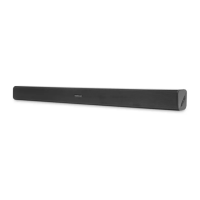
This document is a user manual for the VOXICON Soundbar Dolby Digital 2.1, model VXA-284. It provides comprehensive instructions for safe operation, installation, and usage of the soundbar and its wireless subwoofer.
Function Description
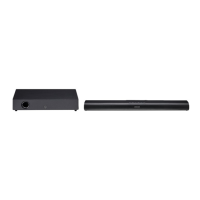
The VOXICON VXA-284 is a 2.1 channel soundbar system designed to enhance audio output from TVs and other external audio devices. It features Dolby Digital support for an immersive audio experience. The system includes a main soundbar unit and a wireless subwoofer for extended bass response. Connectivity options include HDMI (ARC), optical, coaxial, and AUX inputs, as well as Bluetooth for wireless audio streaming. The soundbar can be operated via its on-unit controls or a supplied remote control.
Important Safety Instructions
The manual emphasizes several critical safety precautions:
- Electrical Safety: Users are warned about uninsulated "dangerous voltage" and the risk of electric shock. It advises against opening the unit, referring all servicing to qualified personnel. The device is a Class II, double-insulated appliance, not requiring an electrical earth connection. A polarized or grounding plug should not be defeated. Power cords should be protected from being walked on or pinched. The mains plug/appliance coupler serves as the disconnect device and must remain readily operable.
- Placement and Environment: The unit should not be exposed to dripping or splashing liquids, and no objects filled with liquids (like vases) should be placed on it. It should not be used near water or moisture. Adequate ventilation is crucial, with a minimum distance of 5cm around the apparatus; ventilation openings should not be blocked by items like newspapers or curtains. The unit should be kept away from heat sources (radiators, heaters, stoves, amplifiers) and strong magnetic fields. It should not be placed on an amplifier or receiver.
- Battery Safety (Remote Control): The remote control uses a coin/button cell battery (CR2025, 3V Lithium). Users are warned about the chemical burn hazard if ingested, with instructions to keep batteries away from children and seek immediate medical attention if swallowed. Batteries should not be exposed to excessive heat, disassembled, or thrown into fire/water. They should not be carried or stored with metallic objects to prevent short-circuiting, leaking, or exploding. Only specified batteries should be used, and rechargeable types should only be recharged if confirmed as such. If the remote control is not used for a long time (over a month), the battery should be removed to prevent leakage.
- General Use: Only attachments/accessories specified by the manufacturer should be used. Caution is advised when moving the unit with a cart/stand to prevent tip-over injury. The apparatus should be unplugged during lightning storms or when unused for long periods. Chemical solvents should not be used for cleaning; a clean, dry, or slightly damp cloth is recommended. When unplugging, always pull directly on the plug, not the cord. Unauthorized modifications will void the user's authority to operate the equipment. The rating label is located on the bottom or back of the equipment.
Important Technical Specifications
Soundbar:
- Power Supply: AC 220-240V 60/50Hz
- Output Power: 30W x 2
- Power Consumption: 30W/ ≤0.5W (Standby)
- Frequency Response: 120Hz - 20KHz
- Audio Input Sensitivity (AUX): 700mV
- Speaker Impedance: 8Ω x 2
- Dimensions (W x H x D): 745 x 62 x 92 mm
Wireless Subwoofer:
- Power Supply: AC 220-240V~ 60/50Hz
- Output Power: 60W
- Power Consumption: 30W
- Frequency Response: 40Hz - 120Hz
- Impedance: 4Ω
- Speaker Impedance: 8Ω x 2
- Dimensions (W x H x D): 465 x 94 x 255 mm
Bluetooth:
- Version: V4.2
- Maximum Power Transmitted: <5 dbm
- Frequency Bands: 2402MHz ~ 2480MHz
Wireless Subwoofer 2.4GHz:
- Distance: 6 m
- Angle: 30°
- Battery Type (Remote Control): CR2025
Usage Features
Controls:
- Main Unit Controls: Power, Source selection, EQ effect, Play/Pause/Pair (Bluetooth), Volume Up/Down.
- Remote Control: Power, Mute, Source selection (AUX, Optical, Coaxial, BT, HDMI ARC), EQ (News, Movie, Music), Play/Pause/Pair, Previous/Next track (Bluetooth), Volume Up/Down.
LED Indicators (Main Unit):
- Red: Standby mode
- Green: AUX mode
- Blue: Bluetooth mode
- Orange: Optical mode
- Orange Flash: Coaxial mode
- White: HDMI ARC mode
Connectivity:
- HDMI (ARC): Connects to an ARC-compliant TV for audio return. Requires HDMI-CEC and ARC to be enabled on the TV. Supports TV remote control for volume adjustment. Only HDMI 1.4 cables support ARC.
- Coaxial: Connects to a TV's coaxial output.
- Optical: Connects to a TV's optical output. Remove the protective cap before connecting.
- AUX: Connects to external audio devices using RCA to 3.5mm or 3.5mm to 3.5mm audio cables.
Wireless Subwoofer Pairing:
- Automatic Pairing: The subwoofer and soundbar automatically pair within 30 seconds when both are powered on. The subwoofer's Pair indicator flashes during pairing and lights up steadily when successful.
- Manual Pairing: If automatic pairing fails, unplug both units, wait 3 minutes, then plug them back in. Press and hold the PAIR switch on the subwoofer until its indicator rapidly blinks, then turn on the main unit. The indicator will become solid upon successful pairing.
- Tips for Pairing: The subwoofer should be within 6m of the soundbar in an open area. Remove any objects between the units. Check for and remove strong interference from other electronic devices.
General Operation:
- Standby/ON: The unit enters Standby mode when first connected to power. Press the power button on the unit or remote to switch ON/OFF. The unit will automatically switch to standby if there's no input signal in Bluetooth, Optical, Coaxial, AUX, or HDMI ARC for over 15 minutes. If a TV or external device is connected to the AUX socket, the unit and subwoofer will switch on automatically when the TV or external device is switched on.
- Mode Selection: Press the Source button on the unit or remote to select Bluetooth, Optical, Coaxial, AUX, or HDMI ARC mode. The front LED indicator changes color to reflect the active mode.
- Volume Adjustment: Use the Vol+/Vol- buttons on the unit or remote. The status indicator flashes quickly during adjustment. It flashes once when maximum or minimum volume is reached.
- Mute: Press the Mute button on the remote to silence the sound. Press again or use Vol+/Vol- to resume listening.
- Equaliser (EQ) Effects: Press the EQ button on the unit or Movie/Music/News buttons on the remote to select preset sound modes: Movie (recommended for movies), Music (recommended for music), News (recommended for news).
External Audio Devices:
- Ensure the unit is connected to the TV or audio device.
- Select the appropriate input mode (Optical, Coaxial, AUX, HDMI ARC).
- Operate the audio device directly for playback.
- Adjust volume using the soundbar controls.
- Tip: If there's no sound in Optical/Coaxial/HDMI ARC mode and the indicator flashes, you may need to activate PCM or Dolby Digital signal output on your source device (e.g., TV, DVD, Blu-ray player).
Bluetooth Operation:
- Connecting: In ON mode, press the Source button to select Bluetooth mode (Blue indicator flashes slowly). Activate Bluetooth on your device and search for "VXA-284". If not found, press and hold the Play/Pair button on the unit or remote to enter pairing mode (Blue indicator flashes rapidly, "Pairing" voice prompt). Select "VXA-284" and enter "0000" if a password is required. The unit will voice "Paired" and the Blue indicator will light up solidly.
- Listening to Music: Play music from the connected Bluetooth device. Use the supplied remote control to control playback (if the device supports AVRCP), including play/pause and skipping tracks.
- Disconnecting: Switch to another function, disable Bluetooth on your device, or press and hold the Play/Pair button on the unit or remote. The unit will voice "Disconnected".
- Bluetooth Tips: The operational range is approximately 8 meters without obstacles. Compatibility with all Bluetooth devices is not guaranteed. Obstacles or weak signal strength can reduce the range or cause disconnection, but the unit will attempt to re-enter pairing mode automatically. If no other Bluetooth device pairs within two minutes, the player will recover its previous connection.
Maintenance Features
Troubleshooting:
The manual includes a troubleshooting section to address common issues:
- No Power: Check AC cord connection, power at the outlet, and ensure the standby button is pressed.
- Remote Control Not Working: Select the correct source, reduce distance to the unit, insert battery with correct polarity, replace battery, aim remote directly at the sensor.
- No Sound: Increase volume, check Mute status, select correct input source. For Digital inputs, try setting TV output to PCM or connect directly to the source. Check if TV audio output is set to FIXED or STANDARD (not VARIABLE). For Bluetooth, ensure source device volume is up and not muted.
- Bluetooth Device Not Found: Ensure Bluetooth is activated on your device and the unit is paired.
- 15-Minute Power Off: This is an ERPII standard power-saving function. If the external input signal level is too low, the unit turns off automatically. Increase the volume of the external device.
- Subwoofer Idle/Indicator Off: Unplug the subwoofer's power cord, wait 4 minutes, then plug it back in to reset.
Care and Cleaning:
- Clean the unit only with a dry cloth. Do not use chemical solvents as they may damage the finish.
Disposal and Marking:
- Correct Disposal of Product: The crossed-out wheeled bin symbol indicates that the product should not be disposed of with other household waste within the EU. It should be recycled responsibly to promote sustainable reuse of material resources. Users should contact their retailer or local collection systems for environmentally safe recycling.
- CE Marking: Declares compliance with European directives 2014/35/EU (LVD), 2014/30/EU (EMC), 2011/65/EU (RoHS), and 2017/53/EU (RED).
- Bluetooth: "Bluetooth" word mark and logos are registered trademarks owned by Bluetooth SIG, Inc.
- HDMI: "HDMI", "HDMI High-Definition Multimedia Interface", and the HDMI Logo are trademarks or registered trademarks of HDMI Licensing, LLC.
- Dolby Audio: "Manufactured under license from Dolby Laboratories. 'Dolby' and the double-D symbol are trademarks of Dolby Laboratories."


 To Next Page
 General