S70
77
ENGLISH
INSTALLING ASIO DRIVER FOR WINDOWS
Before you can use the VOXOA C60, you need to install its ASIO driver fi rst. The ASIO lower latency to under 10
ms. you can confi gure the driver's settings using the Control Panel window. This tool and its options are explained
following:
PC SYSTEM REQUIREMENTS (Minimum system requirements):
- Intel Pentium II 450MHz CPU or comparable AMD CPU(recommend at least a Pentium III CPU with 600M MHz) .
- Windows 98SE, ME, 2000, XP, Vista and Windows 7 operating system
- 1 available USB port
- At least 128MB RAM
- Software applications with ASIO support
INSTALLATION:
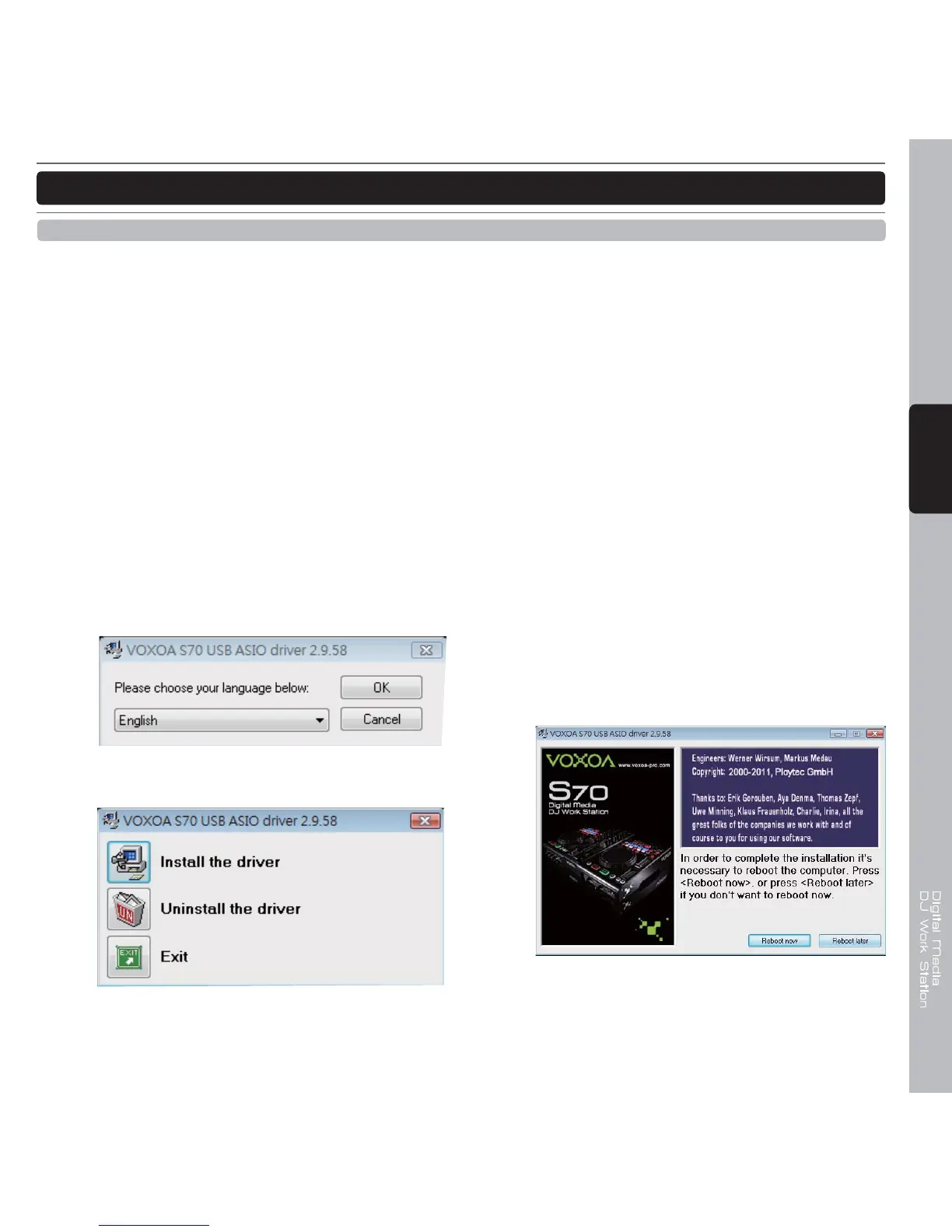
Step 1: Place the installation CD in the CD-ROM drive of your computer and execute Setup.exe fi le.
SOFTWARE INSTALLATION INSTRUCTION
Step 2: Select the desired language and click “Ok”
Step 3: Click “Install the driver”
Step 4:
Follow the instructions from the installation window
and install the driver step by step.
Step 5:
In order to complete the installation it’s necessary
to reboot the computer. Press [Reboot now], or
press [Reboot later] if you don’t want to reboot
your computer now.



 To Next Page