ICON USER’S MANUAL: SECTION 8 VIRGINIA PANEL CORPORATION
8-2 For the most current information available, visit www.vpc.com.
6/7/18
ICON PCB MOUNTING OVERVIEW
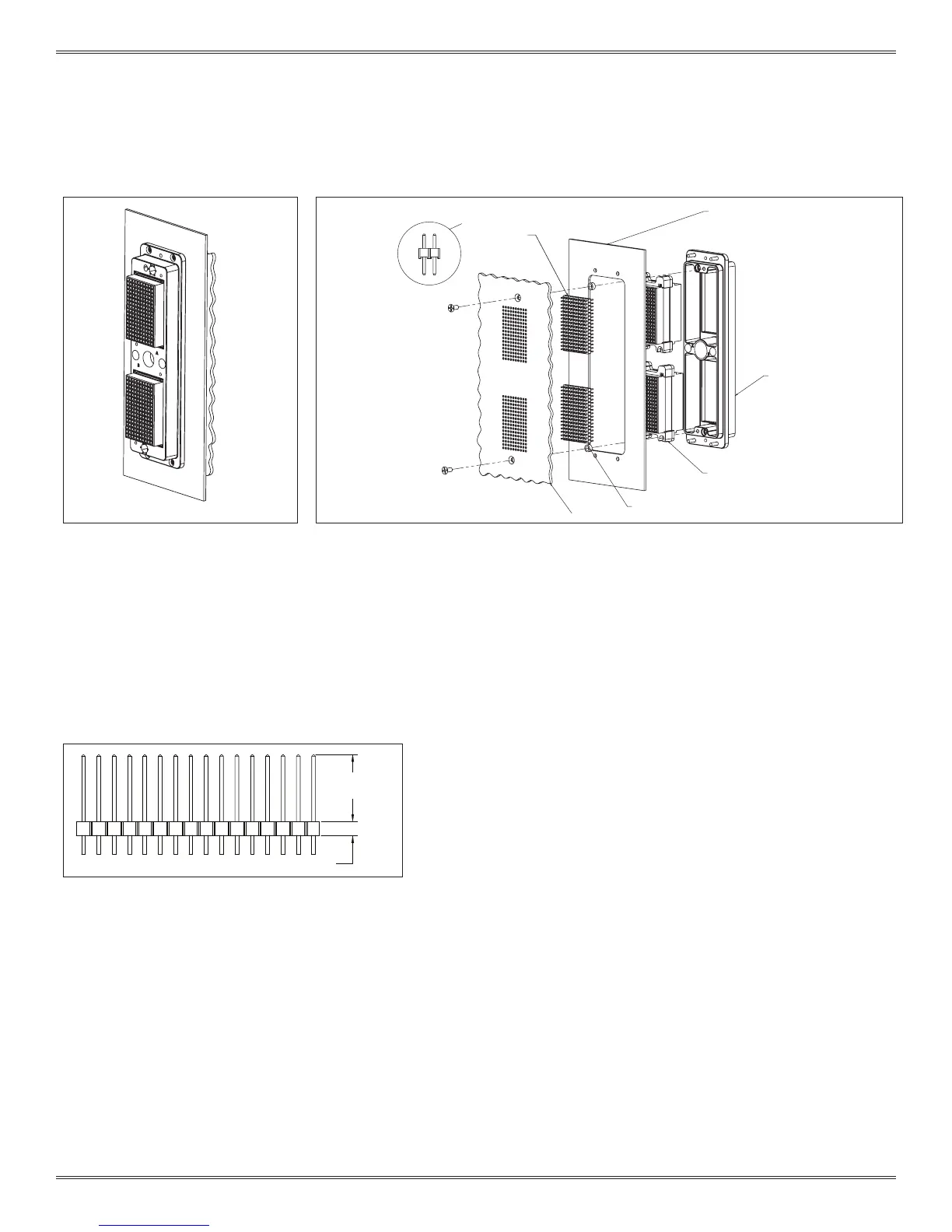
Figure B. iCon receiver with two
160 pin QuadraPaddle modules.
Each module is loaded with twin
female contacts, Part # 510 160 105.
Each module will accept twin male
headers connecting the female
contacts to the PCB plated thru holes.
Figure C. A PCB can be mounted directly to the back of an iCon receiver as shown above.
Use 2 x 4-40 screws (athead shown) to mount to the Receiver frame. When using twin male
headers, spacers may be needed to prevent unwanted stress on the PCB.
PCB - ENVELOP DIMENSIONS ARE NOT FIXED
TO PCB CREATES A
SEPARABLE INTERFACE
ICON RECEIVER FRAM
160 PIN TWIN FEMALE ICON MODULE
HEADER, .100 SPACING TWIN MALE SOLDERED
SPACER, SAME WIDTH AS HEADER BODY TO
RECEIVER FRAME MOUNTING PLATE
0.22” [5.6 mm]
/
0.45” [11.4 mm]
HEADER CARRIER HEIGHT
Figure D. Twin male header.
NOTE: Figure D details 0.22” [5.59 mm]/0.45” [11.43 mm] min/max
engagement.
NOTE: Minimum spacer height = 0.24” + header carrier height -
panel thickness (if used).
Any additional height beyond this minimum must be added to
the header post limits shown in Figure D.
NOTE: Several manufacturers offer the twin male header:
Samtec, TE, MultiComp, Molex. The specic part number
required is dependant on the distance the iCon will be located
from the PCB, the thickness of the PCB, and the plating type
required.


 To Next Page
 Loading...