EasyManua.ls Logo

VR PROMARK p70- vr - User Manual

VR PROMARK p70- vr
8 pages
Print Icon
To Next Page IconTo Next Page
Loading...
VIRTUAL REALITYDRONE
PACKING LIST
CONTENTS
P70-VR
INSTRUCTION MANUAL
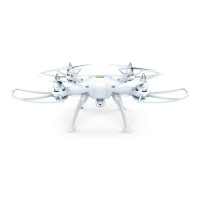
VR Drone Quadcopter
Page 1
VR Remote Control Console
(Smartphone not included)
VR 3D Glasses
VIRTUAL REALITY DRONE
PACKING LIST.....................................................................1
QUICK START...................................................................2-3
IMPORTANT THINGS TO KNOW BEFORE YOU FLY..................3
VR DRONE FEATURES ..........................................................4
VR REMOTE CONTROL CONSOLE FEATURES.........................5
PROMARK VR APP FEATURES ..............................................5
PREPARATION FOR FLIGHT..................................................6
OPERATION INSTRUCTIONS.................................................6
MODES ...............................................................................7
FLYING ACTION ...................................................................7
3D TUMBLING ACTION.........................................................7
CLEANING TIPS...................................................................7
WARNINGS..........................................................................8
Question and Answer IconNeed help?

Do you have a question about the VR PROMARK p70- vr and is the answer not in the manual?

Summary

Packing List

Quick Start

Important Things to Know Before You Fly

Drone Features

Remote Control Console Features

Promark VR App Features

Preparation for Flight

Operating Instructions

Hover Up and Down

Control drone ascent and descent using the throttle lever.

Forward and Backward

Control drone forward/backward movement with the direction lever.

Turn Left and Right

Control drone rotation with the throttle lever left or right.

Sideward Fly

Control lateral movement using the direction lever left or right.

Left;Right-Tuning Fly Fine-Tuning

Adjust left/right flight path by pressing the fine-tuning button.

Forward;Backward Fly Fine-Tuning

Adjust forward/backward flight path by pressing the fine-tuning button.

Modes

Normal Mode

Default flight mode for conventional quadcopter operation.

Altitude - Holding Mode

Maintain current altitude using the Camera Key and throttle control.

Headless Mode

Operate drone without regard to its forward direction via transmitter button.

3 D Tumbling Function

Cleaning Tips

Warning

VR PROMARK p70- vr Specifications

General IconGeneral
BrandVR PROMARK
Modelp70- vr
CategoryDrones
LanguageEnglish