VIRTUAL REALITY DRONE
QUICK START
Page 2
2
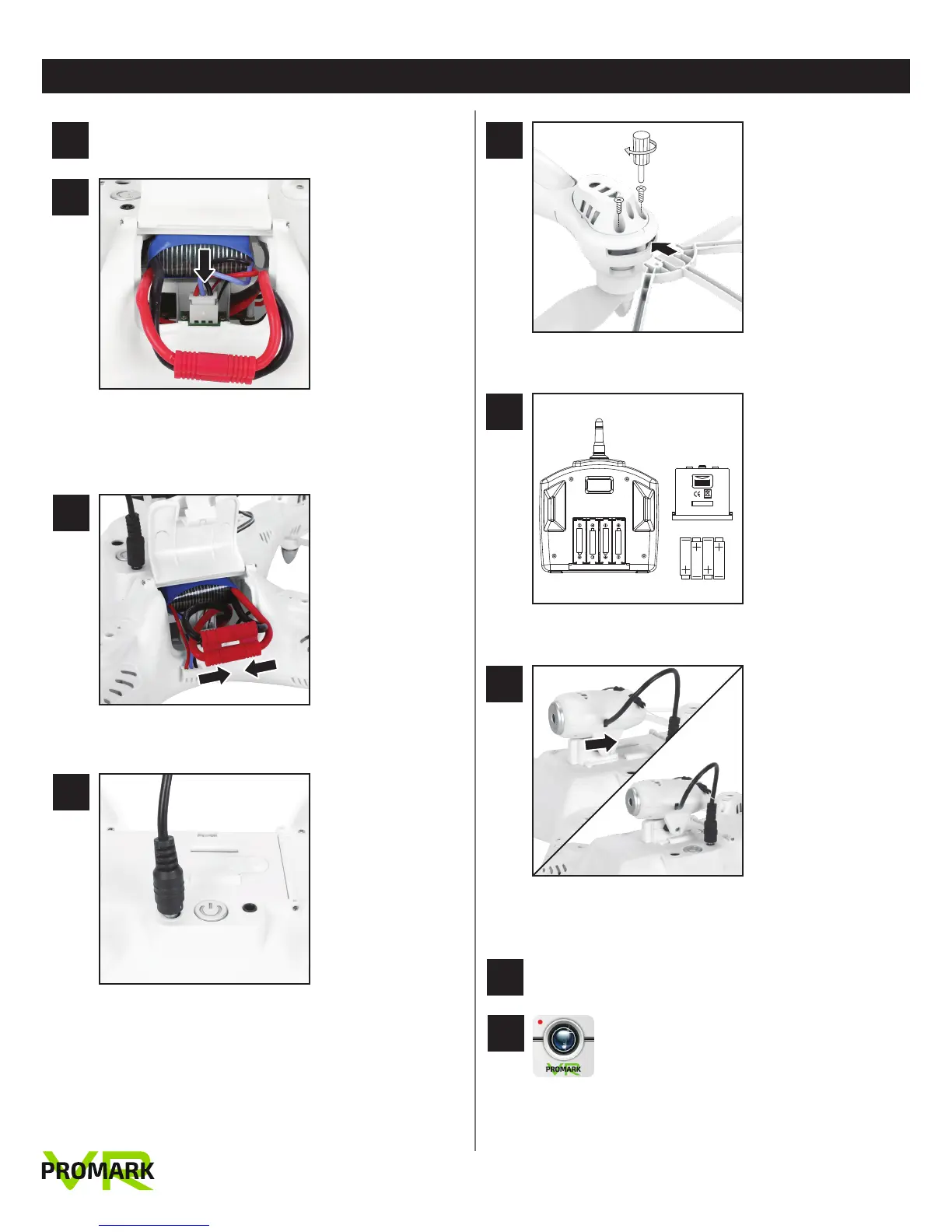
Open battery compartment and slide battery in. Plug 3
color battery cable into port. No need to remove
battery when charging!
3
Connect black and red power cables to each other
4
Connect USB power cord to drone and to power
source.
Connect protective rings
1
Charge drone battery up to 5 hours (red light will turn
off when fully charged).
6
7
Add 4AA batteries to remote control console
Slide camera onto bottom of drone and attach black
power cord
8
Attach head strap to VR 3D Glasses
9
Download the Promark VR aerial-photography
app to stream real-time video direct from
your Promark VR Drone to your smartphone.
The Promark VR app works as both a 2D FPV
(First Person Viewer) and 3D virtual reality
device (VR glasses required, included).
5
1.5V SIZE AA/LR6
1.5V SIZE AA/LR6
1.5V SIZE AA/LR6
1.5V SIZE AA/LR6
OPEN
MADE IN CHINA


 To Next Page