14 · Operation · Dehumidifier 50, 35, 22 Pint
CONTROL PANEL
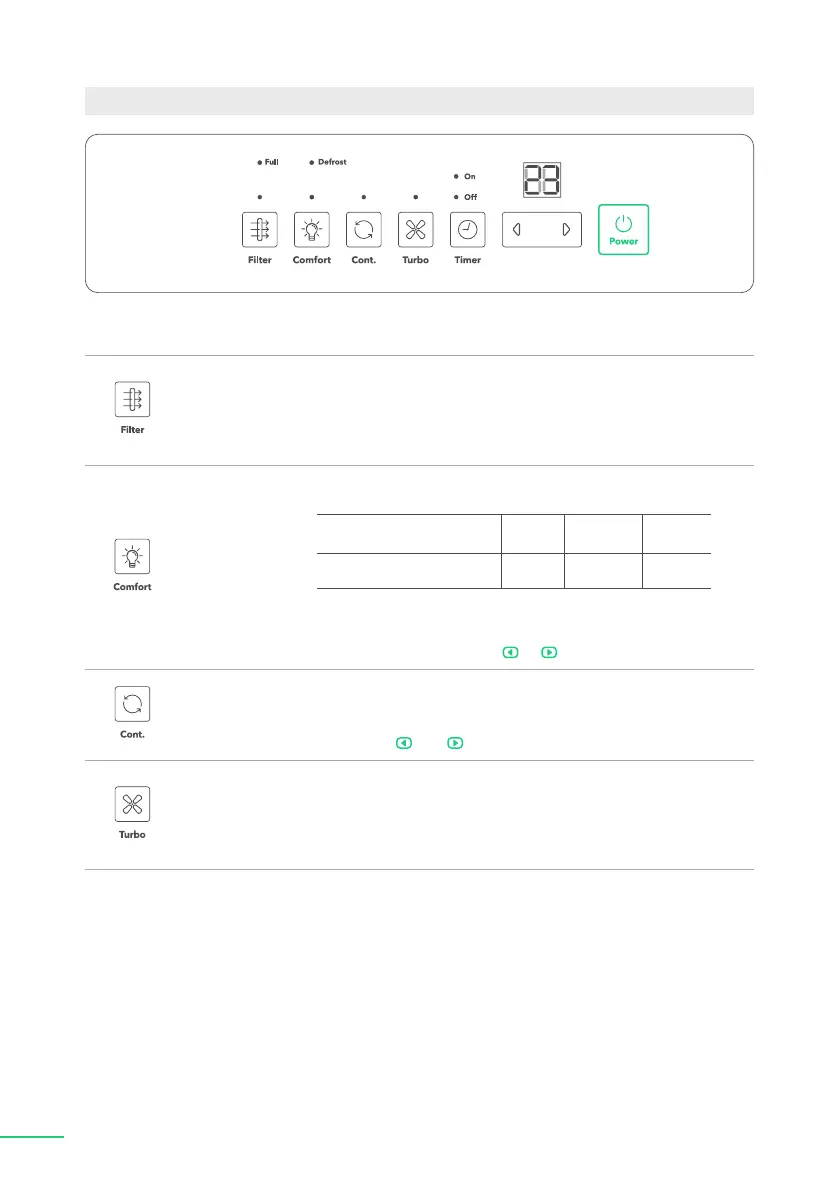
"Filter" button
The check "Filter" feature is a reminder to clean the air
lter for more efcient operation. The "Filter" light ("Clean
Filter" light) will ash after 250 hours of operation. To reset
after cleaning the lter, press the "Filter" button and the
light will go off.
"Comfort"
button
This button turns on/off the "Comfort" function, which
offers preset temperatures and humidity levels (see chart):
Ambient Temperature <65°F 65—77°F >77° F
Relative Humidity 55% 50% 45%
NOTE: The humidity cannot be controlled manually when
using this function. To cancel "Comfort" mode and adjust
humidity manually, press or button.
"Continuous"
button
Press to activate the "Continuous Dehumidifying"
operation. The appliance will work continuously and will
not stop except that the Bucket is full. In "Continuous"
mode, the and buttons are locked.
"Turbo" button
Controls the fan speed. Press to select either "High" or
"Normal"
fan speed. Set the fan control to "High" for
maximum moisture removal. When the humidity has been
reduced and quiet operation is preferred, set the fan control
to "Normal".


 To Next Page
 Loading...