
 Need help?
Do you have a question about the VSON WP9612 and is the answer not in the manual?
Explains how pressure sensitivity allows for varying line thickness based on pen pressure.
Guides on downloading and installing the necessary driver software for the graphics tablet.
Details the procedure for installing the driver on Windows systems.
Explains the installation process for the driver on macOS systems.
Details the steps for connecting the graphics tablet to a computer and confirming connection.
Explains how to configure the tablet's work area mapping to display screens.
Guides on configuring the express keys on the graphics tablet.
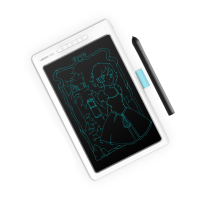
The WP9612 Graphics Tablet is a device designed for handwriting input, drawing, and general computer interaction, offering pressure sensitivity for a more natural creative experience. It connects to a computer via a USB cable and is compatible with Windows 7 and above, as well as Mac OS 10 and above.
The primary function of the WP9612 Graphics Tablet is to provide a digital surface for handwriting input and drawing. When connected to a computer, the tablet allows users to control the mouse cursor directly within its effective working area. Movement of the pressure-sensitive pen on the tablet translates to cursor movement on the screen. The tablet also supports online teaching when used with appropriate teaching software.
A key feature is its pressure sensitivity. When drawing, the thickness or lightness of the handwriting changes based on the pressure applied by the pen. This allows for a more expressive and natural drawing experience, simulating various strokes like pencil, marker, watercolor pen, brush, and oil brush when combined with drawing software such as Photoshop, Painter, or SketchBook.
The tablet includes hardware keys that function similarly to keyboard keys. There are three default keys, and users can customize any key function or key combination. When these three keys are pressed, the computer screen displays their key code values.
The pen itself has several functions:
While specific numerical technical specifications like resolution or report rate are not detailed in the provided text, the manual highlights several important aspects:
The WP9612 Graphics Tablet offers several features to enhance usability:
The manual outlines several maintenance and troubleshooting aspects:
The WP9612 Graphics Tablet is designed to be a versatile and user-friendly tool for digital artists and those requiring precise input, with comprehensive settings for customization and troubleshooting guidance to ensure a smooth experience.
 General
| Brand | VSON |
|---|---|
| Model | WP9612 |
| Category | Graphics Tablet |
| Language | English |

 To Next Page