Features/Operation
5
Tilt & V-Top
Angle Adjustment:
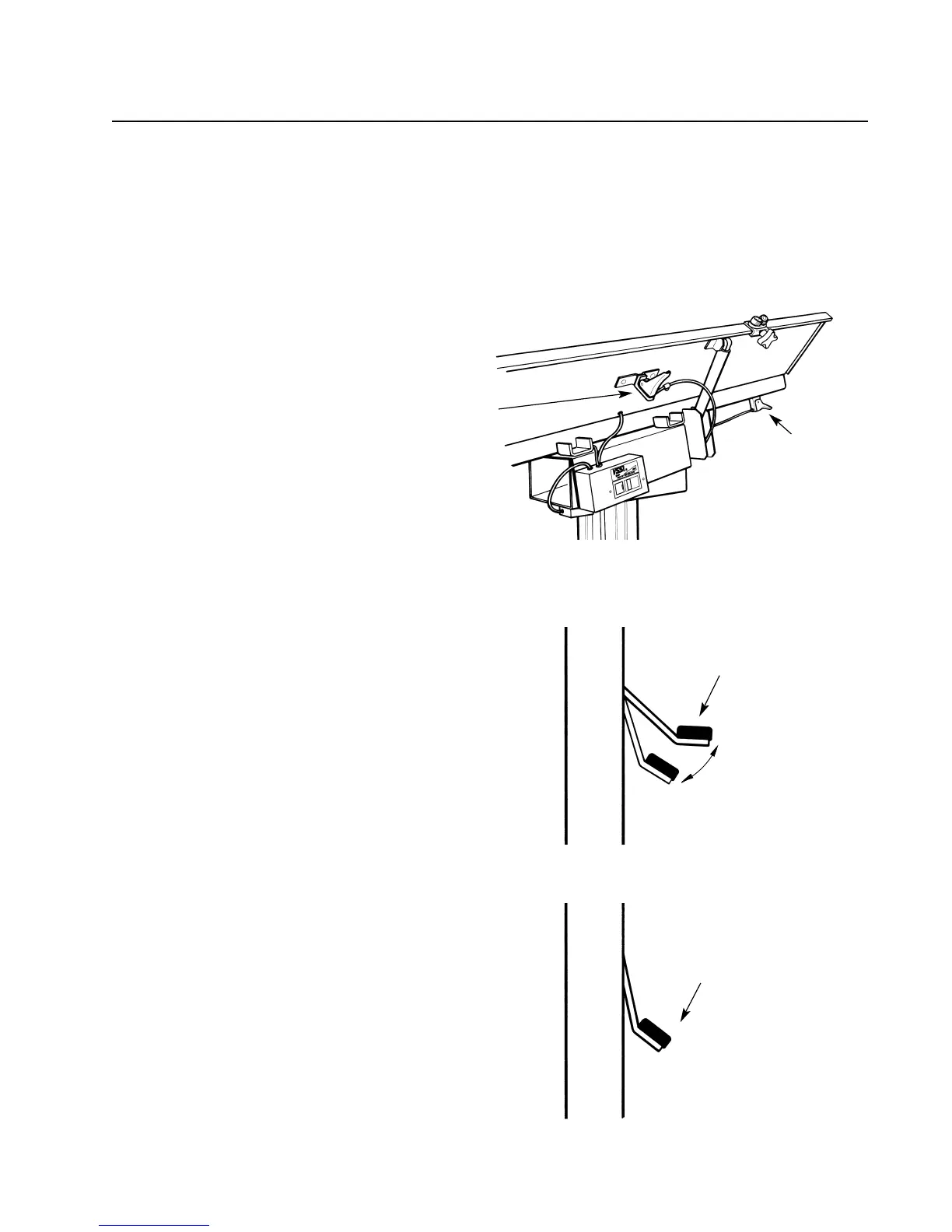
The VSSI Hydraulic Surgery Tables are
designed for easy one-handed adjustment
of table tilt and V-top panel angles. Simply
depress the desired touch control lever
while simultaneously adjusting the top
angle. Release the lever and the panel is
locked solidly in place.
Refer to the drawing on right above for
control lever locations.
Operating
The Hydraulic Column:
Tables equipped with the hydraulic column
allow you to adjust the height of the table
top. To raise the height of the table, step on
the foot pedal repeatedly in a smooth
pumping motion until obtaining desired
height. Depress the pedal only until meeting
greater resistance (if you depress the pedal
until it stops, you are releasing the hydraulic
cylinder, in effect lowering the table).
To lower the height of the table, depress the
pedal completely and hold until the table
“sinks” to the desired position.
Depress Foot Pedal
to bottom position to
lower the table
RAISING THE TABLE
LOWERING THE TABLE
Pedal returns to“up”
position automatically
Step on Foot Pedal
repeatedly in smooth
pumping motion
Tilt Control Lever
This Lever is
located in the
same position
on Flat-Top
tables
V-Panel
Adjust
Control
Lever
4. The VSSI Hydraulic Surgery Table is
protected during shipping with a
white plastic film covering the stainless
steel. Peel off the plastic film before
using. Refer to “Care and Cleaning”,
page 8, for cleaning instructions.
5. Please read all use and care instructions
before using The VSSI Hydraulic
Surgery Table.


 To Next Page