Need help?
Do you have a question about the VT 9500 and is the answer not in the manual?
Lists all items included in the headset package.
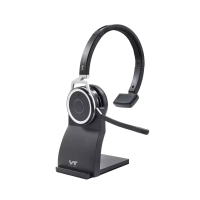
Provides a detailed diagram and labels of the headset components.
Details the different parts and connections of the charging base.
Step-by-step guide on how to pair the headset with a Bluetooth device.
Explains how to answer, hang up, mute, and adjust volume during calls.
Describes the charging process and LED indicators for the headset.
Details the functions of the multifunction button for call control and pairing.
Explains how to use the buttons to adjust the headset speaker volume.
Describes how to use the mute button to toggle microphone on/off.
Explains the meaning of different LED light colors and patterns for status indication.
Lists technical specifications for the headset, including audio, Bluetooth, and compatibility.
Provides details on battery type, capacity, talking/standby time, and charging.
Lists the specifications for the charging base, including port type, size, and weight.
Covers proper disposal methods and FCC compliance information for the device.

 To Next Page
 General