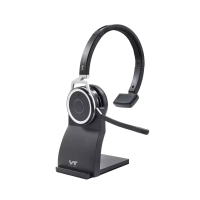
3.2 9500 BT Usage
1.Answer a Call:
After smart phone/laptop successfully pairing with 9500 BT, the headset
will ring when a call coming, please press the multifunction key to
answer it.
2. Hang up a Call
Please short press the multifunction key to hang up a call.
3.Microphone mute and on:
During a call, short press the MUTE button will make microphone on
mute status. If short press the MUTE button again, the microphone will
be on.
4.Volume Adjustment
Short click volume + key to increase the volume while short click volume
- key to decrease it.
3.3 9500 BT Charging
When 9500 BT headset is charging, the red light will on. The green light
will on when it is fully charged. When take the headset off from its
charger base, the headset will be in standby mode. And it is will shut
down automatically to save power consumption if there is no paring
active.


 To Next Page