5
5
5
GETTING STARTED
Battery Removal and Installation
1. Make sure the unit is turned Off.
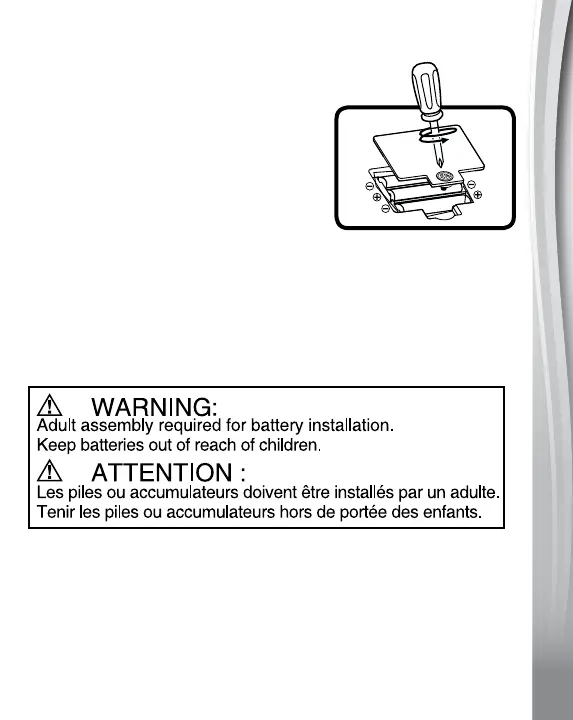
2. Find the battery cover on the back of
the electronic activity panel. Use a
screwdriver to loosen the screw and
then open the battery cover.
3. Remove old batteries by pulling up
on one end of each battery.
4. Install 3 new AA batteries following the
diagram inside the battery box. (For
best performance, alkaline batteries
or fully charged Ni-MH rechargeable
batteries are recommended.)
5. Replace the battery cover and tighten
the screw to secure.
IMPORTANT: BATTERY INFORMATION
• Insertbatterieswiththecorrectpolarity(+and-).
• Donotmixoldandnewbatteries.
• Donotmixalkaline,standard(carbon-zinc)orrechargeable
batteries.
• Onlybatteriesofthesameorequivalenttypeasrecommended
are to be used.






 To Next Page