The VTech Magic 3D Lights is an interactive peg art toy designed to provide hours of entertainment through creative expression and light-based animations. It combines arts and crafts with technology, allowing children to create designs using coloured pegs and then bring them to life with various light shows, sounds, and music.
Function Description:
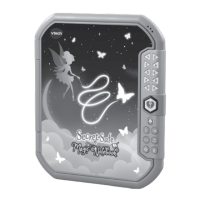
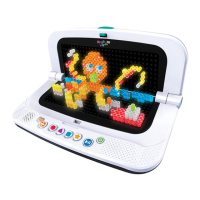
The core function of the Magic 3D Lights is to enable children to create illuminated peg art. Users insert 180 pegs, available in 6 different colours, into the lightbox panel to form designs. Once a design is complete, light codes can be entered using the four light code buttons (circle, triangle, square, star) to trigger different animations, sounds, and music. The device features two primary play modes: 3D Mode, where the lightbox is opened at a 90-degree angle, and Picture Mode, where the lightbox lies flat at 180 degrees. The unit also includes a storage box to keep the pegs organised and a paper stand for upright display.
Important Technical Specifications:
- Pegs: 180 pegs in 6 different colours.
- Power Source: Requires 4 new AA (AM-3/LR6) batteries. Alkaline batteries or fully charged Ni-MH rechargeable batteries are recommended for best performance.
- Automatic Power Off: The unit automatically turns off after 30 minutes of no input to conserve battery life.
- Sleep Mode: If there is no input for 3 minutes, the lightshow animation turns off, and the unit enters Sleep Mode. Pressing the Play Button will replay the lightshow.
- Volume Levels: Seven adjustable volume levels.
Usage Features:
- Hinge Mechanism: The lightbox can be opened at a 90-degree angle for 3D Mode play or fully opened to 180 degrees for Picture Mode.
- Light Code Buttons: Four distinct buttons (circle, triangle, square, star) are used to input light code combinations, which generate different animations. These combinations are detailed in the instruction booklet and available online.
- Play/Pause Button: This button allows users to start playing the last lightshow effect or pause the current one.
- Power On/Off Button: A dedicated button to turn the unit ON and OFF.
- Volume Control: Separate buttons for increasing (+) and decreasing (-) the volume.
- Lightbox Panel: The main surface where pegs are inserted to create designs.
- Paper Stand: Included for displaying the lightbox upright, enhancing the visual experience of the peg art.
- Storage Box: A compact case designed to store the 180 pegs, keeping them organised and preventing loss.
- Booklet and Quick Start Guide: Provide instructions and light code combinations for enhanced play.
Maintenance Features:
- Battery Removal and Installation: The battery compartment is located on the back of the unit and secured with a screw. Adult assembly is required for battery installation.
- Ensure the unit is OFF before changing batteries.
- Use a screwdriver to loosen the screw and open the battery cover.
- Remove old batteries by pulling up on one end.
- Install 4 new AA batteries, ensuring correct polarity as indicated in the battery box diagram.
- Replace the battery cover and tighten the screw.
- Cleaning: The unit can be kept clean by wiping it with a slightly damp cloth.
- Storage: Keep the unit out of direct sunlight and away from any direct heat sources. Remove batteries if the unit will not be used for an extended period.
- Durability: Avoid dropping the unit on hard surfaces and do not expose it to moisture or water.
- Troubleshooting: In case of malfunctions, users are advised to:
- Turn the unit OFF.
- Remove and then re-install the batteries to interrupt the power supply.
- Allow the unit to stand for a few minutes before turning it ON again.
- If the problem persists, install a brand new set of batteries.
- Contact VTech Consumer Services if issues continue.
- Battery Disposal: Batteries and the product itself should not be disposed of in domestic waste. They contain substances that can be damaging to the environment and human health. The crossed-out wheelie bin symbols on packaging indicate proper disposal methods. Chemical symbols (Hg, Cd, Pb) indicate the presence of mercury, cadmium, or lead, respectively, in batteries. Users are encouraged to dispose of products and batteries responsibly through designated collection points.
- Packaging Materials: All packing materials (tape, plastic sheets, packaging locks, removable tags, cable ties, cords, packaging screws) should be discarded for child safety as they are not part of the toy.
- Choking Hazard Warning: The toy contains small parts and is not suitable for children under 4 years of age.

 Need help?



 To Next Page
 General