3
GETTING STARTED
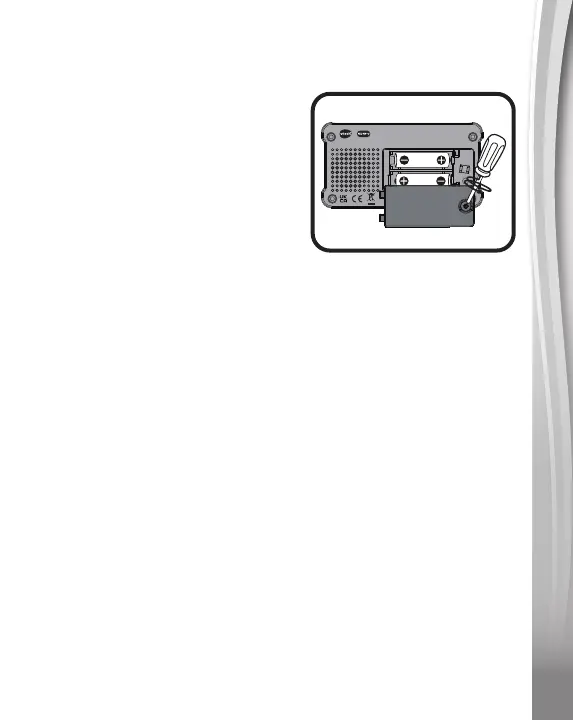
Battery Removal and Installation
1. Make sure the Marble Rush™
Corkscrew Challenge is turned
Off.
2. Find the battery cover located
on the back of the unit, use a
coin or screwdriver to loosen the
screw and then open the battery
cover.
3. Remove old batteries by pulling
up on one end of each battery.
4. Install 2 new AA (AM-3/LR6) batteries following the diagram
inside the battery box. (For best performance, alkaline
batteries or fully charged Ni-MH rechargeable batteries are
recommended).
5. Replace the battery cover and tighten the screw to secure.
WARNING:
Adult assembly required for battery installation.
Keep batteries out of reach of children.
IMPORTANT: BATTERY INFORMATION
• Insert batteries with the correct polarity (+ and -).
• Do not mix old and new batteries.
• Do not mix alkaline, standard (carbon-zinc) or rechargeable
batteries.
• Only batteries of the same or equivalent type as recommended
are to be used.
• Do not short-circuit the supply terminals.
• Remove batteries during long periods of non-use.
• Remove exhausted batteries from the toy.
• Dispose of batteries safely. Do not dispose of batteries in fire.
THIS DEVICE COMPLIES WITH PART 15 OF THE FCC RULES. OPERATION
IS SUBJECT TO THE FOLLOWING TWO CONDITIONS: (1) THIS DEVICE
MAY NOT CAUSE HARMFUL INTERFERENCE, AND (2) THIS DEVICE MUST
ACCEPT ANY INTERFERENCE RECEIVED, INCLUDING INTERFERENCE
THAT MAY CAUSE UNDESIRED OPERATION.
CAN ICES-003(B)/NMB-003(B)
TM & © 2022 VTech.





 To Next Page