EasyManua.ls Logo

VTech Super Sound Karaoke - User Manual

VTech Super Sound Karaoke
15 pages
Print Icon
To Next Page IconTo Next Page
Loading...
用户手册
Instruction Manual
Question and Answer IconNeed help?

Do you have a question about the VTech Super Sound Karaoke and is the answer not in the manual?

Summary

Introduction to the VTech Super Sound Karaoke

Product Overview and Features

Details the portable Bluetooth speaker's karaoke capabilities, multicoloured party light, and voice changing effects.

Getting Started and Setup

Package Contents and Initial Setup

Lists included items, provides instructions for removing packaging locks, and offers pre-use recommendations.

Battery Installation and Safety

Guides on battery removal/installation and important safety information regarding battery usage and disposal.

Power Adaptor Connection

Instructions for connecting the AC adaptor, powering on the unit, and safety precautions for power supply.

Product Controls and Functions

Volume and Audio Controls

Explains the Master Volume, Mic 1/Mic 2, and Echo dials for adjusting sound levels.

Audio Input and Source Selection

Details using Line-in, microSD card, and Radio modes for playing music.

Connectivity and Playback Buttons

Covers Bluetooth pairing, music playback controls, and radio tuning.

Vocal and Entertainment Effects

Describes Singing Effect, Voice Changer, Activities, and SFX buttons for enhanced vocal performance and fun.

Advanced Features and Mode Control

Explains Mode, Back, Play/Pause/OK, Next, and Voice Magic buttons for controlling playback and vocal tracks.

Maintenance and Troubleshooting

Care and Maintenance Guidelines

Provides instructions for cleaning, handling, and storing the unit to ensure longevity.

Troubleshooting Common Issues

Offers step-by-step solutions for malfunctions and guidance on contacting customer support.

Regulatory Information and Support

Bluetooth and Declaration of Conformity

Details Bluetooth trademarks and EU/UK declarations of conformity for radio equipment.

Consumer Services and Warranty Information

Provides contact details for customer support and warranty information for different regions.

Overview

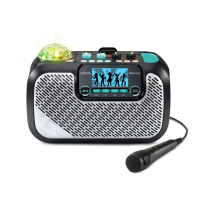
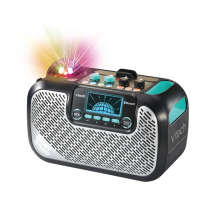
The VTech Super Sound Karaoke is a portable Bluetooth® speaker designed for parties and karaoke. It comes with an included 2-meter microphone cable, allowing users to sing along to their favorite tunes. The device features a multicoloured party light to enhance the atmosphere.

Key Features and Controls:

The device offers a comprehensive set of controls for an engaging karaoke experience:

  • Volume Control:

    • Master Volume Dial: Adjusts the overall sound output.
    • Mic 1 Volume Dial: Controls the volume for the first microphone input.
    • Mic 2 Volume Dial: Controls the volume for the second microphone input.
    • Echo Dial: Adds an echo effect to the vocals. All dials are turned clockwise to increase volume/effect and anticlockwise to decrease.
  • Power and Connectivity:

    • Power Button (ن): Turns the unit ON and OFF.
    • AC Adaptor Jack: For connecting an external AC adaptor (not included) to power the unit.
    • microSD Card Slot: Allows insertion of a microSD card (not included) for playing MP3 music files.
    • 6.35mm Mic 1 Jack: Input for the first microphone.
    • 6.35mm Mic 2 Jack: Input for the second microphone.
    • Line-in Jack (LINE IN): Connects to an external music player using a 3.5mm audio cable (not included). Playback controls for Line-in mode are managed by the external device, and the "Voice Magic" feature is unavailable.
  • Audio Sources and Playback:

    • microSD Button (MICRO SD): Switches to music playback from a microSD card. The Mode Button (MODE) can be used to toggle shuffle and repeat functions for microSD playback.
    • Radio Button (RADIO): Activates FM radio mode. Stations can be changed using the Back Button (◄) and Next Button (►). For weak signals, repositioning the device or trying another station is recommended.
    • Bluetooth® Button ( ): Connects to a Bluetooth®-enabled device to stream music. Users select "VTech Super Sound Karaoke" from their device and input the PIN displayed on the karaoke unit. The Mode, Back, or Next Buttons can turn off the PIN display. Connection issues may require resetting Bluetooth® settings on the external device.
    • Play/Pause/OK Button (►II): Controls playback (play/pause) and confirms selections in activities.
    • Back Button (◄): Navigates back in menus or changes radio stations.
    • Next Button (►): Navigates forward in menus or changes radio stations.
  • Vocal Effects and Activities:

    • Party Light On/Off Button: Toggles the multicoloured party light ON/OFF.
    • Singing Effect Button (SINGING EFFECT): Applies special effects to the user's voice.
    • Voice Changer Button (VOICE CHANGER): Applies one of four voice-changing effects.
    • Activities Button (ACTIVITIES): Enters the Activities menu, offering three modes:
      • Activity 1: Singing Warm Up: Guides users through vocal warm-up exercises with an instructor's voice. Users can select different scales using the Back/Next Buttons. The Mode Button exits the activity.
      • Activity 2: Sing As You Like: Allows users to select background music and sing along.
      • Activity 3: Singing Concert: Simulates a concert experience with audience cheers.
    • SFX Button (SFX): Plays a random fun sound effect.
    • Voice Magic Button (VOICE MAGIC): Reduces or removes the main vocal track of a song, ideal for karaoke. This feature is not available in Line-in mode and works best with studio-recorded songs.

Technical Specifications:

  • Power Rating (AC/DC Adaptor): 12V/2A DC output with a 3.5mm plug (positive centre) (adaptor not included).
  • Battery Type: 6 x AA (LR6/AM-3) batteries (new alkaline batteries recommended for maximum performance).
  • Microphone Cable Length: 2 meters.
  • FM Radio Frequency Band: 87.5MHz – 108MHz.
  • Bluetooth® Frequency Band: 2402MHz – 2480MHz.
  • Maximum Bluetooth® RF Power: 1.6mW (2dBm).
  • Audio File Format (microSD): MP3.

Usage and Setup:

  1. Unpacking: Rotate packaging locks 90 degrees anticlockwise and pull them out.
  2. Initial Volume: Lower the volume before first use.
  3. Exiting Try-me Mode: Plug the microphone into any 6.35mm Mic Jack.
  4. Battery Installation:
    • Ensure the unit is OFF.
    • Remove the battery cover.
    • Remove old batteries if present.
    • Install 6 new AA (LR6/AM-3) batteries, observing correct polarity (+ and -).
    • Replace the battery cover.
  5. AC Adaptor Connection (Optional):
    • Ensure the unit is OFF.
    • Connect an AC adaptor (not included) to the AC Adaptor Jack.
    • Plug the adaptor into a power outlet.
    • Press the Power Button to turn the system ON.
    • Unplug the adaptor for extended periods of non-use.

Important Battery Information:

  • Insert batteries with correct polarity.
  • Do not mix old and new batteries.
  • Do not mix alkaline, standard (carbon-zinc), or rechargeable batteries.
  • Use only recommended battery types.
  • Do not short-circuit supply terminals.
  • Remove batteries during long periods of non-use.
  • Remove exhausted batteries promptly.
  • Dispose of batteries safely and do not dispose of them in fire.

Care & Maintenance:

  • Clean the unit with a slightly damp cloth.
  • Keep the unit away from direct sunlight and heat sources.
  • Remove batteries if the unit will not be used for an extended period.
  • Avoid dropping the unit on hard surfaces or exposing it to moisture/water.
  • Never clean a plugged-in product with liquid.
  • Periodically inspect the power supply for damage (cord, plug, housing, etc.) to prevent fire or electric shock. Discard damaged power supplies.

Troubleshooting:

If the unit malfunctions:

  1. Turn the unit OFF.
  2. Remove batteries to interrupt power supply.
  3. Wait a few minutes, then replace batteries.
  4. Turn the unit ON.
  5. If the issue persists, insert a new set of batteries. For further assistance, contact Consumer Services.

Environmental Responsibility:

  • The crossed-out wheelie bin symbols indicate that products and batteries should not be disposed of with domestic waste due to harmful substances.
  • Chemical symbols (Hg, Cd, Pb) indicate the presence of mercury, cadmium, or lead above specified values.
  • The solid bar indicates the product was placed on the market after August 13th, 2005.
  • Dispose of products and batteries responsibly at designated collection points for recycling.
  • In the UK, visit www.recyclenow.com for collection points.
  • In Australia & New Zealand, check with local councils for kerbside collections.

VTech Super Sound Karaoke Specifications

General IconGeneral
BrandVTech
ModelSuper Sound Karaoke
CategoryKaraoke System
LanguageEnglish

Related product manuals