EasyManua.ls Logo

VTech Toot-Toot Drivers Series - User Manual

VTech Toot-Toot Drivers Series
3 pages
Print Icon
To Next Page IconTo Next Page
Loading...
Toot-Toot Drivers
®
User’s Manual
BATTERY INSTALLATION
1. Make sure the unit is turned OFF.
2. Locate the battery cover on the bottom of the
unit. Use a coin or a screwdriver to loosen the
screw.
3. Install 2 new AAA (AM-4/LR03) batteries
following the diagram inside the battery
box. (The use of new alkaline batteries is
recommended for maximum performance.)
4. Replace the battery cover and tighten the screw
to secure.
WARNING: All packing materials, such as tape, plastic sheets,
packaging locks and tags are not part of this toy, and
should be discarded for your child’s safety.
NOTE: Please keep user’s manual as it contains important
information.
Disposal of batteries and product
The crossed-out wheelie bin symbols on products and batteries, or on
their respective packaging, indicates they must not be disposed of in
domestic waste as they contain substances that can be damaging to
the environment and human health.
The chemical symbols Hg, Cd or Pb, where marked, indicate that
the battery contains more than the specified value of mercury (Hg),
cadmium (Cd) or lead (Pb) set out in Battery Directive (2006/66/EC).
The solid bar indicates that the product was placed on the market after
13th August, 2005.
Help protect the environment by disposing of your product or batteries responsibly.
For more information, please visit:
www.recycle-more.co.uk www.recyclenow.com
PRODUCT FEATURES
1. ON/OFF SWITCH
To turn the unit ON, slide the ON/OFF SWITCH to
the ON ( ) position. To turn the unit OFF, slide
the ON/OFF SWITCH to the OFF ( ) position.
2. AUTOMATIC SHUT-OFF
To preserve battery life, the VTech
®
Toot-Toot Drivers
®
will automatically
power-down after approximately 60 seconds without input. The unit can only be
turned on again by pressing the light-up button or pushing the vehicle quickly.
Note: This product is in a try-me mode in the packaging. After opening the package,
turn the vehicle off and on again to proceed with normal play. If the unit powers down
while playing, we suggest changing the batteries.
ACTIVITIES
1. Slide the ON/OFF SWITCH to turn the unit ON. You
will hear sounds, a song and a phrase. The light will
flash with the sounds.
2. Press the LIGHT UP BUTTON to hear sounds,
songs, phrases and melodies. The light will flash
with the sounds.
1
2
91-003642-000
UK
Turn the packaging lock anticlockwise
several times.
Pull out and discard the packaging lock.
Unlock the packaging locks:
BATTERY NOTICE
• UsenewalkalinebatteriesorfullychargedNI-MH(NickelMetal-hydride)
rechargeable batteries for best performance.
• Useonlybatteriesofthesameorequivalenttypeasrecommended.
• Donotmixdifferenttypesofbatteries:alkaline,standard(carbon-zinc)or
rechargeable(Ni-Cd,Ni-MH),ornewandusedbatteries.
• Donotusedamagedbatteries.
• Insertbatterieswiththecorrectpolarity.
• Donotshort-circuitthebatteryterminals.
• Removeexhaustedbatteriesfromthetoy.
• Removebatteriesduringlongperiodsofnon-use.
• Donotdisposeofbatteriesinfire.
• Donotchargenon-rechargeablebatteries.
• Removerechargeablebatteriesfromthetoybeforecharging(ifremovable).
• Rechargeablebatteriesareonlytobechargedunderadultsupervision.
Question and Answer IconNeed help?

Do you have a question about the VTech Toot-Toot Drivers Series and is the answer not in the manual?

Summary

Battery Installation and Disposal

Battery Installation Steps

Instructions for safely installing batteries, including warnings about packing materials.

Battery Notice

Guidelines for battery usage, types, and safety precautions like polarity and disposal.

Disposal of Batteries and Product

Information on responsible disposal of products and batteries, and environmental symbols.

Product Features Overview

On;Off Switch Functionality

How to operate the unit's power switch for turning it ON and OFF.

Automatic Shut-Off

Details on the automatic power-down feature to conserve battery life.

Product Activities and Interaction

Activating Sounds and Lights

How to turn the unit on to hear sounds, songs, and see lights flash.

Pressing the Light Up Button

Instructions for activating sounds, songs, and melodies with the light-up button.

Using the Gear Button

How to press the gear button to activate mechanical functions and sounds.

Pushing for Sounds and Melodies

How pushing the vehicle produces sounds and adds layers to melodies.

Interaction with Tracks

How the vehicle interacts with VTech Toot-Toot Drivers tracks via SmartPoints.

Care, Maintenance, and Troubleshooting

Care and Maintenance Guide

Instructions on cleaning, protecting the unit from heat and sunlight, and battery removal.

Troubleshooting Steps

Procedures to follow if the unit stops working or malfunctions, including battery replacement.

Consumer Services and Support

UK Customer Support

Contact information and warranty policy details for UK customers.

Australian Customer Support

Contact information and consumer guarantees for Australian customers.

New Zealand Customer Support

Contact information for New Zealand customers.

Product Warranty Information

Details on the product warranty policy for UK and Australian customers.

Summary

Battery Installation and Disposal

Battery Installation Steps

Instructions for safely installing batteries, including warnings about packing materials.

Battery Notice

Guidelines for battery usage, types, and safety precautions like polarity and disposal.

Disposal of Batteries and Product

Information on responsible disposal of products and batteries, and environmental symbols.

Product Features Overview

On;Off Switch Functionality

How to operate the unit's power switch for turning it ON and OFF.

Automatic Shut-Off

Details on the automatic power-down feature to conserve battery life.

Product Activities and Interaction

Activating Sounds and Lights

How to turn the unit on to hear sounds, songs, and see lights flash.

Pressing the Light Up Button

Instructions for activating sounds, songs, and melodies with the light-up button.

Using the Gear Button

How to press the gear button to activate mechanical functions and sounds.

Pushing for Sounds and Melodies

How pushing the vehicle produces sounds and adds layers to melodies.

Interaction with Tracks

How the vehicle interacts with VTech Toot-Toot Drivers tracks via SmartPoints.

Care, Maintenance, and Troubleshooting

Care and Maintenance Guide

Instructions on cleaning, protecting the unit from heat and sunlight, and battery removal.

Troubleshooting Steps

Procedures to follow if the unit stops working or malfunctions, including battery replacement.

Consumer Services and Support

UK Customer Support

Contact information and warranty policy details for UK customers.

Australian Customer Support

Contact information and consumer guarantees for Australian customers.

New Zealand Customer Support

Contact information for New Zealand customers.

Product Warranty Information

Details on the product warranty policy for UK and Australian customers.

Overview

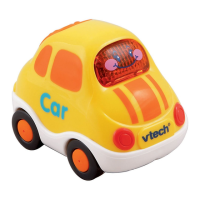
The Toot-Toot Drivers® is an interactive toy vehicle designed to provide engaging play experiences for children. This user-friendly device features a range of functions, including sounds, songs, phrases, and melodies, all activated through simple interactions. The vehicle is designed to be durable and safe for children, with clear instructions for battery installation and general use.

Function Description

The primary function of the Toot-Toot Drivers® vehicle is to provide interactive entertainment through auditory and visual stimuli. It operates with two AAA (AM-4/LR03) batteries, which are recommended to be new alkaline batteries for optimal performance. The device includes an ON/OFF switch, allowing users to easily control its power status. When turned ON, the unit initiates with sounds, a song, and a phrase, accompanied by a flashing light, immediately engaging the child.

A key interactive feature is the LIGHT UP BUTTON. Pressing this button triggers a variety of sounds, songs, phrases, and melodies, with the light flashing in sync with the audio. This encourages repetitive interaction and exploration of the different audio outputs.

The vehicle also incorporates a GEAR BUTTON, which, when pressed, activates a mechanical function on the vehicle itself, along with fun sounds and flashing lights. This adds a tactile and mechanical dimension to the play experience, enhancing engagement.

Another interactive mode is activated by pushing the vehicle. This action produces fun sounds. If a melody is already playing, pushing the vehicle again will layer additional fun sounds over the melody, further enriching the auditory experience. The light will flash in conjunction with these sounds, providing visual feedback.

For extended play and enhanced interactivity, the Toot-Toot Drivers® vehicle is designed to interact with VTech® Toot-Toot Drivers® tracks (sold separately). When the vehicle rolls over one of the tracks' SmartPoints, it triggers specific responses: the light flashes, and the vehicle plays greetings, fun sounds, short tunes, and sing-along songs. This feature expands the play possibilities, encouraging children to integrate the vehicle with other compatible VTech products to create a more dynamic play environment.

The device also includes an automatic shut-off feature to conserve battery life. If there is no input for approximately 60 seconds, the Toot-Toot Drivers® will automatically power down. To reactivate the unit, the child simply needs to press the light-up button or push the vehicle quickly. This intelligent power management ensures that batteries last longer, providing more playtime.

Usage Features

The Toot-Toot Drivers® is designed for ease of use, making it accessible for young children.

  • Battery Installation: The battery compartment is located on the bottom of the unit and secured with a screw, requiring a coin or screwdriver for access. Users are instructed to install two AAA batteries, following the polarity diagram inside the battery box. New alkaline batteries are recommended for maximum performance.
  • Power Control: A simple ON/OFF switch allows for straightforward control of the device's power. Sliding the switch to the ON position activates the unit, while sliding it to the OFF position deactivates it.
  • Packaging Locks: Before initial use, the device is secured with packaging locks. These locks need to be turned anticlockwise and then pulled out and discarded, ensuring the product is ready for play.
  • Interactive Buttons: The LIGHT UP BUTTON and GEAR BUTTON are clearly identifiable and easy to press, allowing children to intuitively activate different sounds, songs, and mechanical functions.
  • Push-and-Play: The vehicle's design encourages physical interaction; simply pushing it activates sounds, making it easy for children to engage in imaginative play.
  • Try-Me Mode: The product comes in a try-me mode within its packaging. After opening, users are advised to turn the vehicle off and then on again to transition to normal play mode.
  • Safety Warnings: The manual includes important warnings regarding packing materials, which should be discarded for child safety, and advises users to keep the manual for important information.

Maintenance Features

Proper care and maintenance are essential to ensure the longevity and optimal performance of the Toot-Toot Drivers® vehicle.

  • Cleaning: The unit should be kept clean by wiping it with a slightly damp cloth. This helps maintain hygiene and prevents the accumulation of dirt that could affect its operation.
  • Environmental Protection: The device should be kept out of direct sunlight and away from any direct heat sources. Exposure to extreme conditions can damage the electronic components and affect battery life.
  • Moisture and Impact: Users are advised not to drop the unit on hard surfaces and to avoid exposing it to moisture or water. Such incidents can cause internal damage and malfunction.
  • Battery Management:
    • Batteries should be removed when the unit is not in use for extended periods to prevent leakage and damage.
    • Exhausted batteries must be removed from the toy promptly.
    • Batteries should not be disposed of in fire.
    • Non-rechargeable batteries should not be charged.
    • If using rechargeable batteries, they should be removed from the toy before charging and charged only under adult supervision.
    • Batteries should be inserted with the correct polarity to ensure proper function and prevent damage.
    • Battery terminals should not be short-circuited.
    • Mixing different types of batteries (alkaline, standard, rechargeable) or new and used batteries is not recommended.
    • Damaged batteries should not be used.
  • Troubleshooting: The manual provides a clear troubleshooting guide for common issues, such as the unit stopping or malfunctioning. The recommended steps include:
    • Turning the unit OFF.
    • Interrupting the power supply by removing the batteries.
    • Allowing the unit to stand for a few minutes.
    • Replacing the batteries.
    • Turning the unit ON again.
    • If the problem persists, replacing with a new set of batteries.
    • If issues continue, users are advised to contact the Consumer Services Department for assistance.
  • Disposal Information: The manual includes important information regarding the responsible disposal of batteries and the product itself, highlighting the crossed-out wheelie bin symbols. It explains that these symbols indicate that the items should not be disposed of with domestic waste due to substances that can harm the environment and human health. Chemical symbols (Hg, Cd, Pb) are noted if the battery contains levels exceeding specified values. Users are encouraged to visit provided websites (www.recycle-more.co.uk, www.recyclenow.com) for more information on responsible disposal.

VTech Toot-Toot Drivers Series Specifications

General IconGeneral
Age Range1-5 years
MaterialPlastic
SeriesToot-Toot Drivers
Power SourceBattery
ManufacturerVTech
Batteries RequiredYes
Interactive FeaturesSounds, lights
Educational FocusMotor skills, cause and effect, language development
CategoryToy
Manufacturer Recommended Age1-5 years
LanguageEnglish

Related product manuals