EasyManua.ls Logo

VTL TL5.5 - Page 8

Default Icon
26 pages
Print Icon
To Next Page IconTo Next Page
To Previous Page IconTo Previous Page
Loading...
channels
oi your
systerrq
and
the preamplifier
is rn the unity
gain
mode.
In
thrs
mode
the
volume control
and the
amplificauon
stages
of
the
TL5.5
are blpassed
completely,
and
the signal
is
passed
to the
front
left
and
nght
amplifien
at precisely
the same
volume as
the surround
processor
is
putting
out.
In
the
default operaflng
mode
oi the preamp,
the Pranssor
switch
stays
n
the
down posinon.
Tkus means
that
the
preamplifierwill
not
be
receir,'ing
the
srgnal
from
the
surround processor.
The Tqe Morutor can be
used to
select v'hether the
input
source
is
coming
from
tape
monitor or
not.
If
you
wish to use the preamplifier
to
monitor an ongomg
recording
session
from
the tape
decb you can
select this
switch to
Tape
Monitor
mode. In
this
state the
plavback
from the preamplifier
will come directly
from the tape deck.
The
unit
is shipped
in
the
default-operatmg
mode
of the
preamp
with the swrtch
in
the
dorvn positron.
This means that the
input source
will
not
come
from
the
tape
deck,
but will be dependent
on the
nput
selection
made
on the
preamplifier.
The Balann Conhvl
knob
can be used
to set the
left
and
riglrt
channel
level. \X4een the
line
on the
knob is rn
the
12
o'clock
position
this
indrcates that the
left
and
nght
channels are equally
balanced.
\'ou
wrll
feel
a center
dent
in
the control
to
indicate
tlrrs
exact positron.
The Input
Sehctor
can be used to select
the source
component
for
the
preamplifier.
You
can
choose any one of
the six
inputs
bv tuming
the selector
knob
to
the
location
as
marked
above the
knob.
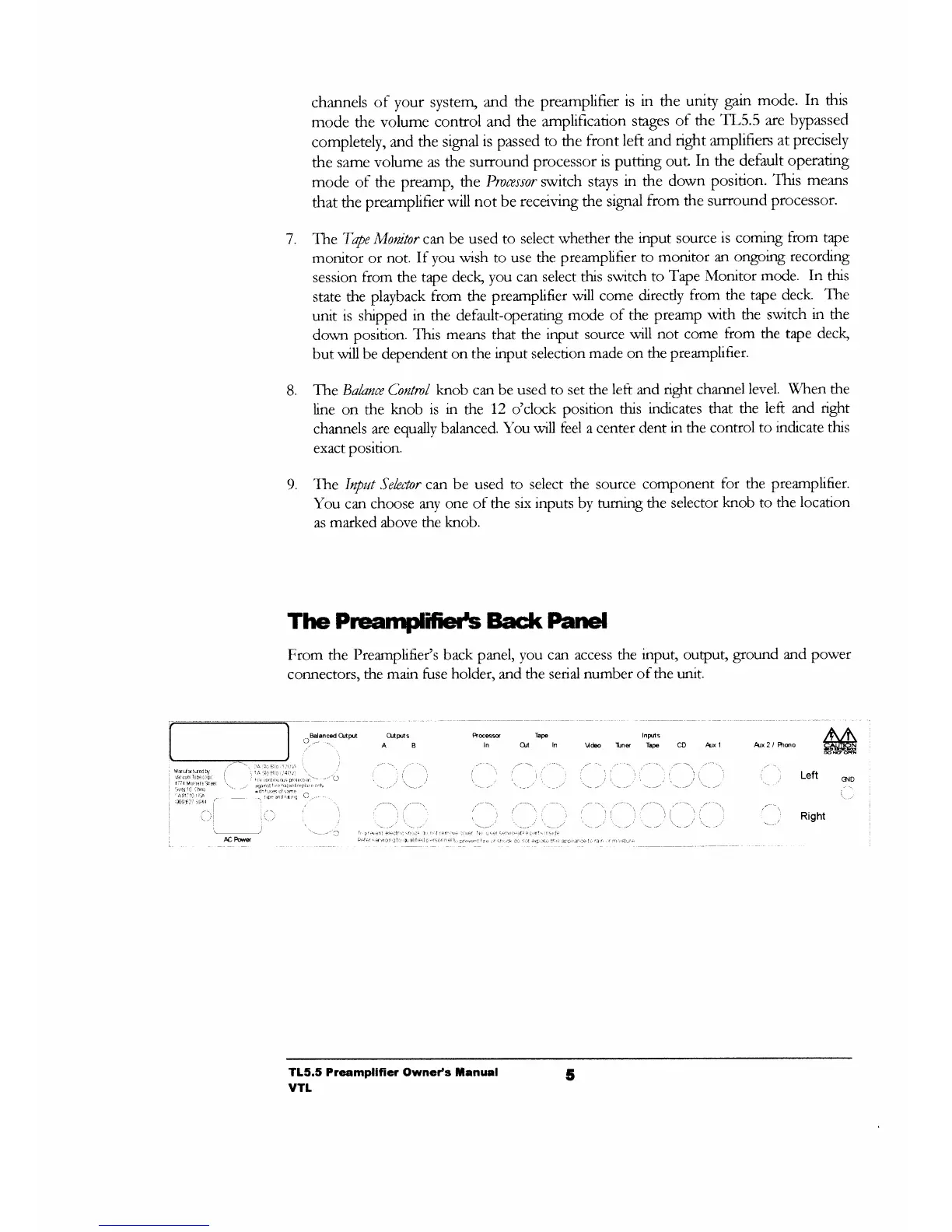
The Prcamifieils
Bact( Panel
From the
Preamplifier's
back panel, you can
access the
input,
output,
ground and power
connectors,
the
main
fuse
holder,
and
the serial
number
of
the unit.
8.
9.
M
Ptcs
Tapa
ln OJi
In
Intrns
Vd€o
Tuns Tape CD Arx
1 Arx 2 / Phso
CND
Right
TL5.5 Preamplifier Owneds
tanual
vTt
5

Related product manuals