8
Making Connections
LAN (Wired setup)
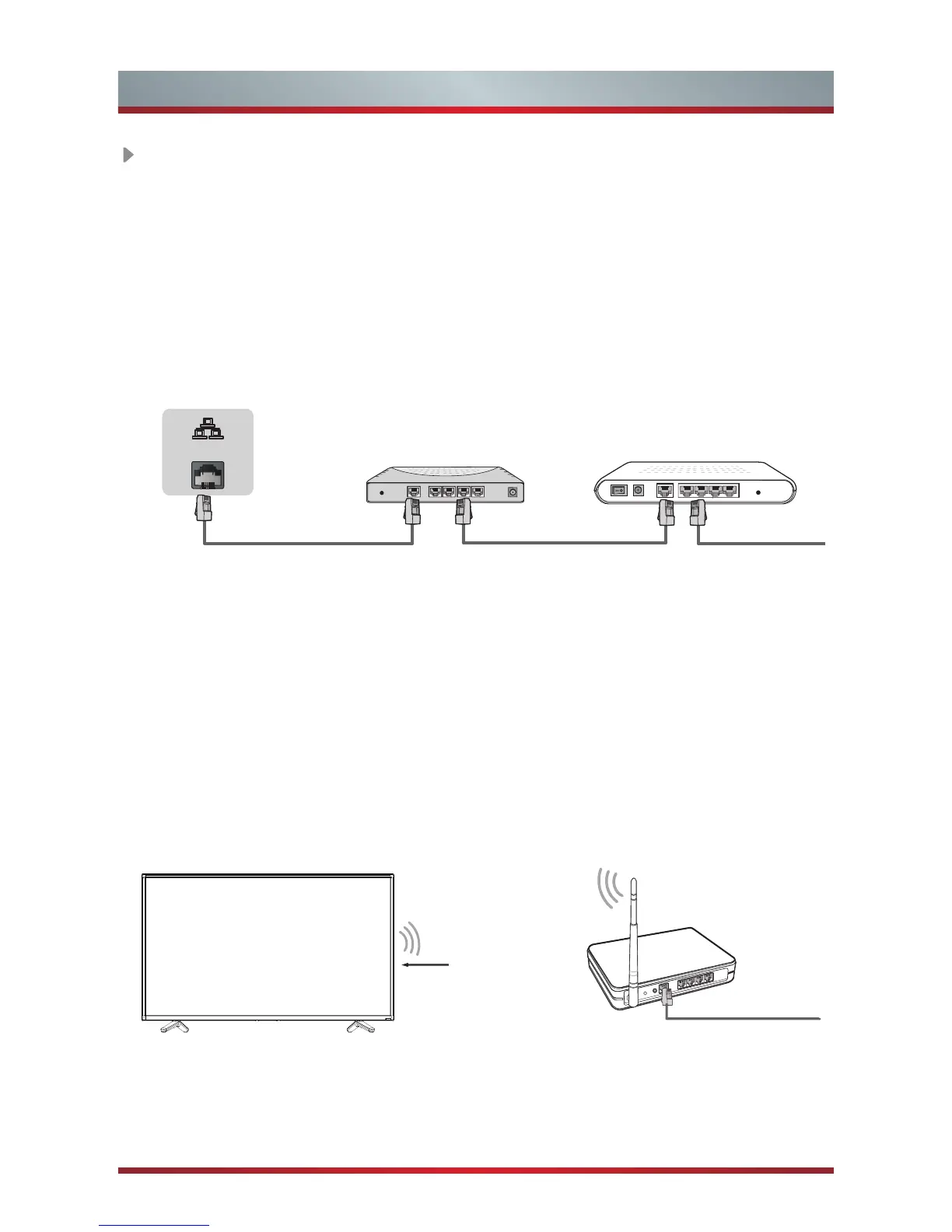
Connect your TV to your network by connecting the LAN port on the back of your
TV to an external modem or router using a LAN (Ethernet/Cat 5) cable. See the
illustration below.
·
We recommend to use a modem or router that supports Dynamic Host
Configuration Protocol (DHCP). Modems and routers that support DHCP
automatically provide the IP address, subnet mask, gateway, and DNS, so you
don’t have to enter them manually. Most home networks already have DHCP.
Wireless setup
Connect your TV to your network wirelessly, you need a wireless router or modem.
See the illustration below.
·
The TV’s built-in Wireless LAN Adapter supports the IEEE 802.11 ac/b/g/n
communication protocols. We recommend using IEEE 802.11ac router. Low
transfer rates for b/g/n may have the influence on the quality of streamed videos
and other media.
Wireless router with DHCP
LAN Cable
Wireless LAN Adapter
built-in TV set
TV JACK
Modem CableLAN CableLAN Cable
External Modem
(ADSL / VDSL / Cable TV)
IP Sharer (Router)
(with DHCP server)
LAN


 To Next Page