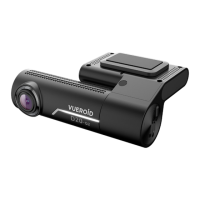
This document serves as a quick start guide for the VUEROID D20-F2 Series dashboard cameras, including models D20-F2 and D20-F2E. These devices are designed to record video while driving, offering various features for safety and convenience.
Function Description
The VUEROID D20-F2 series are Full HD (FHD) dual dashcams. The D20-F2 model includes Wi-Fi connectivity and Smart ADAS (Advanced Driver-Assistance Systems), while the D20-F2E model offers FHD dual dashcam functionality with Wi-Fi, but without ADAS, Safety Camera Alert, and Built-in GPS. The primary function of these devices is to record video from both front and rear cameras, providing a comprehensive view of events on the road.
Important Technical Specifications
Camera:
- CIS: Front / Rear: SONY Starvis 2M (IMX307)
- Resolution: Front / Rear: 1920 x 1080 @ 30fps
- View Angle: Front / Rear: (D)146° x (H)116° x (V)90°
Memory:
- Memory Card: Micro SD Card (16GB / 32GB / 64GB / 128GB / 256GB)
Connectivity:
- Wi-Fi Dongle: For Wi-Fi network connection (included in D20-F2, D20-F2E)
- GPS: Built-in Antenna (not included in D20-F2E)
Sensors & Indicators:
- LED Indicators: Front: Security & Status LED / Rear: Security LED
- G-Sensor: 3-Axis Acceleration Sensor, +2g / -2g
Audio:
- Speaker: Built-in Speaker (Voice Guide)
- Microphone: Built-in Microphone
Video:
- Video Codec: H.264 High Profile
Physical Characteristics:
- Dimensions: Front: 107.8mm x 42.6mm x 75.4mm / Rear: 52mm x 29mm x 42mm
- Weight: Front: 107.5g / Rear: 28g
Power:
- Power Input: DC 12V ~ 24V
- Power Consumption: Max. 5.4W at 12V
- Operating Temp.: -20°C ~ 70°C (-4°F ~ 158°F)
- High Temp. Cut-off: Approximate 70°C (158°F) / Battery Discharge Prevention
General:
- Certifications: FCC, CE, ROHS, RCM
- Software: iOS & Android compatible mobile app, Window & Mac compatible PC viewer
Usage Features
Key Features:
- FHD DUAL: Full High Definition recording from both front and rear cameras.
- SONY Starvis Image Sensor: Enhances image quality, especially in low-light conditions.
- ADAS (Advanced Driver-Assistance Systems): (D20-F2 only) Includes Lane Departure Warning System (LDWS), Front Vehicle Start Alarm (FVSA), Forward Collision Warning System (FCWS), and Rear Collision Warning (RCW).
- Safety Camera Alert: (D20-F2 only) Provides alerts when approaching or passing speed limit zones, utilizing GPS signals and safety camera data.
- Night Vision: Improved visibility for recordings in low-light environments.
- Wi-Fi: Allows connection to a smartphone for live viewing, file management, and settings adjustment.
- Prevent Discharge: A low voltage prevention function that automatically turns off the device if the vehicle's battery drops below a set value.
- Time Lapse: A recording mode that captures frames at intervals, useful for extended parking surveillance.
- Format Free: Simplifies memory card management by reducing the need for frequent manual formatting.
- Built-in GPS: (D20-F2 only) Records location, speed, and travel direction, accessible via the mobile app.
Recording Modes:
- Normal: Continuous recording in 1-minute segments with auto-looping.
- Event: Triggered by impacts, saving 30-second videos (10 seconds before and 20 seconds after detection).
- Manual: Initiated by pressing the manual recording button, saving 30-second videos (10 seconds before and 20 seconds after).
- Parking: Includes motion and impact event recordings, with a maximum of 30 recording files.
- Time Lapse: Records at intervals during parking.
Device Installation:
- The main device and rear view camera are attached to the windshield using tape.
- Power is supplied via a hardwiring cable or 12V power cable. Professional installation is recommended for hardwiring.
- Ensure the Micro SD card is correctly inserted before connecting power.
Wi-Fi Application:
- Download "VUEROID Dashcam" from App Store (iPhone) or Play Store (Android).
- Connect to the device via Wi-Fi using its SSID (VUEROID_D20-F2_XXXXXX) and default password (12345678).
- Wi-Fi Application Start-up Screen features: Wi-Fi Status, Wi-Fi Connect, Live Viewer (front/rear live stream), File Viewer (recording files), History (trip data and travel route by dates - D20-F2 only), and Settings.
- Live View Mode features: Left/Right Reverse (viewing image), Snapshot (capture image), Full Screen, CH (Front/Rear camera image), and ADAS (calibration and function enable/disable - D20-F2 only).
Viewing Recordings:
- Recordings can be viewed through the File Viewer on the mobile app, categorized by Drive, Event, Parked, Manual, and Phone.
- Travel Log (D20-F2 only): Logs trip data, mileage, trip time, and impact events.
- GPS Mapping (D20-F2 only): Stores itineraries in the History Menu, displaying vehicle location, speed, and direction on Google Maps.
Configuration (Setting):
- The mobile app allows control over various settings:
- Recording: Image quality, Power saver, parking mode time.
- Event: Impact and motion event sensitivity.
- Sound: Voice recording options, speaker volume.
- Time: Standard time, current time.
- Memory: Memory allocation, Micro SD card Format.
- System: System settings, Reboot.
Desktop Software (PC Viewer):
- Downloadable from the VUEROID website (http://www.vueroid.com/support/download).
- Compatible with Windows and Mac OS.
- Allows viewing of recordings on a computer after inserting the Micro SD card.
Maintenance Features
Micro SD Card Management:
- The Micro SD card is a consumable item and should be replaced periodically.
- Test the card for errors frequently.
- Always turn off the device before removing the SD card.
- Store important recordings on other devices (e.g., PC).
Firmware / Safety Camera DB Update:
- Full Manual, Firmware, and Safety Camera DB updates are available for download on the VUEROID website.
Troubleshooting (Frequently Asked Questions):
- Compatibility: Usable with both 12V and 24V vehicles (passenger cars or commercial vehicles).
- Low Voltage Prevention: Automatically turns off the device if vehicle battery voltage drops below a set value.
- False Event Recordings: G-sensor sensitivity can be adjusted in settings to prevent unwanted event recordings from minor shakes.
- Power On Issues: Check power cord connection, battery status, and fuse. Contact customer service if issues persist.
Warranty Information:
- All VUEROID dashcams come with a 1-year manufacturer warranty (6 months for SD card).
- Warranty does not cover cosmetic damage, accident/abuse/natural disaster damage, service by unauthorized providers, or damage from non-supplied power/accessories.
Precautions:
- Avoid exposing the product to rain, moisture, or water to prevent electric shock or fire.
- Do not attempt servicing unless qualified; refer to a qualified service technician for repairs.
- Install the device in a safe area with the engine off.
- Keep the installation area clean.
- Unplug DC power if not using the device for a long period.
- Avoid dropping the product.
- During extreme high temperatures, parking indoors is suggested.
- Ensure wiring is not overlapped with other devices (e.g., navigation) to avoid reception interference.

 Need help?
 General

 To Next Page