EasyManua.ls Logo

VUEROID D20-Q2 - User Manual

VUEROID D20-Q2
14 pages
Print Icon
To Next Page IconTo Next Page
Loading...
D20-Q2
QHD Dual Dashcam Wi-Fi & Smart ADAS
Quick Start Guide
V1.0 English
The product is a dashboard camera.
Make sure to understand the contents of the manual to use the product correctly.
Question and Answer IconNeed help?

Do you have a question about the VUEROID D20-Q2 and is the answer not in the manual?

Summary

Precautions Before Using the Product

Safety and Servicing Precautions

Covers warnings about water exposure and cautions regarding servicing by qualified technicians.

Product Overview

Component Identification

Identifies and describes the various ports, buttons, and features of the dashcam using numbered marks.

Key Features

Device Installation

Main Device Installation Procedure

Provides cautions and step-by-step instructions for installing the main dashcam unit.

Connection and Installation Details

Micro SD Card Handling

Advises on proper insertion, testing, and replacement of the Micro SD card to avoid errors.

Hardwiring Cable Connection

Explains how to connect the hardwiring cable, including wire color coding for power.

Rear Camera Installation

Outlines the process for installing the rear view camera, including cleaning and placement considerations.

Product Specifications

Frequently Asked Questions

Common User Questions

Addresses queries on vehicle compatibility, low voltage protection, event recording, and power issues.

Warranty and Firmware Updates

Details warranty coverage, exclusions, and procedures for updating firmware and safety camera databases.

Using Wi-Fi Application

App Download and Device Registration

Guides on downloading the VUEROID Dashcam app and registering the device via Wi-Fi connection.

Wi-Fi Application Interface

Application Start-up Screen

Explains the functions of the main screens, including Wi-Fi status, Live Viewer, and File Viewer.

Live View Mode Features

Details features in live view, such as image switching, screenshots, and ADAS calibration initiation.

ADAS Settings

ADAS Feature Configuration

Allows enabling/disabling Lane Departure Warning, Forward Collision Warning, and Safety Camera Alerts.

Recording Management

File Viewer Functionality

Explains how to view recorded videos by category (Drive, Event, Parked, Manual) using the File Viewer.

Travel Log Functionality

Describes how the device logs trips, mileage, trip time, and impact events for review.

GPS Mapping and Travel Log

GPS Travel Log Display

Details how the mobile app displays itineraries, vehicle location, speed, and direction on a Google map.

App Features: Footage Review and Settings

Footage Review and Sharing

Explains how to access, edit, and share recorded video footage directly from the smartphone app.

Dash Cam Configuration

Provides an overview of dash cam settings accessible via the app, covering recording, event, time, and memory.

Using Desktop Software

PC Viewer Installation and Use

Guides on downloading, compatibility, and launching the PC Viewer software for managing recordings.

Overview

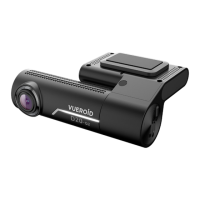
The VUEROID D20-Q2 is a QHD Dual Dashcam equipped with Wi-Fi and Smart ADAS features, designed to provide comprehensive video recording and driver assistance for vehicles. This dashboard camera system is intended for use in various types of cars, including passenger and commercial vehicles, supporting both 12V and 24V power inputs.

Function Description

The primary function of the D20-Q2 is to record video footage from both the front and rear of the vehicle. The front camera captures QHD (Quad High Definition) video, while the rear camera also records in QHD, ensuring high-quality visual evidence. The dashcam utilizes a CMOS Image Sensor, specifically the SONY Starvis 5M (IMX335) for both front and rear cameras, to deliver clear images even in challenging lighting conditions.

Recording modes include Normal, Event, Manual, and Parking (Motion & Time lapse), offering flexibility for different driving scenarios. Normal recording continuously saves video in 1-minute segments with an auto-looping mechanism. Event recording is triggered by impacts detected by the G-sensor, saving 30-second clips (10 seconds before and 20 seconds after detection). Manual recording allows users to initiate a 30-second recording (10 seconds before and 20 seconds after the button press). Parking mode records motion and impact events, saving up to 30 files.

Beyond video recording, the D20-Q2 integrates Smart ADAS (Advanced Driver-Assistance Systems) features to enhance driving safety. These include a Lane Departure Warning System (LDWS), Front Vehicle Start Alarm (FVSA), Forward Collision Warning System (FCWS), Rear Collision Warning (RCW), and Safety Camera Alert. These features provide real-time warnings and assistance to the driver.

The device also includes a built-in GPS antenna, allowing for location tracking, speed monitoring, and direction of travel to be recorded and displayed on a map. A built-in speaker provides voice guidance, and a microphone records audio within the vehicle.

Usage Features

The D20-Q2 is designed for user-friendly operation and integration with smart devices.

  • Installation: The main device and rear view camera are installed on the windshield. It's crucial to select a clean, safe area and ensure the engine is off during installation. The Micro SD card must be inserted correctly before connecting power. For hardwiring, professional installation is recommended, connecting the black wire to GND, yellow to BAT (B+), and red to ACC. Care should be taken to avoid overlapping wiring with other devices like navigation systems to prevent reception interference.
  • Power Management: The dashcam features a low voltage prevention function, automatically turning off the device if the vehicle's battery voltage drops below a user-set value, preventing battery discharge. It also has a high-temperature cut-off feature to protect the device in extreme heat.
  • Wi-Fi Connectivity: A Wi-Fi dongle enables connection to a smartphone via the "VUEROID Dashcam" mobile application (available on App Store and Play Store). This allows users to view live streams (front/rear), access recorded files, review trip history, and configure device settings wirelessly.
  • Mobile Application Features:
    • Wi-Fi Status & Connect: Displays Wi-Fi status and allows enabling/disabling Wi-Fi connection.
    • Live Viewer: Provides a real-time view of the front and rear camera feeds, with options to switch between views, capture screenshots, and display full screen.
    • File Viewer: Organizes recorded videos into folders (Drive, Event, Parked, Manual, Phone) with thumbnail views and front/rear options. Videos saved on the smartphone can also be accessed here.
    • History (Travel Log): Logs every trip, reporting mileage, trip time, and impact events. It also maps the vehicle's location, speed, and direction using GPS data on a Google Maps display.
    • Settings: Allows users to customize various aspects of the dashcam, including image quality, power saver options, parking mode time, impact and motion event sensitivity, voice recording options, speaker volume, time settings, memory allocation, Micro SD card format, and system reboot.
    • ADAS Settings: Enables or disables ADAS features like LDWS, FVSA, FCWS, RCW, and Safety Camera Alert.
  • Desktop Software (PC Viewer): A compatible PC viewer for both Windows and Mac OS is available for download from the VUEROID website. This software allows users to view recordings on a larger screen, manage files, and access GPS data.
  • Micro SD Card: The device supports Micro SD cards from 16GB up to 256GB. It's important to use VUEROID's recommended SD cards and replace them periodically as they are consumable items. Users are advised to turn off the device before removing the SD card and to store important recordings on other devices (e.g., PC).

Maintenance Features

The D20-Q2 incorporates features and guidelines to ensure its longevity and optimal performance.

  • Self-Protection: The low voltage prevention and high-temperature cut-off functions automatically protect the device and the vehicle's battery from potential damage.
  • SD Card Management: The device is format-free, reducing the need for frequent manual formatting of the Micro SD card. However, periodic testing for errors and replacement of the SD card are recommended due to its consumable nature.
  • Firmware Updates: Firmware and Safety Camera DB updates are available for download from the VUEROID website, ensuring the device remains up-to-date with the latest features and improvements.
  • Troubleshooting: The manual provides guidance for common issues, such as the device not turning on (checking power cord, battery status, fuse) and unexpected event file saving (adjusting G-sensor sensitivity).
  • Warranty: All VUEROID dashcams come with a 1-year manufacturer warranty (6 months for the SD card), covering defects not caused by owner's fault, accidents, abuse, unauthorized service, or use of non-supplied accessories.

In summary, the VUEROID D20-Q2 is a comprehensive dual dashcam solution that combines high-definition video recording with advanced driver-assistance systems, smart connectivity, and user-friendly management tools, all designed to enhance driving safety and provide reliable incident recording.

VUEROID D20-Q2 Specifications

General IconGeneral
G-SensorYes
GPSYes
Wi-FiYes
Parking ModeYes
Operating Temperature-20°C to 70°C

Related product manuals