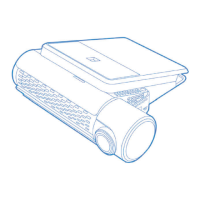
This document is the user manual for the VUGERA VG-F2K dashcam, a specialized onboard device designed to continuously record video while a vehicle is in use. It provides comprehensive instructions for proper use, maintenance, and troubleshooting.
Function Description:
The VUGERA VG-F2K is a dashcam that records videos during vehicle operation. It is primarily intended for reference when investigating incidents or road accidents. The device supports various recording modes including Driving, Parking, Event, Forced, Driving Hyperlapse, and Parking Hyperlapse. It features Advanced Driver Assistance System (ADAS) functions such as Front Vehicle Departure Warning (FVDW) and Lane Departure Warning System (LDWS) to enhance driver safety. The dashcam also includes a low voltage blocking function to prevent vehicle battery discharge during Parking Recording Mode.
Important Technical Specifications:
- Product Model: VG-F2K
- Camera: Front and Rear cameras, both 2 million pixels.
- Resolution: Full HD 1920 x 1080 for both front and rear.
- Compression Method: Video: H.264 / Audio: PCM.
- Audio: Supported (PCM).
- Angle of View: Front: 130° (opposite angle), Rear: 138° (opposite angle).
- Memory: Supports up to 128GB (Max. 256GB). VUGERA's warranty covers only Micro SD cards supplied by VUGERA.
- Video Output: 3.5" (480 x 320) IPS LCD with touch functionality.
- Size / Weight: Front: 104mm x 63mm / 89.2g; Rear: 52mm x 31mm / 22.1g.
- Power: DC 12V-24V.
- Power Consumption: Driving: 299 mA; Parking (motion + event): 234 mA.
- Working Temperature: -20℃ ~ 60℃ (-4°F ~ 140℉).
- Recommended Voltage: 12V.
Usage Features:
- Recording Modes:
- Driving: Records continuously while driving.
- Parking (Default: off): Activates 10 seconds after ignition is switched off, recording upon impact or motion detection. Requires constant power connection.
- Event: Stores recordings when an impact exceeding a set sensitivity level is detected. Sensitivity can be adjusted.
- Manual: Initiated by a short press of the Power button while driving.
- Hyperlapse: Compresses video recording to 1 frame per second (1 FPS) for longer recording times in both driving and parking modes. Impact and Manual Recording are not available in Hyperlapse Mode, and the microphone is disabled.
- ADAS (Advanced Driver Assistance System):
- Front Vehicle Departure Warning (FVDW): Notifies the driver when the vehicle ahead starts moving (e.g., at a traffic signal). Can be switched ON/OFF (default OFF).
- Lane Departure Warning System (LDWS): Detects lane edges and warns the driver if the car moves out of the lane. Activation speed can be set (60km/h, 80km/h, 100km/h). Requires GPS signal.
- Select Vehicle Type: Calibrates ADAS function based on vehicle type (Car, Van, Pick-up truck) to adjust for device height and angle.
- LCD Settings:
- Turn OFF after 1/3/5 min: Sets the time after which the LCD screen will turn off automatically. Default is 3 minutes.
- Clock: Displays a digital clock on the LCD screen when not in use.
- OFF: Keeps the LCD screen ON continuously.
- Audio Settings:
- Voice Recording: Can be switched ON/OFF (default ON).
- Volume Control: Adjusts the volume to Low, Normal, or High (default Normal).
- Sound Effects: Can be switched ON/OFF (default ON).
- Audio Guidance: Provides audio prompts for dashcam operations (default ON).
- System Settings:
- Time: Allows manual setting of GMT, Hour, Minute, Second, Year, Month, Day. Automatically set via GPS signal if connected.
- Touchpad: Recalibrates touch sensitivity to minimize LCD touch errors.
- Format SD Card: Permanently deletes all files on the SD card. Important videos should be backed up before formatting.
- Storage Space Settings: Allows users to prioritize storage allocation for different recording types (Driving, Event, Parking, Manual). Default settings are: Driving 45%, Event 30%, Parking 20%, Manual 4%, System 1%.
- F/W version: Displays the device model name and current firmware version.
- Convenience Features:
- Front LED Settings: Controls the Front Security LED (ON/OFF, default OFF).
- Speed Unit: Allows changing the speed unit display to mph or km/h.
- Secret Mode: Protects saved video footage with a 4-digit password, preventing unauthorized modification or deletion. Entering the password incorrectly 5 times in a row locks access for 3 minutes.
- Events pop-up: Notifies the user of recorded motion and event files when exiting Parking Mode.
- PC Viewer Software: VUGERA provides PC Viewer software for Windows to manage and view recorded videos. It allows adjusting various settings like impact and motion sensitivity, low voltage cut-off, and GMT.
- Mobile Viewer Software: VUGERA Mobile APP is available for viewing recorded videos on mobile devices.
Maintenance Features:
- SD Card Management:
- Format the SD card once a month and replace it every 6 months for optimal performance.
- Regularly check the data stored on the Micro SD card to ensure proper device operation.
- The factory-supplied Micro SD card has a 12-month warranty.
- Use only VUGERA-provided Micro SD cards to avoid data loss or device issues.
- Do not remove the Micro SD card from the PC during formatting to prevent damage.
- Cleaning: Use a dry cloth to clean the device; avoid liquid cleaners or wet cloths to prevent malfunctions.
- Installation Check: Ensure the main body is properly installed from time to time, as constant vibration can cause it to fall off.
- Power Cable: Do not modify, cut, or place heavy objects on the Power Cable. Do not use damaged Power Cables. Ensure a secure connection between the cable plug and the device connector.
- Temperature: Avoid exposing the product to excess sunlight or operating/storing it outside the specified temperature range (-20°C to 60°C) to prevent physical damage and voiding the warranty.
- Factory Reset: Resets all functions and settings to factory defaults, including formatting the micro-SD card.
- Windshield and Camera Lens: Keep them clean for optimal video quality.
- Warranty: Standard 1-year warranty for dashcams and add-on products, 12-month warranty for memory cards. Extended warranty (24 months) for the main body and micro SD card is available upon online registration within 90 days of purchase with proof of purchase. The warranty is valid only in the country of purchase.

 Need help?
 General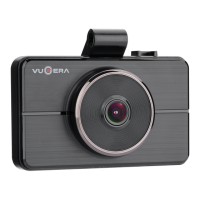

 To Next Page