Need help?
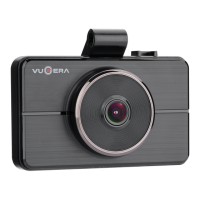
Do you have a question about the VUGERA VG-QX8 and is the answer not in the manual?
Details product usage limitations and responsibilities for accidents.
Essential safety and operational guidelines for using the dashcam.
Proper handling and maintenance procedures for the Micro SD card.
Technical details, dimensions, power consumption, and operating temperature.
List and description of standard and optional accessories included with the product.
Detailed breakdown of the VUGERA exterior parts and their functions.
Overview of main functionalities like Auto delete, ADAS, Storage settings, etc.
Navigating primary interface options: Preview, Wi-Fi, Playlist, and MENU.
Selecting camera views: Front Only, Front & Rear, Rear Only, or LCD OFF.
Enabling and managing Wi-Fi connection for data transfer and app control.
Accessing and reviewing recorded video files by category.
Adjusting screen settings like turn-off timers and clock display.
Configuring voice recording, volume control, sound effects, and audio guidance.
Managing Time, Touchpad calibration, SD card formatting, Image quality, Storage space.
Adjusting Impact Sensitivity, Motion Sensitivity, Low Voltage Cut-off, Driving/Parking Modes, Factory Reset.
Settings for Front LED, Speed Unit, Secret Mode, and Language.
Checking the model name and current firmware version of the device.
Advanced Driver Assistance Systems: FVDW, LDWS, Select Vehicle Type.
Notifies driver when vehicle ahead begins to move.
Warns driver if vehicle drifts out of its lane.
Calibrates ADAS functions based on vehicle type.
Details on status indicators, operation states, and sound effects.
Instructions for downloading and installing the PC viewer software.
Guide to navigating the PC viewer interface and its features.
Configuring various settings within the PC viewer software.
Explanation of how recorded video files are named and organized.
Recording time estimates for VG-UX9 model based on capacity and settings.
Recording time estimates for VG-QX8 model based on capacity and settings.
Step-by-step guide to formatting the SD card using a PC.
Instructions for downloading the VUGERA mobile application.
Overview of the mobile application's interface and key features.
Guide to viewing recorded videos using the mobile application.
Step-by-step instructions for mounting the dashcam in the vehicle.
Guide for connecting the power cable to the vehicle's electrical system.
Details on warranty periods for dashcams, cameras, and memory cards.
Information on how to register the product for extended warranty coverage.
 General
| G-Sensor | Yes |
|---|---|
| Low Voltage Cut-off | Yes |
| Loop Recording | Yes |
| Recording Modes | motion detection |
| Parking Mode | Yes |
| Voice Guidance | Yes |
| Night Vision | Yes |
| Battery | Built-in |

 To Next Page