Page 4
The FLEX is factory pre-set for DIRECTV standard digital programming broadcast from the
101° W satellite (DIRECTV SD). If you also receive your local channels from DIRECTV’s 119 satellite
or if you subscribe to DISH or Bell TV programming, you must confi gure the antenna to work with
your satellite service. Doing this will allow the FLEX to lock on the correct satellites to receive your
programming and also enable automatic satellite switching via the receiver’s remote control for
multi-satellite service.
Antenna confi guration is a one time procedure that MUST BE COMPLETED before using your
FLEX antenna. To confi gure your antenna, do the following:
1. Press POWER to turn on FLEX controller. The COAX CONNECTION light will fl ash for
approximately 10 seconds and then remain on. SCAN PROGRESS lights will fl ash 3 times to
indicate the selected service confi guration.
2. Simultaneously press and hold POWER and SCAN for fi ve seconds.
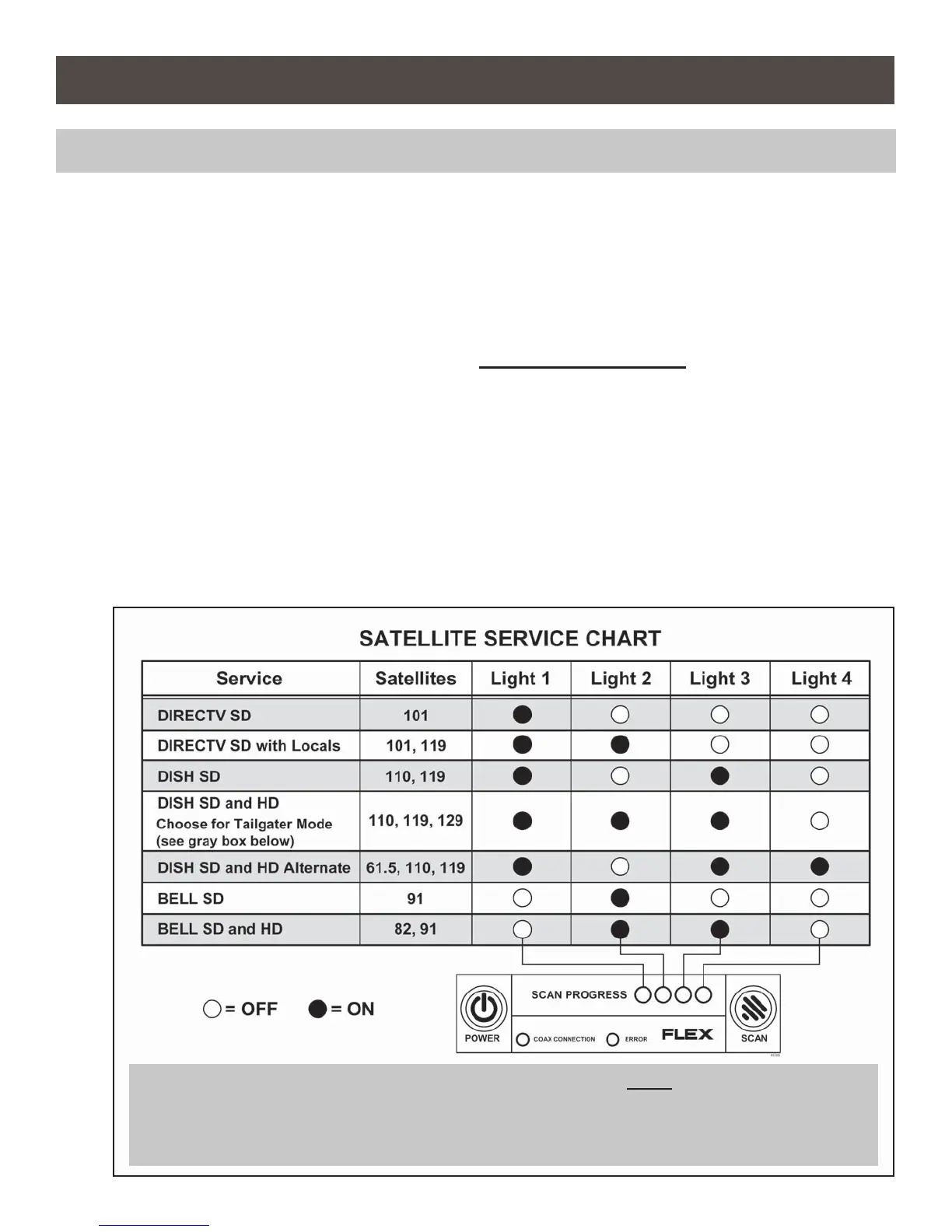
COAX CONNECTION and SCAN PROGRESS lights will fl ash slowly, and then the appropriate
SCAN PROGRESS lights will turn on to show the current service and satellites selected.
Section 2 ANTENNA CONFIGURATION
NOTE: If you have DIRECTV SD service you do not need to confi gure your antenna. Go to step 5 on next page.
NOTE: If you have a DISH receiver ViP211z, ViP211k, ViP211 or 411, FIRST choose the DISH SD and
HD setting as instructed on these two pages, and then continue with Tailgater Mode (Section 5,
page 12).
To verify the current service confi guration without changing it, perform steps 1, 2 and 4.


 To Next Page