EasyManua.ls Logo

VWR International 1915 - User Manual

Default Icon
21 pages
Print Icon
To Next Page IconTo Next Page
Loading...
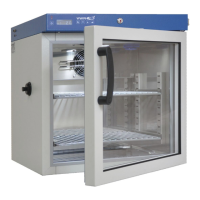
REACH-IN INCUBATOR
MODEL: 1915/1925
INSTALLATION AND OPERATIONAL MANUAL
10/12
4861401
Sheldon Manufacturing Inc. P.O. Box 627 Cornelius, Oregon 97113
EMAIL: tech@Shellab.com INTERNET: http://www.Shellab.com/~Shellab
1-800-322-4897 (503) 640-3000 FAX (503) 640-1366

Questions and Answers

  • R
    Rebecca YoungAug 20, 2025
    What to do if my VWR International 1915 unit will not turn on?
    • P
      Pamela CampbellAug 20, 2025
      If the VWR International Accessories unit will not turn on, first check the wall power source. Then, check the fuse or circuit breaker on the unit or in the wall. See if the unit is on (e.g., fan or heater) and just the controller is off. Finally, check all wiring connections, especially around the on/off switch.
  • T
    tuckermarthaAug 22, 2025
    Why does the VWR International 1915 unit or wall fuse/circuit breaker keep blowing?
    • K
      Kathryn GilbertAug 22, 2025
      If the VWR International Accessories unit or wall fuse/circuit breaker is blown, check the wall power source. Compare the current draw to the specifications on the data plate. Also, check what other loads are on the wall circuit.
  • J
    justinrobertsonAug 25, 2025
    What to do if my VWR International Accessories unit will not heat up at all?
    • M
      Michael ConwayAug 25, 2025
      If the VWR International Accessories unit will not heat up at all, look for the HEATING light. If the pilot light is not on continuously during initial start up, there is a problem with the controller. The amperage should be virtually at the maximum rated amperage (data plate). Check if all controller functions work. For diagnostics, the thermostat should be fully clockwise with the pilot light never on. Also, verify if the fuse/circuit breaker has blown.
  • J
    Justin RomeroAug 28, 2025
    What to do if my VWR International 1915 Accessories unit will not heat over a temperature that is below set point?
    • M
      mandy68Aug 28, 2025
      If the VWR International Accessories unit will not heat over a temperature that is below the set point, confirm that the fan is moving and that the amperage and voltage match the data plate. Check the fan motor motion by removing the top panel of the unit. Turn the thermostat all the way clockwise and see if the HEATING light or OVERTEMP light comes on. Check connections to the sensor. Using an independent thermometer, follow the calibration procedure.
  • S
    Stacey BradshawAug 30, 2025
    What to do if the controller on my VWR International 1915 Accessories is locked-up?
    • C
      colekatieAug 30, 2025
      If the VWR International Accessories unit's controller is on at all times or "locked-up", turn the unit off and on to reset it. If the problem persists, contact Customer Service.
  • T
    Thomas MartinezAug 31, 2025
    What to do if the door of my VWR International Accessories is not sealing?
    • C
      Cassandra PrinceSep 1, 2025
      To address a VWR International Accessories door that is not sealing, check the physical condition of the gasket. Ensure that the gasket is in its original location. Adjust the hinge blocks or twist the door. Confirm that the unit has not been damaged and the body is square.
  • J
    Jose Graves MDSep 2, 2025
    Why does the display on my VWR International Accessories read "HI" or "400+"?
    • B
      Brett FreemanSep 2, 2025
      If the display of your VWR International Accessories reads "HI" or "400+", trace the wire from the display to the probe. Move the wire and watch the display to see if there are intermittent problems, which indicates that the probe is unplugged, is broken or the wire to the sensor is broken.
  • S
    Sherri CruzSep 4, 2025
    Why does the chamber temperature of my VWR International Accessories spike over the set point?
    • M
      maryrothSep 4, 2025
      If the VWR International Accessories chamber temperature spikes over the set point and then settles to the set point, wait for the display to stop changing. Incubators will need 24 hours to warm up and stabilize. See if the HEATING light is on and compare the current draw to the data plate. Confirm with the front panel lights that the controller is calling for heat. Also, confirm with the front panel lights that the thermostat is operating correctly. Check all functions and compare the wiring to the owner's manual, especially around any areas recently worked on. If the problem persists, contact Customer Service.
  • D
    debbiemorrisSep 6, 2025
    Why is the motor in my VWR International Accessories making noise?
    • W
      williamsmichaelSep 6, 2025
      If the VWR International Accessories motor makes noise, make sure that the fan or blower wheel is not contacting its housing. Adjust the motor mounting bracket position to re-center the fan or blower wheel, if necessary. Check the fan or blower wheel for damage or an out of balance condition. Replace the fan or blower wheel if it is damaged or out of balance. Turn the motor shaft to make sure that it spins freely. If it binds or the bearings make a rubbing or scrapping sound then replace the motor.
  • R
    Roberto HickmanSep 8, 2025
    Why does the display on my VWR International 1915 Accessories read "LO"?
    • M
      mikefarrellSep 8, 2025
      If the display of your VWR International Accessories reads "LO", compare the set points and ambient temperature to the rated specifications in section 9.0 if the ambient temperature is lower than the range of the unit. If the problem persists, contact Customer Service.

VWR International 1915 Specifications

General IconGeneral
BrandVWR International
Model1915
CategoryAccessories
LanguageEnglish

Related product manuals