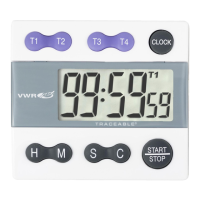
VWR Collection Manual ver 1, rel 1 02.05.2017
Legal Address of Manufacturer
United States Europe
VWR International VWR International bvba
Radnor Corporate Center Researchpark Haasrode 2020
Building One, Suite 200 Geldenaaksebaan 464
100 Matsonford Road, P.O. Box 6660 B-3001 Leuven
Radnor, PA 19087 + 32 16 385011
800-932-5000 http://be.vwr.com
http://www.vwr.com
Country of origin - China
Intended use
This item is intended for general laboratory use to monitor time duration.
Product Specifications
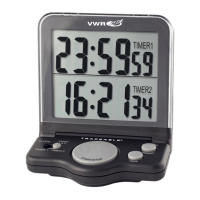
Display: LCD, 4-Digit 1”
Resolution: 1 second
Accuracy: ± 0.01%
Power: AAA battery
Size: 3¾ x 5½ X ½ inches
Accessories Supplied: Wall-mount bracket, stand, battery, Traceable® Certificate, instructions.
Getting Started
Before using this timer, open the battery compartment and remove the battery tab.
Operation
Setting the Clock:
1. Insert battery in battery compartment located on the back side of unit
2. To set clock, slide the CLOCK/TIMER switch to CLOCK.
3. Select 12 hour or 24-hour format
4. Slide SET/LOCK switch located on the back of unit to SET. Press HR, MIN, and SEC keys until
desired time is reached. Slide SET/LOCK switch to LOCK position.
Counting up
1. Place the unit in the clock mode by sliding the CLOCK/TIMER switch to CLOCK.
2. Press the START/STOP key once to begin counting up. Press the START/STOP key a second
time to pause the count (time-out). Press the START/STOP key again to resume counting. Any
number of time-outs may be taken. Press CLEAR while the count is paused to reset the unit to
00:00:00.


 To Next Page