VWR Collection Manual ver 3, rel 5 30.10.2013
2.
Once count up timing has been stopped for corresponding channel (T1, T2, T3, or T4), press START/STOP
button to recall original programmed time.
3.
Press START/STOP button to begin counting down. You may repeat this process as often as needed for
each channel.
NOTE: If C button is pressed when time is stopped, it clears display and memory for channel being displayed.
STOPWATCH (COUNT-UP) TIMING:
1.
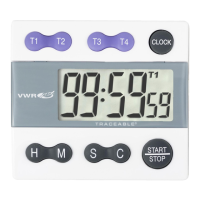
Press T1, T2, T3, or T4 button. The display will show T1, T2, T3 or T4 in right corner. If timer is running,
press START/STOP button and then press C button. Display should read 0:00 00.
2.
Press START/STOP button to begin count-up timing.
All four timing channels can run simultaneously, simply follow steps 1 through 2 to begin count- up timing for
other channels.
When a channel is timing but is not displayed, corresponding channel indicator (T1, T2, T3, or T4) will flash on
display.
Timer may be stopped by pressing START/ STOP button and restarted by pressing START/ STOP button (See
Timeout Function).
3.
When timing has completed for a channel (T1, T2, T3, or T4) and timing has stopped, press C button to
clear display to 0:00 00.
TIMEOUT:
Any channel may be stopped during any running time. Press corresponding channel button (T1, T2, T3, or T4) to
display channel, then press START/STOP button. Timing may be resumed by pressing START/STOP button.
ALL OPERATIONAL DIFFICULTIES:
If this timer does not function properly for any reason, please replace battery with a new high quality battery (see
“Battery Replacement” section). Low battery power can occasionally cause any number of “apparent” operational
difficulties. Replacing battery with a new fresh battery will solve most difficulties.
BATTERY REPLACEMENT:
An incorrect display, no display or operational difficulties indicate the battery should be replaced. Use a coin to
open battery cover on back of timer (turn cover approximately 1/8 turn counter-clockwise). Equivalent battery
replace- ments are: RAYOVAC RW42, DURACELL D357,
and EVEREADY 357. Insert battery with positive side facing you. Replace battery cover.


 To Next Page