This document describes the VWR TD 111 Digital Quick Response Thermometer, designed for use with Type K probes. It includes technical specifications, usage instructions, and maintenance information.
Function Description
The VWR TD 111 is a digital quick response thermometer used for measuring temperature with Type K thermocouples. It features a clear LCD display, a range of operational modes including Min/Max value memory and a Hold function, and options for offset and scale adjustment to compensate for external probe errors. The device is designed for ease of use with three foil keys for ON/OFF, Min/Max value display, and Hold functions. It also incorporates an auto-off function to conserve battery life.
Important Technical Specifications
Measuring Range:
- -65.0 to +199.9°C (resolution 0.1°C)
- -65 to +1150°C (resolution 1°C)
- -85.0 to +199.9°F (resolution 0.1°F)
- -85 to +1999°F (resolution 1°F)
Precision (at nominal temperature = 25°C):
- -65.0 to +199.9°C: ±0.05% of measured value ±0.2% full scale
- -65 to +1150°C: ±0.1% of measured value ±0.2% full scale
- Temperature drift: 0.01%/K
- Point of comparison: ±0.3°C
Probe Connection: Standard flat-pin plug suitable for all NiCr-Ni (Type K) probes.
Offset and Scale: Digital offset and scale adjustment via menu setting.
Measuring Frequency: 3 measurements per second.
Display: Approximately 13 mm high, 3½-digit LCD.
Operating Conditions: -25 to 50°C; 0 to 80% RH (non-condensing).
Storage Temperature: -25 to 70°C.
Power Supply: 9V battery type IEC 6F22 (included in scope of supply).
Power Consumption: Approximately 150 µA.
Housing: Impact-resistant ABS-housing, approximately 106 x 67 x 30 mm (HxWxD).
Weight: Approximately 135 g (including battery).
EMC: Complies with essential protection ratings of the Council for Electromagnetic Compatibility (2004/108/EG). Additional fault: <1%.
Usage Features
Min-/Max-Value Memory:
- To view the minimum (Lo) value, press the 'Mode' key briefly once. The display will show 'Lo' and the minimum value.
- To view the maximum (Hi) value, press the 'Mode' key briefly again. The display will show 'Hi' and the maximum value.
- To restore the current value display, press the 'Mode' key briefly again.
- To clear the Min/Max values, press and hold the 'Mode' key for 2 seconds. The display will briefly show 'CLr' (clear).
Hold Function:
- To "freeze" the currently measured value, press the 'Hold' key briefly. The display will alternate between 'Hld' and the frozen value.
- To reset the display to the current value, press the 'Hold' key briefly again.
- Note: Measuring continues in the background, and Min/Max values are continuously updated even when the Hold function is active.
Offset and Scale Adjustment:
This feature compensates for errors in external temperature probes. The display value is calculated using the formula:
- For °C: Display = (measured value - offset) * (1 + scale adjustment / 100)
- For °F: Display = (measured value - 32°F - offset) * (1 + scale adjustment / 100) + 32°F
To adjust:
- Switch off the instrument.
- Press and hold the 'Hold' key while switching on until 'OFS' appears (approx. 3 seconds).
- Press 'Mode' or 'Hold' key to view the current offset.
- Adjust the desired offset (max. ±5.0°C or ±9.0°F) using 'Mode' or 'Hold' key.
- Confirm with 'On/Off' key; 'SCL' will appear.
- Press 'Mode' or 'Hold' key to view the current scale adjustment.
- Adjust the desired scale (max. ±5.00% change) using 'Mode' or 'Hold' key.
- Store values with 'On/Off' key.
Note: If no key is pressed for 20 seconds during adjustment, the input will be aborted, and changes will not be stored.
Configuration of the Instrument:
- Switch off the instrument.
- Press and hold the 'Mode' key while switching on until 'P.oF' appears (approx. 3 seconds).
I. Auto Power Off Time ('P.oF'):
- If no key is pressed, the device automatically switches off after a set time.
- Press 'Mode' or 'Hold' key to view the current auto-off time (off, 1-120 min).
- Adjust the desired time using 'Mode' or 'Hold' key. 'Off' deactivates the function (permanent operation).
- Confirm with 'On/Off' key; 'Uni' appears.
II. Display Unit ('Uni'):
- Choose between °C or °F.
- Press 'Mode' or 'Hold' key to view the current unit.
- Adjust the desired unit using 'Mode' or 'Hold' key.
- Confirm with 'On/Off' key; 'rES' appears.
III. Display Resolution ('rES'):
- Choose between 1° or 0.1°.
- Press 'Mode' or 'Hold' key to view the current resolution.
- Adjust the desired resolution using 'Mode' or 'Hold' key.
- 0.1°: Display 0.1°C or 0.1°F. Automatically switches to 1° resolution if >199.9°.
- 1°: Display 1°C or 1°F.
- Confirm with 'On/Off' key. Values are stored, and the instrument restarts with a segment test.
Note: If no key is pressed for 20 seconds during configuration, the process will be aborted, and changes will not be stored.
Displays at Reboot:
After switching on, the instrument performs a segment test, then sequentially displays the selected unit and activated configuration points (Offset, Slope, P.oF).
System Messages:
- Er. 1: Measuring range exceeded.
- Er. 2: Measured values below permissible range.
- Er. 7: System fault (defective or outside allowable ambient temperature).
- No temperature probe connected or defective.
- "BAT" (bottom left): Battery is weak, can continue for a certain time.
- "bAt" (main display): Battery is used up, measuring is no longer possible.
Maintenance Features
Safety Instructions:
- Ensure the device operates within specified climatic conditions.
- Allow the device to acclimate to ambient temperature after transport from cold to warm environments to prevent condensation.
- Design circuitry carefully when connecting to other devices to avoid damaging the device or connected equipment.
- If the device is unsafe to operate (visible damage, not working as specified, stored improperly), switch it off immediately, mark it, and return it to the manufacturer for repair.
- Do not use this product as a safety or emergency stop device, or in any application where product failure could cause personal injury or material damage.
- Remove the battery when storing the device above 50°C or for extended periods.
General Temperature Measurement with Thermocouples:
- Allow temperatures to adjust (up to 15 minutes) after connecting or touching the probe connector to avoid measurement errors.
- Be aware of the probe's allowable temperature range.
- Ensure the probe is dry when measuring air temperature to prevent low readings due to evaporation.
Low Battery Warning: "BAT" is automatically displayed when the battery is low. If "bAt" appears in the main display, the battery is completely depleted and needs replacement.
Disposal:
The device is marked with the crossed-out wheeled bin symbol, indicating it should not be disposed of with unsorted waste. It must be handed over to an authorized facility for separate collection and recycling at the end of its lifecycle. Decontaminate the equipment if biologically, chemically, or radiologically contaminated to protect personnel involved in disposal and recycling. Contact your local dealer for information on disposal locations. This ensures the conservation of natural resources and human health protection.
Warranty:
VWR warrants this product to be free from defects in material and workmanship for two (2) years from the date of delivery. VWR will, at its discretion, repair, replace, or refund the purchase price if a defect is present and the product is returned within the warranty period. The warranty is void if the product has been damaged by accident, abuse, misuse, misapplication, or normal wear and tear. Failure to perform required maintenance and inspection services as per manuals and local regulations also voids the warranty, unless the defect is not due to such non-performance. Returned items must be insured by the customer against possible damage or loss. This warranty is limited to the aforementioned remedies and is in lieu of all other warranties, including fitness and merchantability.

 Need help?
 General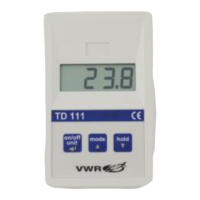

 To Next Page