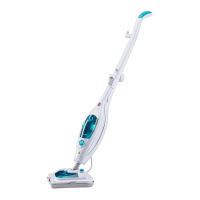
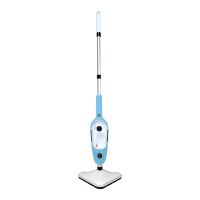
This document is an instruction manual for the Vytronix R4SFL Steam Mop, a household appliance designed for cleaning hard floor surfaces using steam.
Function Description
The Vytronix R4SFL Steam Mop is designed to sanitize and clean various hard floor surfaces by emitting very hot steam. It can also be used on softer surfaces like carpets, rugs, upholstery, and pet bedding with the included carpet glide, primarily to kill dust mites and other allergens. The appliance uses a microfiber pad to contact the floor, through which high-temperature steam passes to clean and sanitize.
Important Technical Specifications
- Rated Voltage: 220-240V
- Rated Frequency: 50Hz
- Output Power: 1600W (+5%, -10%)
- Water Tank Capacity: 400 ML
- Ready Indicator: The appliance has a ready indicator. After connecting to the power supply and turning on the power switch, the mop starts to emit steam after approximately 25 seconds.
- Rotation Axis Angle: The cleaner features a greater angle for its rotation axis.
Usage Features
General Operation:
- Assembly: The base of the steam mop is assembled by inserting a screw and tightening it with a flat-head screwdriver. If the screw turns freely, additional pressure should be applied when turning.
- Water Tank: The detachable water tank is filled with water after pressing the water tank release button. The cap is tightened, and the tank is inserted until it "clicks" into place.
- Power On/Off: The appliance is turned on by pressing the ON/OFF button. It takes approximately 25 seconds to heat up, during which the unit may vibrate.
- Steam Cleaning: Once heated, the unit is gently placed on a microfiber pad. To clean, the handle is tilted to a 45° angle, and the mop is pushed and pulled slowly across the floor.
- Power Off: After use, the ON/OFF button is pressed to turn off the appliance.
- Storage: After cooling, the microfiber pad is removed, and the unit is stored upright in a dry area. The water tank should always be emptied after use.
Floor Setting Control:
The steam mop features a "Floor Setting Control" button and "Floor Setting Indicator Lights" to adjust steam levels for different floor types:
- High Steam Emission: Indicated by a specific light, this setting is ideal for ceramic, stone, tile, and other durable floors.
- Gentle Steam Emission: Indicated by another light, this setting is perfect for sealed hardwood, laminate, bamboo, and other delicate floors.
Carpet Glide:
- Attachment: The carpet glide is attached by placing the unit under its "tabs" and gently pushing down into place.
- Usage: With the carpet glide attached, the unit is turned on and slowly moved back and forth over stains on carpets, rugs, upholstery, or pet bedding.
- Removal: After use and cooling, the carpet glide can be removed by using a foot on the "Hands Free" removal tab to lift it from the steam head.
Helpful Hints for Usage:
- Always vacuum or sweep floors before sanitizing.
- Tilt the handle to a 45° angle and clean slowly (2-3 yards at a time) for optimal results.
- Change the microfiber pad when it becomes oversaturated.
- For stubborn stains on vinyl or linoleum, pre-treat with a mild detergent and water before using the steam mop.
- Never leave the appliance in one spot on any surface when heated.
- Do not use on unsealed wood or unglazed ceramic floors. Test an isolated area before use on wax-treated or no-wax floors, as the sheen may be removed.
- The product is NOT for space heating purposes.
Maintenance Features
Care & Maintenance:
- Unplugging: Always turn off and unplug the appliance from the electrical outlet before cleaning or emptying the water tank.
- Cord Storage: Wrap the power cord around the cord hangers.
- Cool Down: Allow the appliance to cool down for five minutes after use before removing the microfiber pad and emptying the water tank.
- Microfiber Pad Care:
- Always remove the microfiber pad after use.
- Wash the microfiber pad in warm water with a mild detergent.
- Never use bleach or fabric softener.
- The pad can be machine washed.
- Hang dry or dry on a radiator for 24 hours to ensure it is fully dry and prolong its lifespan.
- Ensure a completely dry pad is used for each cleaning session.
- Water Tank Cleaning & Descaling: To improve the appliance's lifespan, clean and descale the water tank once a month or every four to five uses. A normal descaling kit with water can be run through the steamer until all the water is used.
- Emptying Water Tank: Always empty the water tank when finished using the appliance.
- Appliance Cleaning: Wipe the appliance with a damp cloth to clean. Never immerse the appliance in water or any other liquid.
Troubleshooting:
- Vibration sound lasts longer than 60 seconds: Add water to the water tank and ensure it is inserted correctly.
- Unit not operating: Ensure the plug is firmly in the outlet and check/replace the fuse.
- Unit does not emit steam: Ensure the water tank is filled with water.
- Water left on floor: Change the microfiber pad and ensure the unit is always level and parallel to the floor.
- White spot left on floor: Do not leave the unit in one spot for too long when cleaning. Use a protector pad/floor mat when the unit is ON and stationary. Use distilled water instead of hard tap water. To remove spots, use a damp cloth and a small amount of white vinegar.
- Important Safety Precaution: Always ensure the unit is disconnected from the mains and has completely cooled down before performing any troubleshooting checks or maintenance.
Warranty Registration:
Users can register their free one-year Vytronix warranty at www.vytronix.com using the product code: brandnew-vytronix-R4SFL. For queries or assistance, customer care can be contacted via email at support@vytronix.com.
Safe Disposal:
The product should not be disposed of with other household waste in the EU. It should be recycled responsibly to promote the sustainable reuse of material resources. Users should use return and collection systems or contact the retailer for safe disposal.

 Need help?
 General

 To Next Page