19
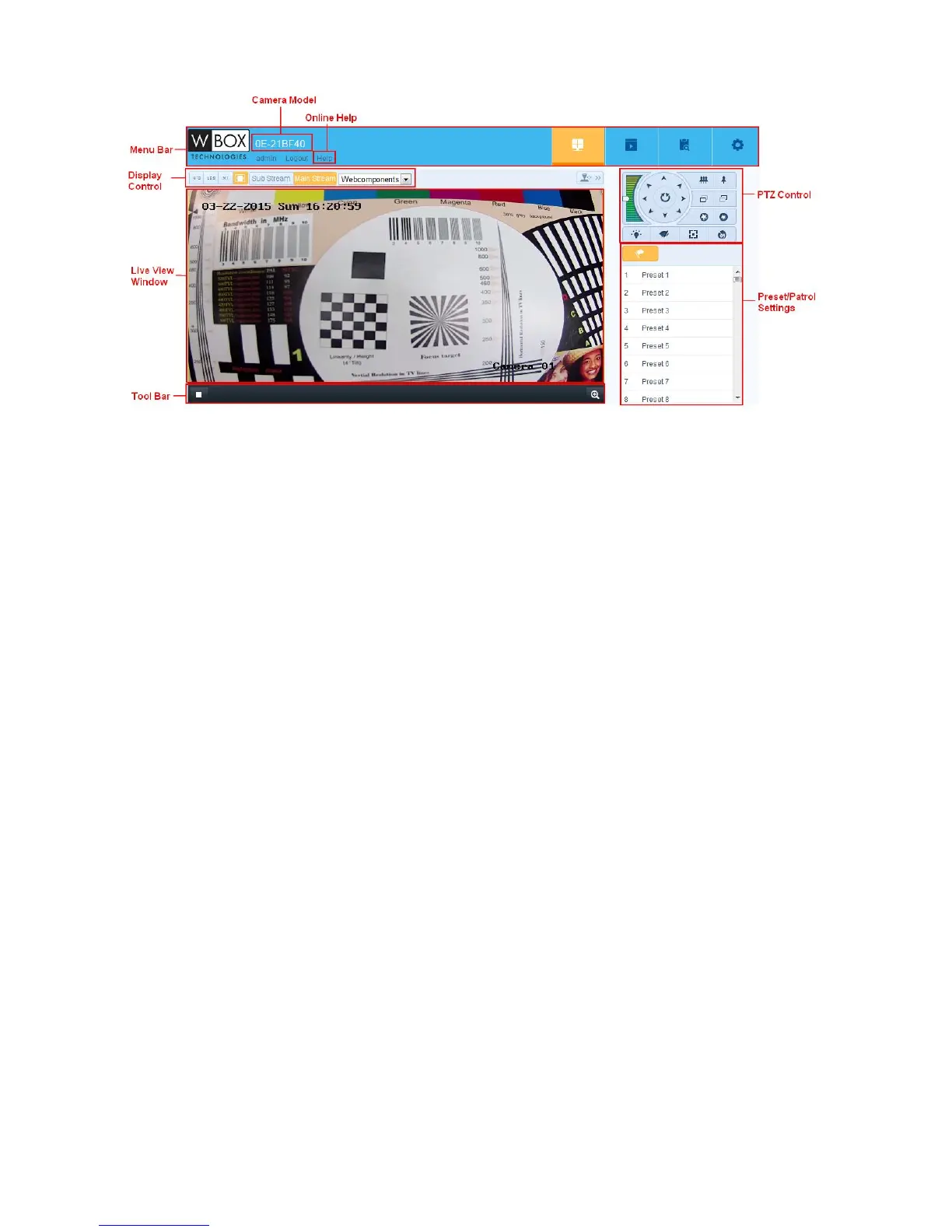
Camera Model:
It lists the camera model you are connecting to.
Online Help:
Click ‘Help’ to get the online help, which will guide you through the basic operations for each function.
Menu Bar:
Click each tab to enter Live View, Playback, Log and Configuration page respectively.
Display Control:
Click each tab to adjust the layout and the stream type of the live view. And you can click the drop-down to select the
plug-in. For IE (internet explorer) user, webcomponents and quick time are selectable. And for Non-IE user,
webcomponents, quick time, VLC or MJPEG is selectable if they are supported by the web browser.
Live View Window:
Display the live video.
Toolbar:
Operations on the live view page, e.g., live view, capture, record, audio on/off, two-way audio, etc.
PTZ Control:
Panning, tilting and zooming actions of the camera and the light and wiper control. (only available for cameras supporting
PTZ function)
Preset/Patrol Settings:
Set/call/delete the presets or patrols for PTZ cameras. (only available for cameras supporting PTZ function)


 To Next Page