5
Mounting and Connecting
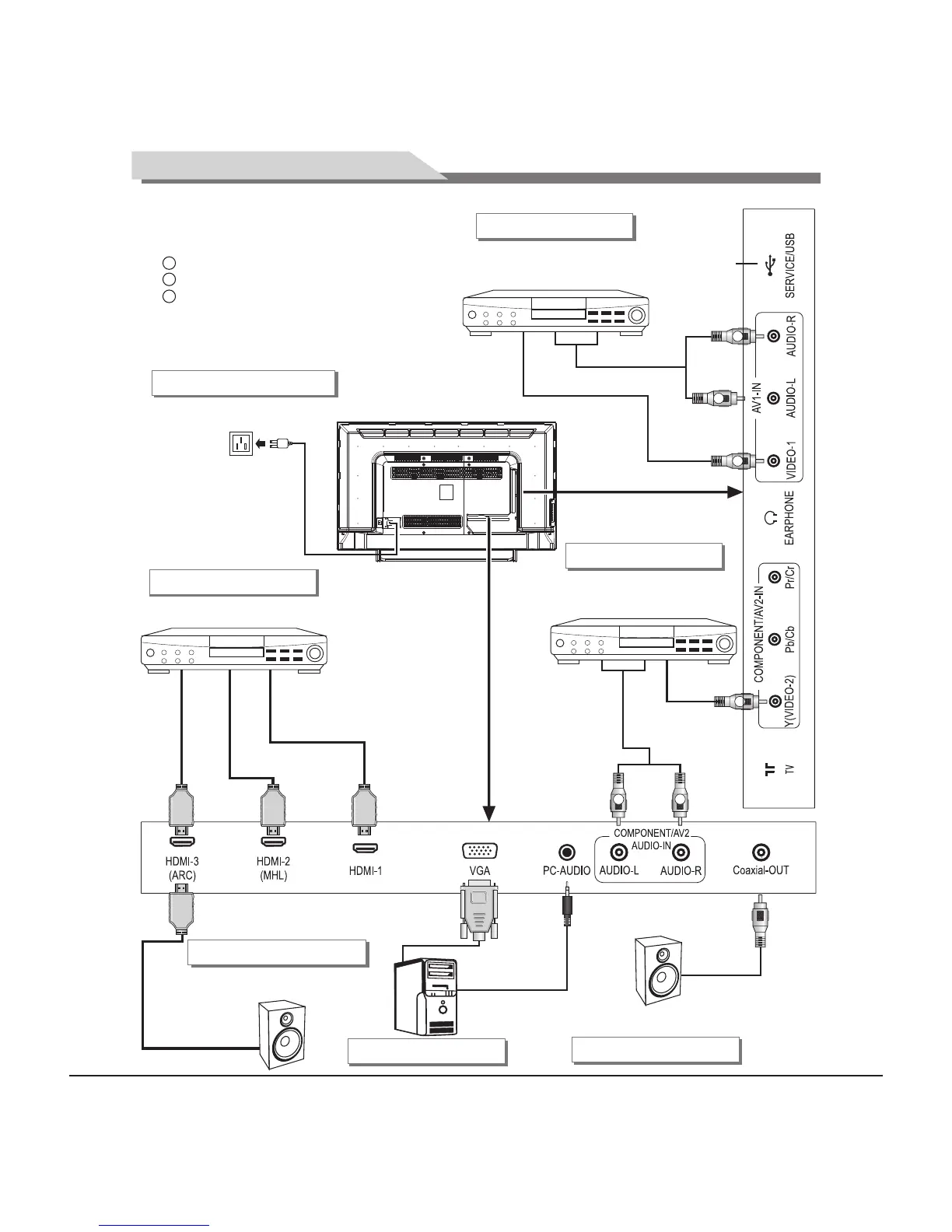
AV2 input connection
Connect to the devices
with AV output interface
(e.g. DVD, VCR, game console)
W
R
Y
Audio cable
Video cable
AV1 input connection
Connect to the devices
with AV output interface
(e.g. DVD, VCR, game console)
Audio cable
Video cable
W
R
HDMI signal cable
HDMI signal cable
Connect to the AV device
with HDMI interface
HDMI input connection
USB interface
Y Yellow (VIDEO signal cable)
W White(AUDIO-L signal cable)
R Red (AUDIO-R signal cable)
VGA cable
VGA input connection
Connect to the audio devices
with coaxial interface
Coaxial-out connection
Coaxial cable
HDMI signal cable
PC audio cable
Y
Connecting power supply
To power socket
(100-240VAC 60/50Hz)
Connect to the audio devices
with ARC function
ARC function connection
HDMI signal cable


 To Next Page