WADIA
860
COMPACT DISC PLAYER
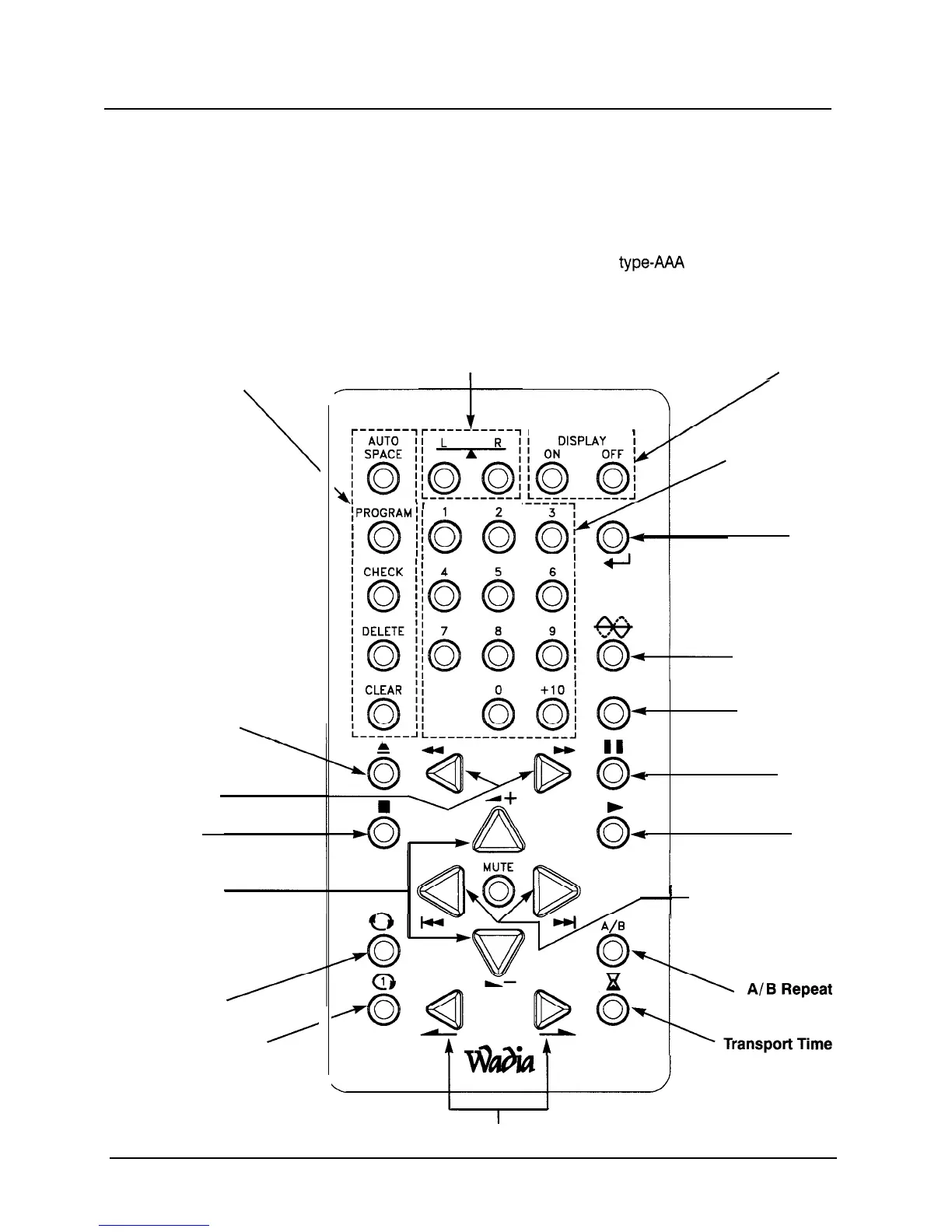
REMOTE CONTROL OPERATION
The remote control included with your Wadia 860 Compact Disc Player is a
new design. The machined aluminum chassis is ergonomically pleasing in
look, feel and use. The controls have been carefully laid out for the most
convenient operation.
The Wadia 860 remote control requires three
type-AM
batteries, which
you will find in the accessories kit. To install the batteries, remove the battery
cover on the back of the remote by removing the phillips head screw.
Insert the batteries as indicated on the battery holders.
Transport
Programming
\
Drawer Open/Close
Search
stop
Volume
Repeat
Single Track
A
Balance
r-----------
10
0
c,
0
Display
/
r-----------i
Direct Access
Enter
.
Phase Invert
INPUT
O4
0
Input Scroll
Pause
Play
I
Track Forward /Rev
Mode
Index
10



 To Next Page