5
ON A WEEKLY BASIS:
• Clean the external surfaces on the KICKR RUN.
• Clean the area underneath the KICKR RUN.
ON A MONTHLY BASIS:
• Check the entire KICKR RUN for any damage. If unsure, please contact Wahoo Support.
ON AN EVERY OTHER YEAR BASIS:
• Lubricate the belt. If unsure, please contact Wahoo Support.
CLEANING THE KICKR RUN:
• Always power off and unplug KICKR RUN before cleaning.
• Clean the surfaces (belt and external surfaces) with a damp cloth and lightly soapy water.
• Never use abrasive cleaners.
• Never spray or pour liquid directly onto KICKR RUN surfaces.
• Never allow liquid to drip into openings on the KICKR RUN .
FEATURES AND SPECIFICATIONS
PHYSICAL DIMENSIONS AND LOCATION REQUIREMENTS
• KICKR RUN’s footprint is 4.5’ long x 2.4’ wide x 3.6’ tall and weighs 275 lbs.
• You should have at least 80” of clearance directly behind KICKR RUN and 24”
of clearance on all other sides.
• We recommend the following ceiling height:
- 7ʹ ceiling works well for someone 5ʹ2″ and under
- 7ʹ6″ ceiling works well for someone 5ʹ7″ and under
- 8ʹ ceiling works well for someone 6ʹ1″ and under
- 9ʹ ceiling suitable for all heights
POWER REQUIREMENTS
KICKR RUN requires a dedicated 15 amp electrical service. Without a dedicated service
you could run into issues with not enough power supply to KICKR RUN causing tripped
breakers or an error on the KICKR RUN.
• Do not attempt to access the power cord, WAHOO
DIRECT CONNECT accessory, or the power switch
during treadmill operation.
POWER SWITCH
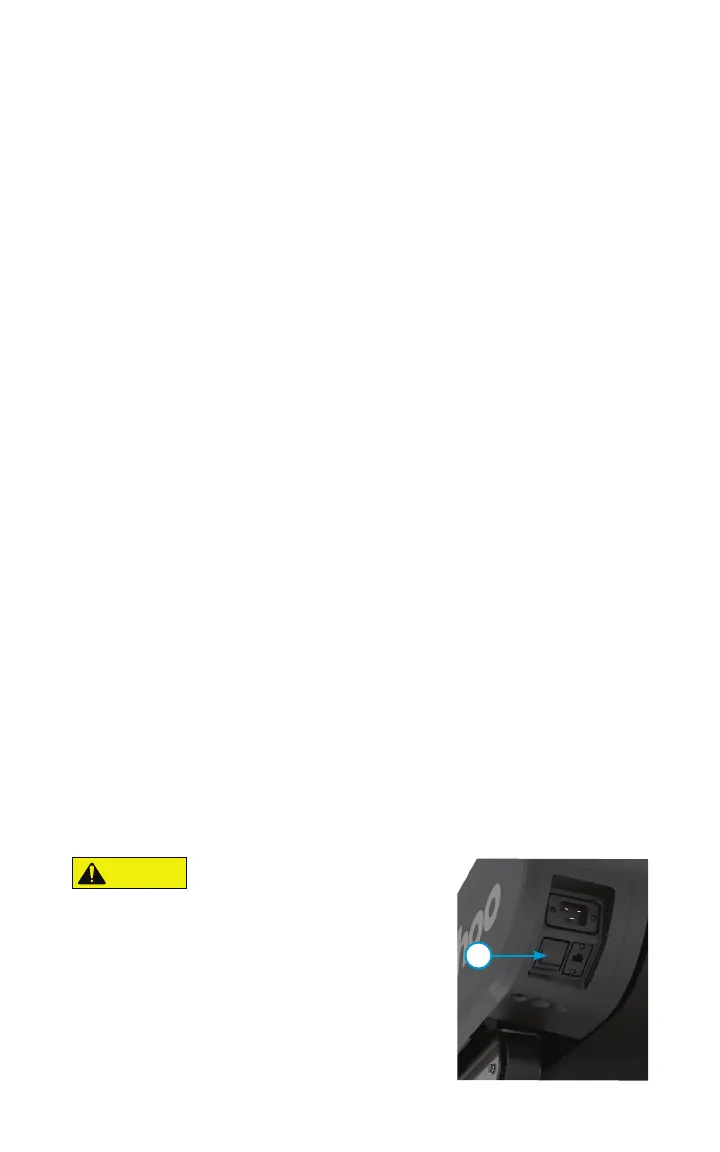
There is a power switch (1) located above the power
cable. You can use this to turn power on and off to the
unit without unplugging the power cable.
CAUTION
1


 To Next Page