6
SAFETY FEATURES
SAFETY KEY
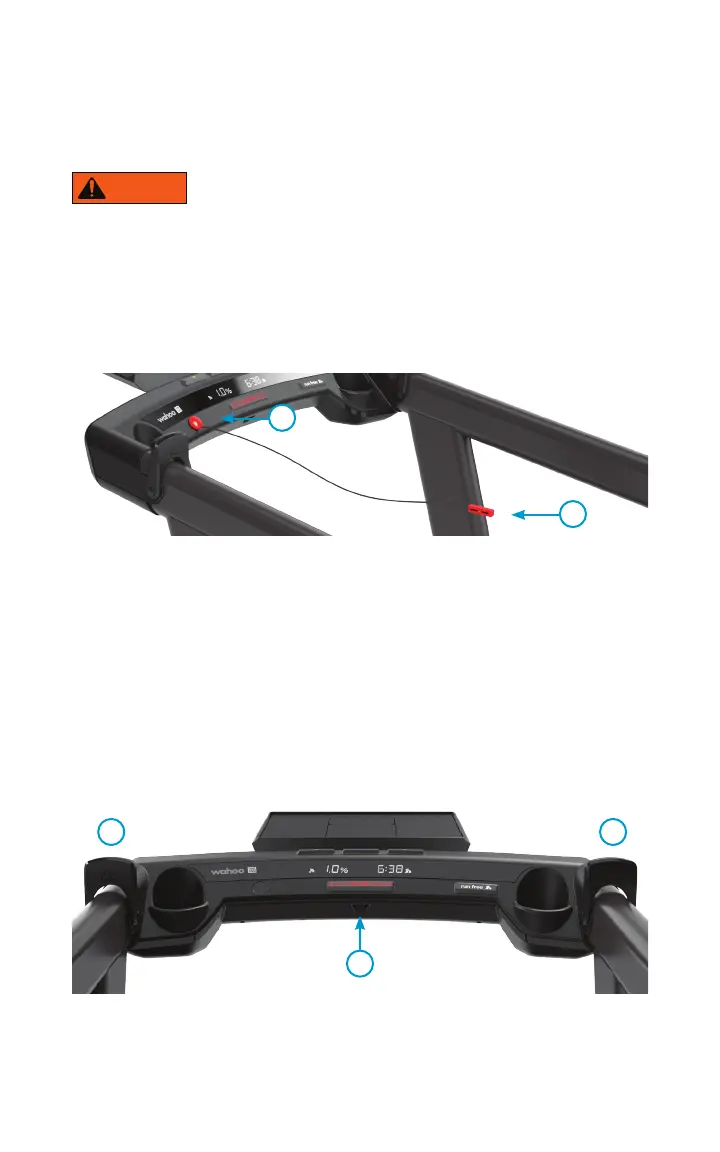
Magnet attaches to the console (2). Safety Key clip attached to the user’s shirt.
• You should never use KICKR RUN without securing the Safety Key clip (3) to your shirt or
clothing.
• If the Safety Key is removed, the KICKR RUN will stop immediately.
• You will not be able to control the KICKR RUN until the Safety Key is installed.
• Always remove and store the Safety Key away from the KICKR RUN and out of reach
of children.
CADENCE DETECTION
When KICKR RUN does not detect running cadence it will bring the belt speed to a
complete stop.
RUNNER DETECTION - TIME OF FLIGHT SENSOR
KICKR RUN uses the Time of Flight Sensor (4) to detect if a person is on the running
surface. If there is no person detected, then the KICKR RUN controls are disabled. If the
KICKR RUN is in use and a person is no longer detected then the KICKR RUN will come
to a complete stop.
Note: blocking the time of flight sensor, located in the center of the console, will disable
RunFree mode and bring the KICKR RUN to a full stop.
WARNING
3
2
4
6 5


 To Next Page