7
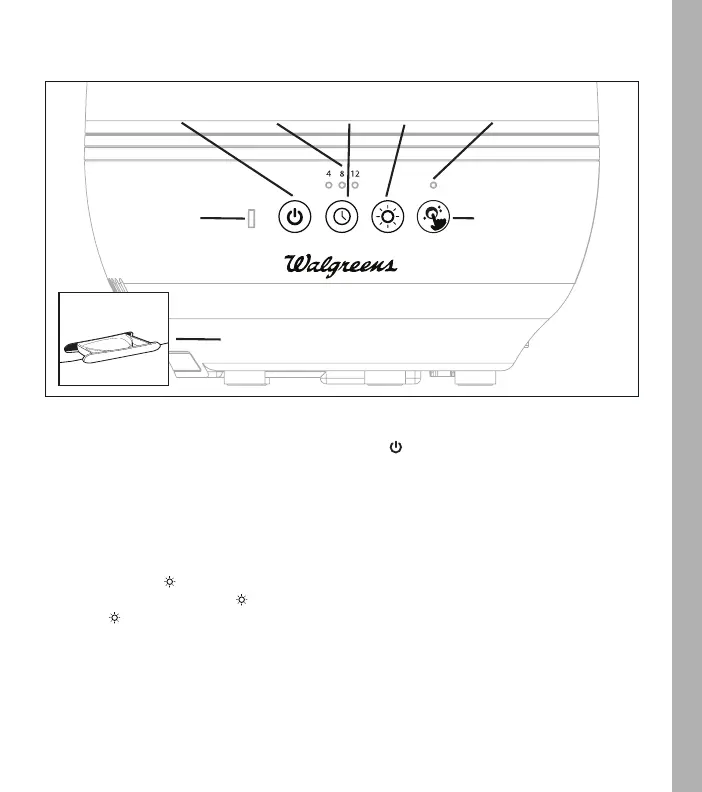
timer
button
power
/mist output
button
power
/out of
water indicator
oil
tray
night
-light
button
clean
button
clean
reminder
POWER ON/OFF & MIST OUTPUT LEVEL BUTTON
Plug unit into a 120-volt AC electrical outlet. Press the power button to turn unit on.
The humidifier will operate at low mist. Press the power button a second time to select high mist output.
Press again to turn the humidifier off.
360° ROTATING MIST NOZZLE
Rotate the mist output nozzle to adjust the mist direction.
NIGHT-LIGHT
Press the night-light button to turn the night-light on. The night-light will continuously scroll through
the 7 colors. Press the night-light button to stop scrolling and park on your favorite color. Press the
night-light button again to turn the night-light off. The next time you turn the night-light on, it will
resume scrolling from the parked color.
HOW TO USE
timer
settings



 To Next Page