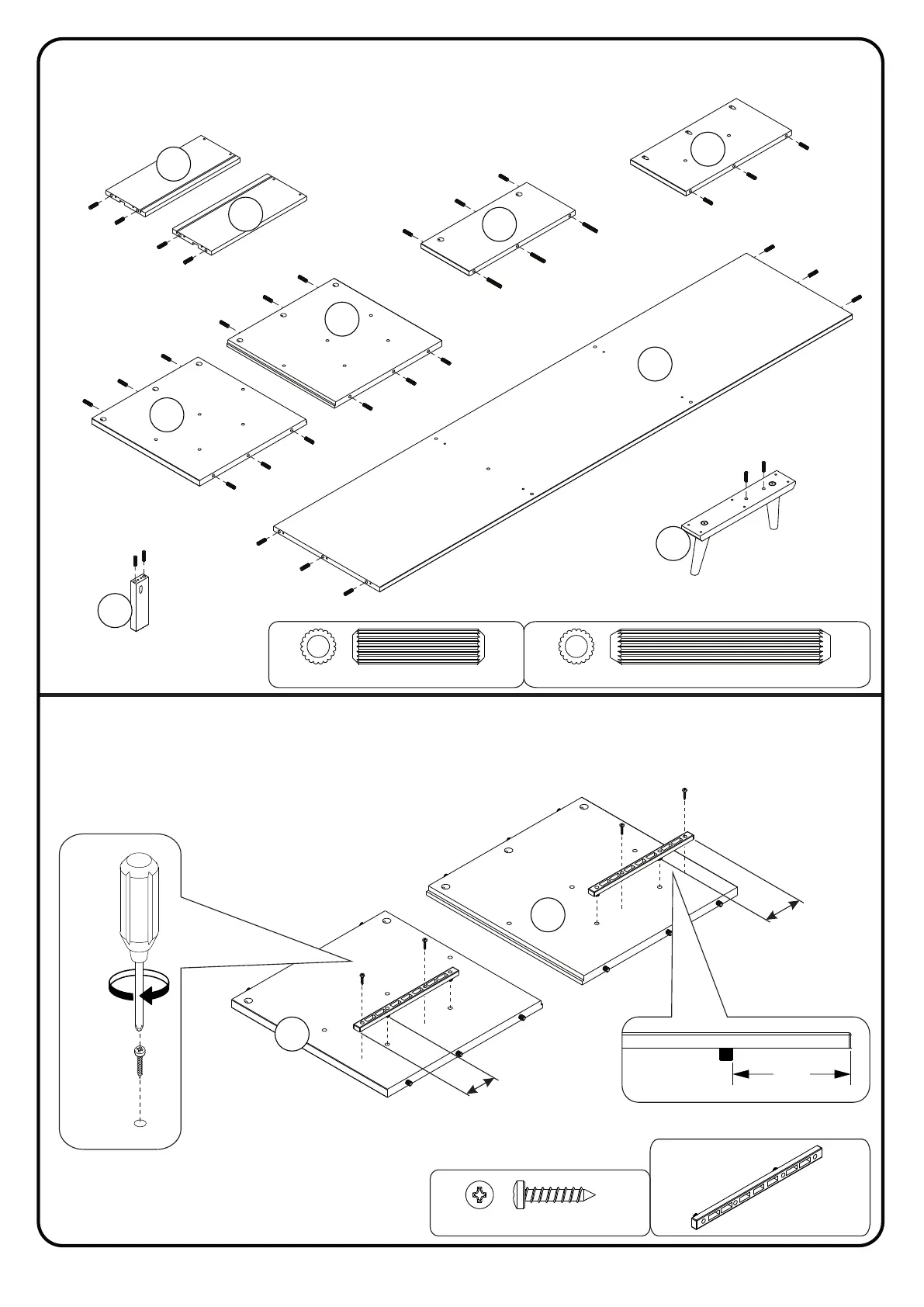
Step 2
P.5
Attach the Plastic Slide (F) into part (6) and (7) using Screw (E) and a Phillips
head screwdriver. Complete this step twice.
Qty
06
Ø 8,0x50 mm
Step 1
Insert wood dowel (D) into parts (2), (4), (5), (6), (7), (8), (12), (13) and (16).
Insert wood dowel (K) into part (4).
Qty
48
D
Ø 8,0x30 mm
K
8
D
(2x)
D
16
D
D
2
D
D
D
D
D
D
D
D
D
D
13
12
(3x)
(3x)
7
6
D
D
D
D
D
D
D
D
D
D
D
D
4
(2x)
(2x)
5
D
D
D
K
K
K
D
D
D
Qty
02
F
Qty
04
E
Ø 3,5x16 mm
E
E
F
+
E
E
+
+
F
( x)4
E
F
6
7



 To Next Page