EasyManua.ls Logo

Wallenstein BXR Series - User Manual

Wallenstein BXR Series
76 pages
Print Icon
To Next Page IconTo Next Page
Loading...
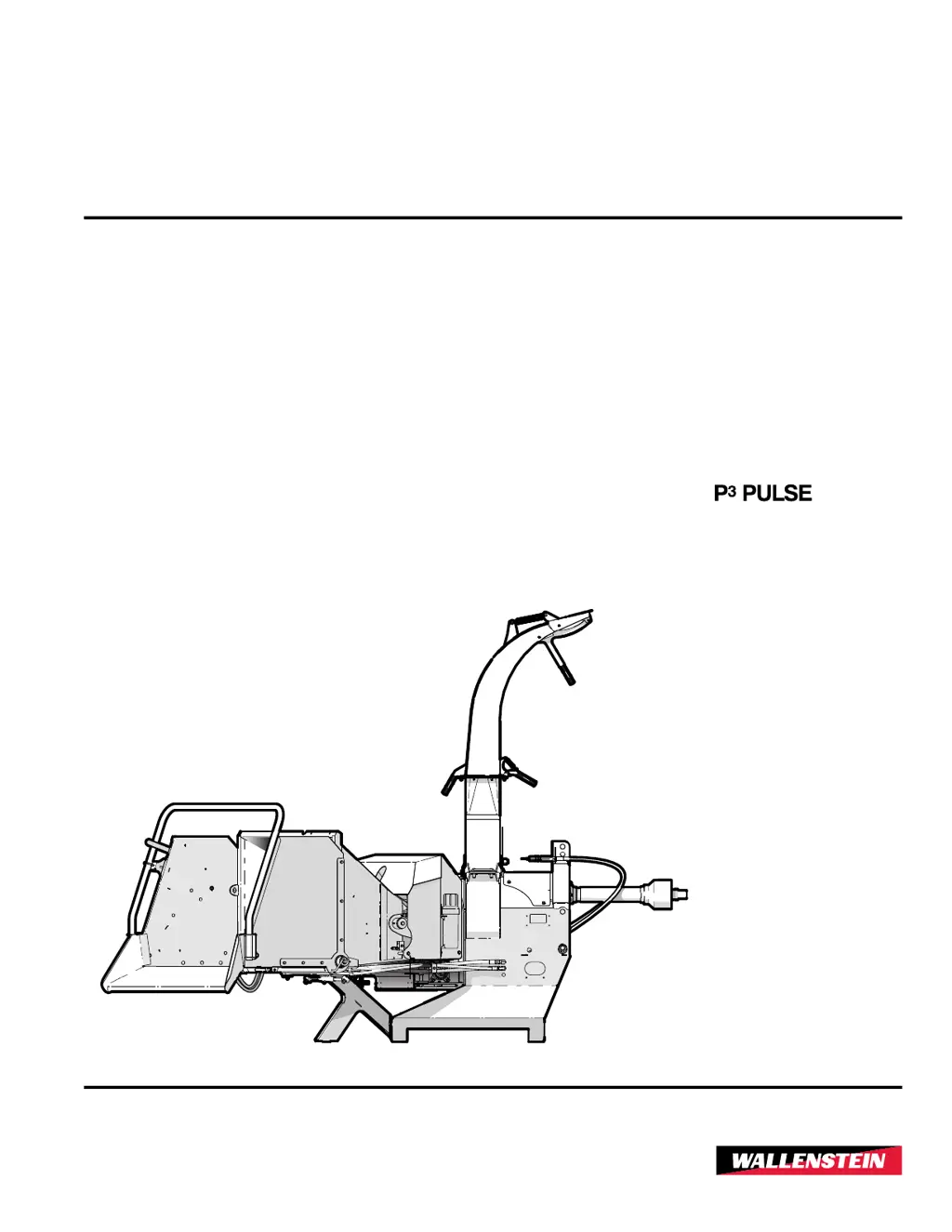
OPERATOR'S MANUAL
Wood Chipper
BX52R Models – S/N 152R1437 and up
BX72R Models – S/N 172R724 and up
BX102R Models – S/N 1102R510 and up
BXR
Series
Document Number: Z97072_EnRev Oct-2022
TECHNOLOGY

Table of Contents

Questions and Answers

  • J
    Jose BrownAug 18, 2025
    Why is my Wallenstein BXR vibrating so much?
    • S
      Sean SmithAug 18, 2025
      If the Wallenstein Chipper experiences unusual vibration, it might be due to a broken or missing rotor blade, which would require replacement. Another cause could be a bent rotor, indicated by a wobble, suggesting the rotor needs replacing. Also, failed rotor bearings can cause vibration, necessitating their replacement. Lastly, check for and tighten any loose fasteners, referring to the torque tables on page 64.
  • S
    Sharon WheelerAug 20, 2025
    What to do if my Wallenstein BXR requires excessive power?
    • C
      Christopher JohnsonAug 21, 2025
      If the Wallenstein Chipper requires excessive power or stalls, it may be due to an obstructed discharge, so clear any debris from the discharge chute. You might be feeding in too much material, which can be addressed by adjusting the P3 PULSE programming (refer to page 31). Check the rotor for plugging and clear the chipper hopper lower rotor housing and rotor if necessary. If you're processing green material that isn't discharging well, try allowing the material to dry or alternate between dry and wet material. The space between the rotor blade and ledger knife might be too large; use a ledger gauge tool to check the clearance (see page 57). Finally, dull blades can cause stalling, so check, rotate, sharpen, or replace the rotor and ledger blades (refer to page 56).
  • S
    Sherri NicholsonAug 27, 2025
    How to fix a Wallenstein BXR when the rotor does not turn?
    • K
      Keith WellsAug 27, 2025
      If the rotor of your Wallenstein Chipper does not turn, it could be due to a few reasons. One possibility is an obstructed discharge, so clear any debris from the discharge chute. Another reason might be that the rotor is plugged; in this case, inspect and clear the chipper hopper lower rotor housing and rotor. Lastly, a broken shear pin could be the cause, requiring replacement.
  • B
    bryanmillerAug 30, 2025
    What causes poor chip quality in my Wallenstein Chipper?
    • R
      Regina SchroederAug 30, 2025
      If you are experiencing poor chip quality with your Wallenstein Chipper, it could be due to dull blades. In this case, check the rotor and ledger blades, and rotate, sharpen, or replace them as needed (refer to page 56). The material itself might be of poor quality, such as being too small or rotting; try mixing it with higher quality material. Finally, incorrect knife clearance can affect chip quality, so check and adjust as required (see page 57).
  • N
    Nicole FieldsSep 1, 2025
    Why is the material feeding in too slow into my Wallenstein BXR Chipper?
    • J
      Jamie WilliamsSep 1, 2025
      If the material is feeding too slowly into your Wallenstein Chipper, there are several potential causes. First, the engine or rotor speed might be too low, so increase the rotor RPM by adjusting the throttle. Also, check if the lower roller is jammed, and if so, open the lower roller clean out to remove any debris. An obstructed discharge can also cause slow feeding, so clear any debris from the discharge chute.
  • S
    Sheryl JimenezSep 3, 2025
    What to do if my Wallenstein BXR Chipper requires excessive power or stalls?
    • Z
      zjacobsonSep 3, 2025
      If your Wallenstein Chipper requires excessive power or stalls, several factors could be responsible. Check for an obstructed discharge and clear any debris from the discharge chute. Inspect and clear the chipper hopper lower rotor housing and rotor if they are plugged. Also, ensure the P3 PULSE programming is correct and adjust it if necessary. If you're processing green material that doesn't discharge well, allow it to dry or alternate between dry and wet material.
  • A
    Alexander CruzSep 6, 2025
    Why does the PTO shear bolt keep breaking on my Wallenstein Chipper?
    • C
      calexanderSep 6, 2025
      If the PTO shear bolt on your Wallenstein Chipper keeps breaking, there are several possible reasons. Make sure the tractor's cruise control is turned off. Increase the PTO speed to 540 or 1,000 rpm if it's set too low. Ensure the chipper is placed on the ground and the three-point hitch is not raised or lowered while the rotor is turning. Adjust the toplink to align the tractor and chipper PTO spline planes if they are not parallel. Set the yokes on each end of the PTO shaft to the same phase.
  • F
    Frederick ScottSep 8, 2025
    How to fix unusual machine vibration in my Wallenstein Chipper?
    • J
      Johnny SerranoSep 8, 2025
      If you notice unusual vibration while operating your Wallenstein Chipper, check for the following: a broken or missing rotor blade, and replace if necessary. The rotor may be bent, so check for wobble and replace if needed. The rotor bearings may have failed, so replace them. Also, check for loose fasteners and tighten them to the correct torque. Ensure that the PTO shaft yokes are in phase.
  • M
    Michael AndersonSep 12, 2025
    What to do if the rotor does not turn on my Wallenstein Chipper?
    • J
      Joseph GrantSep 12, 2025
      If the rotor of your Wallenstein Chipper does not turn, there are a few potential causes. First, check for an obstructed discharge and clear any debris from the discharge chute. Inspect the chipper hopper lower rotor housing and rotor for any blockages and clear them. Finally, check for a broken shear bolt and replace it with one of the correct size and hardness.
  • V
    Veronica JohnsonSep 13, 2025
    Why are the feed rollers intermittent or not turning on my Wallenstein BXR Chipper?
    • M
      mercerjesseSep 13, 2025
      If the feed rollers on your Wallenstein Chipper are intermittent or not turning, consider these possible causes: Ensure the feed roll control bar is set to Forward or Reverse, not Stop. Make sure the engine speed is at or above the minimum setting by setting the engine throttle for maximum rpm. Inspect the hydraulic oil condition for dirt or foaming, and replace the oil if contaminated. Check the roller drive key and replace it if sheared.

Summary

Foreword

Introduction

General introduction to the Wallenstein BXR Series wood chipper and its capabilities.

Model Configuration

Explains how to interpret the chipper model designation based on features and serial numbers.

Delivery Inspection Report

Form for dealers and customers to document delivery inspection and operator instructions.

Serial Number Location

Shows where to find the product's serial number for service, parts, and reference.

Types of Decals on the Machine

Explains different types of decals (safety, informative, product, maintenance) and their meanings.

Safety

Safety Alert Symbol

Explains the meaning and importance of the Safety Alert Symbol for hazard identification.

Signal Words

Defines signal words (DANGER, WARNING, CAUTION, IMPORTANT) used to indicate hazard seriousness.

Why Safety is Important

Emphasizes operator responsibility, accident prevention, and the importance of safety practices.

Safety Rules

Lists essential safety rules for operating the wood chipper safely and effectively.

Equipment Safety Guidelines

Provides general safety precautions for equipment operation, maintenance, and handling.

Safe Condition

Details steps to place the machine in a safe state for maintenance or storage.

Safety Training

Stresses the importance of operator training and understanding manual instructions for safe operation.

Being Prepared

Outlines necessary preparations and checks before operating the machine.

Hydraulic System Safety

Provides safety guidelines specific to the hydraulic system to prevent injury.

Sign-Off Form

Provides a form to record operator training completion for compliance.

Safety Signs

Safety Sign Locations

Illustrates the placement of various safety signs on the chipper for hazard awareness.

Safety Sign Explanations

Explains the meaning of various safety signs found on the machine for proper interpretation.

Replace Damaged or Missing Safety Signs

Provides instructions on how to replace damaged or missing safety signs to maintain safety.

Familiarization

To the New Operator or Owner

Emphasizes owner's responsibility for training and ensuring safe operation.

Operator Orientation

Defines directional terms (left, right, forward, backward) based on operator position.

Machine Components

Identifies and labels the main components of the wood chipper with diagrams.

Attach to a Tractor

Connect 3-point Hitch

Step-by-step instructions for connecting the chipper to the tractor's 3-point hitch.

Size PTO Shaft

Instructions for measuring, cutting, and assembling the PTO shaft for correct length.

Install a PTO Shaft

Details how to properly install the PTO shaft onto the tractor and implement.

Connect Hydraulic Hoses

Instructions for connecting the hydraulic hoses between the tractor and chipper.

P3 PULSE Equipped Models

Instructions for connecting the P3 PULSE electronic control system power supply.

Controls

Discharge Chute Operation

Explains how to operate the discharge chute and its deflector.

Feed Roller Control Bar

Explains the function and operation of the feed roller control bar for material feed.

Feed Roller Flow Control Valve

Details how to adjust the feed rate using the flow control valve.

Rotor Lock

Explains how to use and set the rotor lock for safety during maintenance.

P3 PULSE Electronic Control System

Overview of the P3 PULSE system for optimizing chipper operation and feed control.

Hydraulic Feed Roller Lift Option

Details the hydraulic lift option for raising the top feed roller for maintenance.

Hydraulic Winch Option

Explains the operation of the hydraulic winch for pulling material into the chipper.

Operating Instructions

Operating Safety Rules

Lists essential safety rules to follow during chipper operation.

Pre-Start Checklist

Provides a checklist of items to inspect before each use of the wood chipper.

Before Startup

Step-by-step guide on preparing the chipper and work area before starting.

Chipping Operation

Step-by-step guide on how to operate the chipper for chipping material.

P3 PULSE Equipped Models

Explains how the P3 PULSE system controls feed rate based on rotor speed.

Stopping Procedure

Step-by-step instructions for safely stopping the chipper.

Unplugging the Chipper

Procedure for clearing material blockages from the chipper.

Transporting the Chipper

Safety rules and preparation steps for transporting the chipper.

Storage

Instructions for safely storing the chipper for extended periods.

Service and Maintenance

Service and Maintenance Safety

General safety precautions to follow during service and maintenance procedures.

Fluids and Lubricants

Information on grease types, hydraulic oil, and lubricant storage.

Maintenance Schedule

Schedule of maintenance tasks based on time or operating hours.

Grease Points

Identifies grease points and frequency for the PTO shaft and other components.

PTO Shaft Maintenance

Instructions for greasing the PTO shaft and information on the shear bolt.

Rotor Blades

Procedures for checking rotor blade sharpness and sharpening/replacing them.

Ledger Knife

Guidance on checking ledger knife performance and sharpness.

Feed Rollers

General maintenance for feed rollers, including raising the upper roller.

Electrical System - General

General electrical system safety precautions, especially during welding.

Troubleshooting

Specifications

Machine Specifications

Technical specifications for BX52R, BX72R, and BX102R models.

Common Bolt Torque

Torque specifications for various imperial and metric bolts.

Hydraulic Fitting Torque

Torque specifications for tightening hydraulic tube fittings.

Product Warranty

Wallenstein BXR Series Specifications

General IconGeneral
ModelBXR Series
CategoryChipper
Mounting3-Point Hitch
PTO Horsepower Range20-50 HP
Discharge ChuteAdjustable
Feed TypeManual

Related product manuals