EasyManua.ls Logo

Wallenstein BX52S - User Manual

Wallenstein BX52S
50 pages
Print Icon
To Next Page IconTo Next Page
Loading...
EMB Manufacturing Inc.
4144 Boomer Line · St. Clements, Ontario · N0B 2M0 · Canada
www.wallensteinequipment.com
PRINTED IN CANADA
REV 310117 PART NUMBER: Z97085
Keep this manual with the
machine at all times
Do not attempt to start or operate the equipment without thoroughly
reviewing this manual for safe and proper operation.
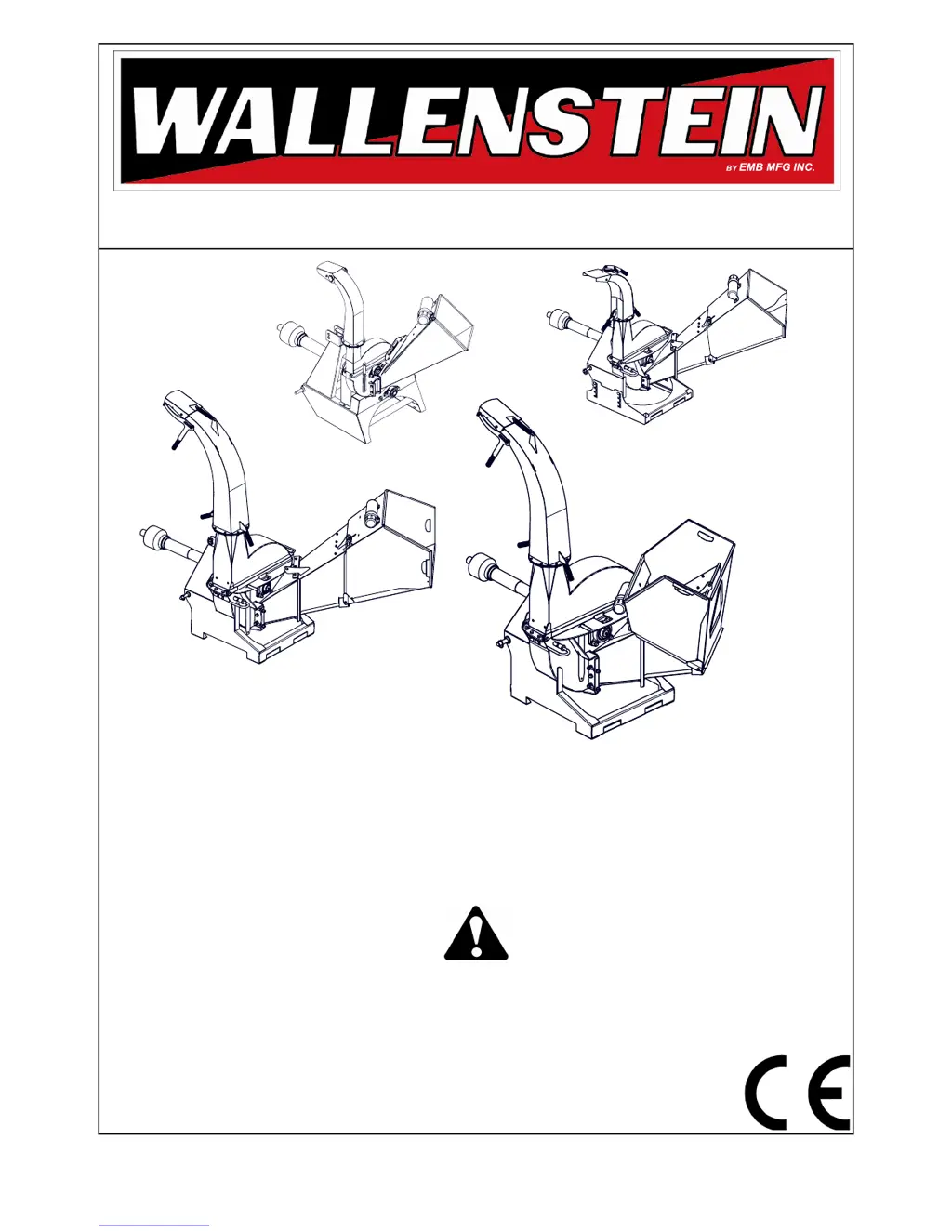
BX72S
BX102S
BX32S
BX52S
BX "S" SERIES 3 POINT HITCH
WOOD CHIPPER
MODEL BX32S, BX52S, BX72S & BX102S
OPERATOR'S MANUAL

Questions and Answers

  • C
    christinehendersonAug 2, 2025
    What to do if my Wallenstein BX52S requires excessive power or stalls?
    • P
      Paula CobbAug 2, 2025
      If your Wallenstein Chipper requires excessive power or stalls, several factors could be at play. First, check for an obstructed discharge and clear any debris from the discharge chute. Avoid feeding too much material or feeding it too quickly; instead, feed smaller amounts or larger material slowly into the chipper hopper. Inspect and clear the chipper hopper lower rotor housing and rotor if they are plugged. For green material that won't discharge, allow it to dry or alternate between dry and wet material. Ensure the chipper blade clearance is correctly set to 1/32 to 1/16 ' (.76 - 1.52 mm), using a chipper clearance tool if needed. Finally, rotate, sharpen, or replace dull blades.
  • A
    andrewsjenniferAug 8, 2025
    Why is my Wallenstein BX52S Chipper feeding slowly?
    • J
      Joan JonesAug 8, 2025
      Slow feeding in your Wallenstein Chipper can stem from a few issues. Ensure the engine speed is set to the specified range (540 -1000). Check if the blades and/or knives are dull; if so, rotate, sharpen, or replace them. Verify the rotor blade angle is correct and that the blade is installed properly after re-sharpening the knives to the specified angle. Also, make sure the discharge is not obstructed by clearing any debris from the discharge chute.
  • R
    Richard WatkinsAug 15, 2025
    How to fix unusual vibration while running Wallenstein BX52S Chipper?
    • C
      Courtney Garcia DDSAug 15, 2025
      If your Wallenstein Chipper experiences unusual vibration while running, it could be due to a broken or missing blade, which you should replace. Another cause might be the PTO driveline being out of phase, so ensure you align the driveline. Additionally, the rotor may be bent; check if it wobbles and replace the rotor if necessary.
  • C
    Caitlin WilliamsAug 21, 2025
    What to do if drive belts are slipping or smoking on my Wallenstein BX52S Chipper?
    • S
      shermandavidAug 21, 2025
      If the drive belts on your Wallenstein Chipper are slipping or smoking, it's likely due to loose or worn belts. You should adjust or replace the belts. Another potential cause is a plugged rotor, so clear the rotor to resolve this issue.
  • R
    rcostaAug 27, 2025
    How to troubleshoot a Wallenstein Chipper when the rotor does not turn?
    • H
      Heather GarrisonAug 27, 2025
      If the rotor of your Wallenstein Chipper isn't turning, start by checking for an obstructed discharge and clear any debris from the discharge chute. Next, inspect and clear the chipper hopper lower rotor housing and rotor if they are plugged. Finally, check for a broken shear pin and replace it if necessary.

Summary

SAFETY

SAFETY DOS & DONTS

Lists essential safety practices, including what to do and what not to do when operating or maintaining the chipper.

EQUIPMENT SAFETY GUIDELINES

Provides critical safety guidelines for operating the equipment, focusing on operator and bystander protection.

SAFETY TRAINING

Emphasizes the importance of operator training and understanding manual instructions for safe operation.

OPERATING SAFETY

Lists critical safety rules and precautions for operating the wood chipper safely.

SAFETY SIGNS

SAFETY SIGN EXPLANATIONS

Explains the meaning and context of various safety signs found on the chipper.

SAFETY SIGN LOCATIONS

Illustrates the placement of safety signs on the BX models for operator awareness.

OPERATION

PRE-OPERATION CHECKLIST

A checklist to ensure the chipper is in safe and proper working order before each use.

FIELD OPERATION

General safety and operational advice for using the chipper in the field.

STARTING PROCEDURE

Procedures for starting the tractor and engaging the chipper.

EMERGENCY STOPPING

Critical steps to take in case of an emergency to stop the chipper and tractor.

CHIPPING OPERATION

Detailed instructions on how to operate the wood chipper for effective chipping.

TRANSPORTING

STORAGE

SERVICE AND MAINTENANCE

MAINTENANCE SAFETY

Safety guidelines to follow during all maintenance and service activities.

MAINTENANCE

General overview of maintenance to ensure long-term, trouble-free operation of the chipper.

ROTOR BLADES

Procedures for inspecting, sharpening, and replacing rotor blades for optimal performance.

LEDGER BLADES

Instructions for adjusting, rotating, and replacing ledger blades for proper shearing.

TROUBLE SHOOTING

TROUBLE SHOOTING CHART

A chart listing common problems, their causes, solutions, and necessary cautions.

SPECIFICATIONS

Wallenstein BX52S Specifications

General IconGeneral
BrandWallenstein
ModelBX52S
CategoryChipper
LanguageEnglish

Related product manuals