The Walrus Audio Canvas Mono is a versatile line isolator and direct injection (DI) box designed to provide a clean, balanced signal for various audio applications. It aims to remove any resistance between your sound and your audience, offering a pristine sonic foundation for your single-channel masterpiece.
Function Description:
The Canvas Mono serves two primary functions:
- DI (Direct Injection) Mode: This mode is used when connecting an unbalanced, high impedance source (e.g., Electric Guitar, Bass Guitar, etc.) to a balanced signal path. The input signal is reduced by 20dB (35dB with pad engaged) and then converted to a balanced signal via a transformer, outputting to the XLR output. The gain on your mixer or preamp should be used to bring the signal up to line level.
- LI (Line Isolation) Mode: This mode is used when connecting an unbalanced, low impedance source (e.g., Amp, Cab Sim, Keyboards, etc.). The signal remains full volume and is converted to a balanced signal via the transformer, outputting to the XLR output. Less preamp gain will be required in LI mode.
Important Technical Specifications & Usage Features:
- Impedance Matching: When deciding between DI or LI mode, it's crucial to check the manufacturer's specifications of your gear to find the output impedance of the device you are interfacing with. A general guide for impedance is:
- High Impedance: anything above 1kΩ = Use DI
- Low Impedance: less than 1kΩ = Use LI
- If you have high-frequency information when using LI mode, you should probably be in DI mode.
- PAD: This feature enables a -15dB input pad, which is only active in DI mode. It's used for reducing hot signals in order to minimize distortion.
- GND LIFT: This isolates the GND pin on the XLR output to help reduce hum. It should be left out for normal operation.
- SUM: This is a sum switch that turns the Thru channel into a second input. When engaged, it allows stereo input signals to be summed to the XLR output.
- THRU: The Thru jack is a pass-through that can be plugged into a guitar amp or another source, allowing you to monitor your sound while sending a clean signal to your mixer or front of house.
Usage Scenarios:
The Canvas Mono is designed to connect your instrument to a variety of sources. Here are a few examples:
- Guitar/Bass Amp Rig:
- Guitar/Bass -> DSP Amp -> Canvas Mono -> Front of House
- Guitar/Bass -> DSP Amp -> Canvas Mono -> Thru/Out -> Amp
- Guitar/Bass -> DSP Amp -> Canvas Mono -> Thru/Out -> Mixer Out
- Acoustic Guitar at the Studio:
- Acoustic -> Canvas Mono -> DAW
- Mono Synth & Keys:
- Keys/Synth -> Canvas Mono -> FOH or DAW
Maintenance Features:
- Limited Lifetime Warranty: This product comes with a limited lifetime warranty, ensuring long-term reliability and support.
- Support & Repair:
- For questions, contact help@walrusaudio.com.
- For repairs, contact repairs@walrusaudio.com.
The Walrus Audio Canvas Mono is built to be the performance palette that goes wherever you are making music, providing a robust and reliable solution for line isolation and direct injection needs.

 Need help?
 General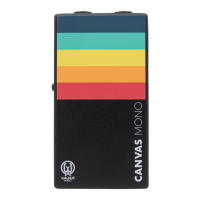

 To Next Page