The Walrus Audio Fathom is a multi-function reverb pedal designed to offer a wide range of ambient textures and spatial effects for musicians. This versatile pedal features four distinct reverb algorithms, allowing users to transition seamlessly from subtle room reverbs to expansive, modulated soundscapes. Its intuitive controls and smart bypass switching make it a powerful tool for creative expression.
Function Description:
The Fathom pedal provides a rich array of reverb options through its four core algorithms: Hall, Plate, Lo-Fi, and Sonar. Each algorithm is meticulously crafted to deliver unique sonic characteristics.
- Hall: This algorithm creates a wide, open, and vast reverb with a decay that gradually rolls off high frequencies, mimicking the natural acoustics of a large hall. It's ideal for adding spaciousness and depth to your sound.
- Plate: The Plate algorithm offers a full-bodied reverb with a smooth and even decay. This classic reverb type is known for its dense and shimmering qualities, perfect for adding a rich, vintage-inspired ambiance.
- Lo-Fi: This mode produces a filtered reverb with a decay that can range from warm and subtle to a thin, AM-radio-like sound. It's excellent for creating unique, textured soundscapes and experimental effects. The "X" knob in this mode controls the filter width, allowing for dynamic tonal shaping.
- Sonar: The Sonar algorithm is a distinctive reverb that incorporates both high and low octaves into the reverb trail. The "X" knob allows users to blend these octaves, with noon providing an equal mix of both. Turning the knob to the left emphasizes the lower octave, while turning it to the right highlights the higher octave, offering unique harmonic possibilities.
Usage Features:
The Fathom pedal is equipped with several controls and features that enable precise shaping of the reverb effect:
- DECAY Knob: This control adjusts the length of the reverb trail. Turning it counter-clockwise results in tight, short reverbs, while turning it clockwise extends the decay to long, drawn-out textures.
- DAMPEN Knob: This knob controls the overall tone of the reverb decay. Turning it clockwise darkens the decay by filtering out high frequencies, creating a warmer sound. Conversely, turning it counter-clockwise opens the filter, brightening the decay and allowing more high frequencies to pass through.
- MIX Knob: This control adjusts the blend between your dry instrument signal and the wet reverb effect. Rotating it clockwise increases the amount of reverb. The white line at the 2 o'clock position represents an equal mix of dry and wet signals.
- X Knob: The function of the "X" knob changes depending on the selected reverb algorithm.
- In Hall and Plate modes, it controls the pre-delay, which is the time before the reverb effect begins, allowing for more clarity in the initial attack of your notes.
- In Lo-Fi mode, it adjusts the filter width, enabling you to shape the tonal character of the filtered reverb.
- In Sonar mode, it blends the low and high octaves within the reverb, as described above.
- MOD Toggle: This three-position toggle switch selects between Low, Medium, and High modulation settings, adding movement and character to the reverb tail. In Sonar mode, the Low modulation setting is turned off.
- PROGRAM Switch: This switch allows you to select which of the four reverb algorithms (Hall, Plate, Lo-Fi, Sonar) is used to generate the reverb signal.
- Bypass Switch (Momentary Feature): When the pedal is in the off position, pressing and holding the bypass switch temporarily activates the reverb effect. This is useful for adding a brief moment of reverb texture to your sound. Releasing the switch returns the pedal to the off state.
- Sustain Switch (Momentary Feature): When pressed, the sustain switch ramps up the reverb trail to its maximum length, creating a long, dreamy reverb. Releasing the switch then ramps the decay back down to the setting determined by the DECAY knob.
- Trails Mode: The Fathom can operate in either "trails" or "no trails" mode. In trails mode, when you turn the pedal off, the reverb decay naturally fades out, providing a smooth transition. In no trails mode, the reverb decay is abruptly cut off when the pedal is disengaged. To toggle between these modes, hold down the bypass switch for 2 seconds while applying power to the pedal. This setting is saved until you repeat the process.
Maintenance Features:
Walrus Audio pedals, including the Fathom, are designed with durability in mind and come with a limited lifetime warranty.
- Warranty and Repair: Should your pedal require a tune-up or repair, Walrus Audio encourages users to contact them via email at repairs@walrusaudio.com or visit their website for detailed warranty and repair information. This commitment ensures long-term support and maintenance for your device.
- Power Supply Recommendations: For optimal performance, it is recommended to power the Fathom pedal with an isolated 9-volt DC power supply with a center-negative polarity and a minimum current output of 100mA. The use of daisy chain power supplies is not recommended, as they can introduce noise and affect the pedal's performance.
The Walrus Audio Fathom is a robust and versatile reverb pedal that offers a wide spectrum of sonic possibilities, from subtle enhancements to expansive soundscapes, all within a user-friendly interface.

 Need help?
 General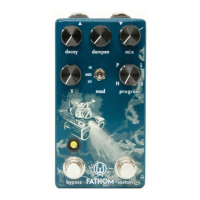

 To Next Page