EasyManua.ls Logo

Walther SMS-02 - User Manual

Walther SMS-02
34 pages
Print Icon
To Next Page IconTo Next Page
Loading...
Rev. 1.2
Assembly Instructions - Spray Valve SMS-02
Page 1 of 34
Walther Systemtechnik GmbH D 76726 Germersheim
Telefon: +49 (0)7274-7022-0 Telefax: +49 (0)7274-7022-91
http://www.walther-2000.de info@walther-2000.de
Assembly Instructions
Spray Valve SMS-02
Article Number: S02-….
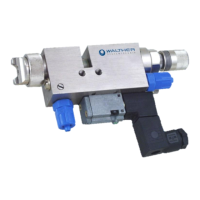
Picture: Spray Valve SMS-02 with flat air cap and raster-needle lock
NOTE
Please read the Assembly Instructions carefully before first using the incomplete device and
strictly adhere to the instructions!
The incomplete device may only be worked with and worked on by persons who are familiar
with the assembly instructions and the current regulations for industrial safety and accident
prevention.
Always keep this translated version of the “Original Assembly Instructions at the incomplete
device! The instructions have to be available anytime!

Table of Contents

Questions and Answers

  • M
    Molly ScottJul 31, 2025
    Why is my Walther SMS-02 spray image shaped too much upwards and downwards?
    • J
      Jennifer BridgesJul 31, 2025
      The spray image might be shaped too much upwards and downwards because of a soiled air cap or nozzle. To resolve this, clean the nozzles.
  • A
    Angelica HenryAug 4, 2025
    Why is my Walther Control Unit spray image too much left-sided or right-sided?
    • G
      Gregory KingAug 4, 2025
      A left-sided or right-sided spray image can be caused by a soiled air cap or nozzle. Clean the nozzles to fix this issue.
  • G
    gonzalezhollyAug 9, 2025
    What to do if my Walther SMS-02 Control Unit has heavy application in the middle of the spray image?
    • J
      jennifer19Aug 9, 2025
      If there's a heavy application in the middle of the spray image, it could be due to too much material or the material being too thick. Try reducing the material supply or diluting the material.
  • L
    lesliewrightAug 13, 2025
    What to do if my Walther Control Unit nozzle needle does not open?
    • J
      Jeffrey FlemingAug 13, 2025
      If the nozzle needle doesn't open, consider these possible causes and solutions: * **No electrical current:** Check the electrical power supply. * **Insufficient control air pressure:** Ensure the control air pressure is set to 5-6 bar. * **Leakages:** Inspect and replace O-rings (6.2.0), (7.4.0), or (7.5.0) if necessary. * **Sticky needle:** Disassemble and clean the needle (7.0.0) within the needle sealing screw (6.1.0). * **Low needle stroke:** Adjust the needle stroke by turning left at the raster-needle setting.
  • M
    Monica HoodAug 17, 2025
    What to do if my Walther SMS-02 Control Unit has a split spray image?
    • L
      Lindsay AlvarezAug 17, 2025
      A split spray image could be the result of too little material or pressure flat jet being too high. Increase the material supply or increase pressure for the round jet.
  • T
    Tiffany LawrenceAug 21, 2025
    What to do if Pre-supply/After-supply air is constantly blowing in my Walther SMS-02?
    • B
      Brian DuarteAug 21, 2025
      If pre-supply or after-supply air is constantly blowing, it might be due to: * **Adjusting screw (10.4.0) screwed in too deep:** Move the adjusting screw back to its basic setting. * **Locking piston (11.2.0) unsuitable:** Replace the air valve (11.0.0) completely. * **Defective O-ring (11.2.1):** Replace the O-ring on the locking piston.
  • B
    Beverly PrattAug 26, 2025
    What to do if medium leaks at the slot of my Walther Control Unit?
    • J
      Joshua JohnsonAug 27, 2025
      If medium leaks at the slot (covered by plastic protection sleeve 5.4.0), it indicates a leakage of material sealing. A complete overhaul of the spray valve is suggested.

Summary

EC Declaration of Incorporation

Introduction

1.1 Target Group of the Assembly Instructions

Identifies the intended audience for the assembly instructions.

1.2 List of Signs and Symbols

Explains warning signs, symbols, and their meanings used in the manual.

Safety

2.1 General Information

Provides general safety considerations and device reliability.

2.2 Dangers from Residual Energy

Details potential hazards arising from residual energy sources within the device.

2.3 Warranty and Liability

Outlines the terms and conditions of the product warranty and manufacturer liability.

2.4 Correct Use

Specifies the intended applications and correct usage of the spray valve.

2.5 Incorrect Use

Lists improper uses that can lead to hazards, damage, or device failure.

2.6 Qualification of Personnel

Defines the required qualifications and responsibilities for personnel operating the equipment.

Transport

3.1 Packaging

Describes packaging methods and regulatory compliance for shipping.

3.2 Tasks before Transport

Lists necessary pre-transport checks and preparation steps.

Description of Function

4.1 Purpose of the Device

Explains the primary function and intended applications of the spray valve.

4.2 Technical Data

Provides detailed technical specifications, dimensions, and operating parameters.

4.3 Type Label

Describes the location and content of the device's identification label.

Installation and Start-up

5.1 Hose Mounting

Details the correct procedure for connecting the functional hoses to the spray valve.

5.2 Total View; Description

Provides an overall view and descriptive explanation of the device's components.

5.3 Adjusting the Device

Explains how to adjust key settings like needle stroke and material quantity.

5.4 SMS-02 with Raster-Needle Detection

Details the optional raster-needle detection feature.

5.4.1 Terminal Assignment for Needle Query

Shows the wiring diagram for the needle query sensor's connection.

5.4.2 Terminal Assignment for Magnetic Valve

Details the terminal connections for the magnetic 5/2-way valve.

5.5 Installation Diagram for Color-Marking Systems

Illustrates the specific installation setup for color-marking systems.

Operation

6.1 General Information

Provides general information and requirements for operating the device safely.

6.2 Operation Information; Operating Conditions

Covers operating information and optimal conditions for effective and safe use.

6.3 Operating Elements

Identifies and explains the function of the device's primary operating controls and indicators.

Maintenance and Repair

7.1 General Information

Provides general guidelines and principles for performing maintenance and repair.

7.2 Cleaning

Explains the recommended procedures for cleaning the spray valve and its components.

7.3 Exchanging the Air Valve (11.0.0)

Instructions for the correct procedure to replace the air valve assembly.

7.4 Exchanging the Return Check Valve, complete (10.0.0)

Steps to safely replace the complete return check valve assembly.

7.5 Replacing the Needle (7.0.0) and the Nozzle (2.1.0)

Procedure for replacing the nozzle needle and nozzle components.

7.6 Exchanging the Sealing Bush (6.0.0)

Instructions for the correct procedure to exchange the sealing bush.

7.7 Inserting Gaskets and O-Rings

Guide for correctly inserting and seating gaskets and O-rings.

7.8 Maintenance for Operation in Color-Marking Systems (Normal Operation)

Specific maintenance tasks for devices operating in color-marking systems.

7.9 Spare Parts

Information and recommendations for identifying and ordering replacement spare parts.

7.10 Customer Service; Support

Contact information and resources for obtaining customer service and technical support.

Troubleshooting

8.1 General Information

General advice and initial checks for troubleshooting common problems.

8.2 Failures:

Lists common faults, their potential causes, and recommended corrective actions.

8.3 Spray Image; Type of defect

Diagnoses common spray image defects, their causes, and corrective solutions.

Taking out of Service

9.1 Short Interruption

Instructions for handling and preparing for short periods of non-operation.

9.2 Long-term Interruption

Procedure for properly preparing the device for extended periods of inactivity.

9.3 Final Shutdown of Device

Steps for safely and completely shutting down the device.

Appendix

10.1 Dimensioned Drawing (Flat jet)

Provides detailed dimensional drawings for the flat jet spray valve configuration.

10.2 Dimensioned Drawing (Round jet)

Provides detailed dimensional drawings for the round jet spray valve configuration.

10.3 Spare Parts Drawing SMS-02 (Standard)

Illustrates the assembly and identifies spare parts for the standard SMS-02 model.

10.3.1 Spare Part List for SMS-02 (Standard)

Lists specific part numbers and descriptions for the standard SMS-02 model.

10.4 Spare Part Drawings SMS-02 (Raster-Needle Detection)

Illustrates the assembly and identifies spare parts for the raster-needle detection model.

10.4.1 Spare Part List for SMS-02 (Raster-Needle Detection)

Lists specific part numbers and descriptions for the raster-needle detection model.

10.5 Article Numbers for Air Caps

Provides a catalog of article numbers for various types of air caps.

10.6 Article Numbers for Nozzles

Lists article numbers corresponding to different nozzle types and sizes.

10.7 Article Numbers for Nozzle Needles

Provides article numbers for various nozzle needle configurations.

10.8 Article Numbers for Valves

Lists article numbers for different control air and magnetic valves.

10.9 Article Numbers for Threaded Joints

Provides article numbers for various threaded connectors and fittings.

10.10 Article Numbers for Other Parts

Lists article numbers for miscellaneous components and accessories.

10.11 Wear-and-Tear Parts

Details the available wear-and-tear kits and their constituent parts.

10.12 Accessories

Lists available optional accessories that can be used with the spray valve.

10.13 Description Pneumatic Needle-Stroke Adjustment 97800037

Explains the function, setting, and operation of the PNA accessory.

Walther SMS-02 Specifications

General IconGeneral
TypeSMS-02
CategoryControl Unit
Input Voltage24 V DC
Output Voltage24 V DC
Protection ClassIP20
ManufacturerWalther