MIDI Input /
Output:
Use 1/8” TRS
Type A
Routing
Switch:
Serial (L)
Parallel (R)
Power:
9V DC Only
130mA
Expression:
1/4” TRS
Expression
Pedal Input
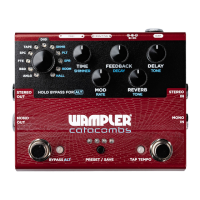
Program Selector:
Alt Mode selects Reverbs
ANLG - Analog Delay
BBD - ‘Bucket Brigade’ Delay
FTE - ‘Faux Tape Echo’
SPC - Echo-Space Delay
TAPE - Multi-head / Tape Delay
DIGI - Digital Delay
SHMR - Shimmer Reverb
PLT - Plate Reverb
SPR - Spring Reverb
ROOM - Room Reverb
HALL - Hall Reverb
Output Jacks:
Mono or Stereo
Primary Controls:
Time: sets delay length
between 20ms and 2000ms
Alt - Shimmer: When using
the Shimmer Reverb program,
sets the shimmer amount
Mod: sets modulation depth
Alt - Rate: sets modulation
rate
Feedback: sets Delay
feedback
Alt - Decay: sets the Reverb
program’s decay
Delay: Sets Delay program
output level
Alt - Tone: Sets Delay tone
Reverb: Sets Reverb program
output level
Alt - Tone: Sets Reverb tone
Bypass / Alt Mode:
Turns effect on/off
Alt: Hold down the bypass
switch until the bypass
LED turns red to select Alt
controls (Press and hold for
quick changes, mode will
latch on after 2 Seconds)
Preset Switch:
Presets 1-8 are accessible via the front panel preset switch;
To save the current setting confi guration to a preset:
• Hold the preset switch for 1 second. The preset LEDs
will blink, indicating the destination preset.
• Select the preset destination by pressing the preset
switch to cycle through presets 1-8. Press and then hold
the preset switch to save the preset to the indicated
preset number.
Tap Tempo Switch / LED :
The right footswitch serves multiple functions; the current function is
indicated by the tap tempo LED. To cycle between functions, press and
hold the right footswitch for one second until the tap tempo LED changes
color.
Modes:
• Tap Tempo, LED will blink Blue
• Preset Increment, LED will blink Green
• Reverb On/Off, LED Lights Red (R Footswitch activates Reverb, L Delay)
Input Jacks:
Mono or Stereo
QUICK REFERENCE GUIDE
Unless specifi ed, Clockwise (CW) is the highest / fastest setting
and Counter Clockwise (CCW) is the lowest / slowest setting

 Need help?
 General


 To Next Page