Page 7
camping a nd outdoors
OPERATING INSTRUCTIONS
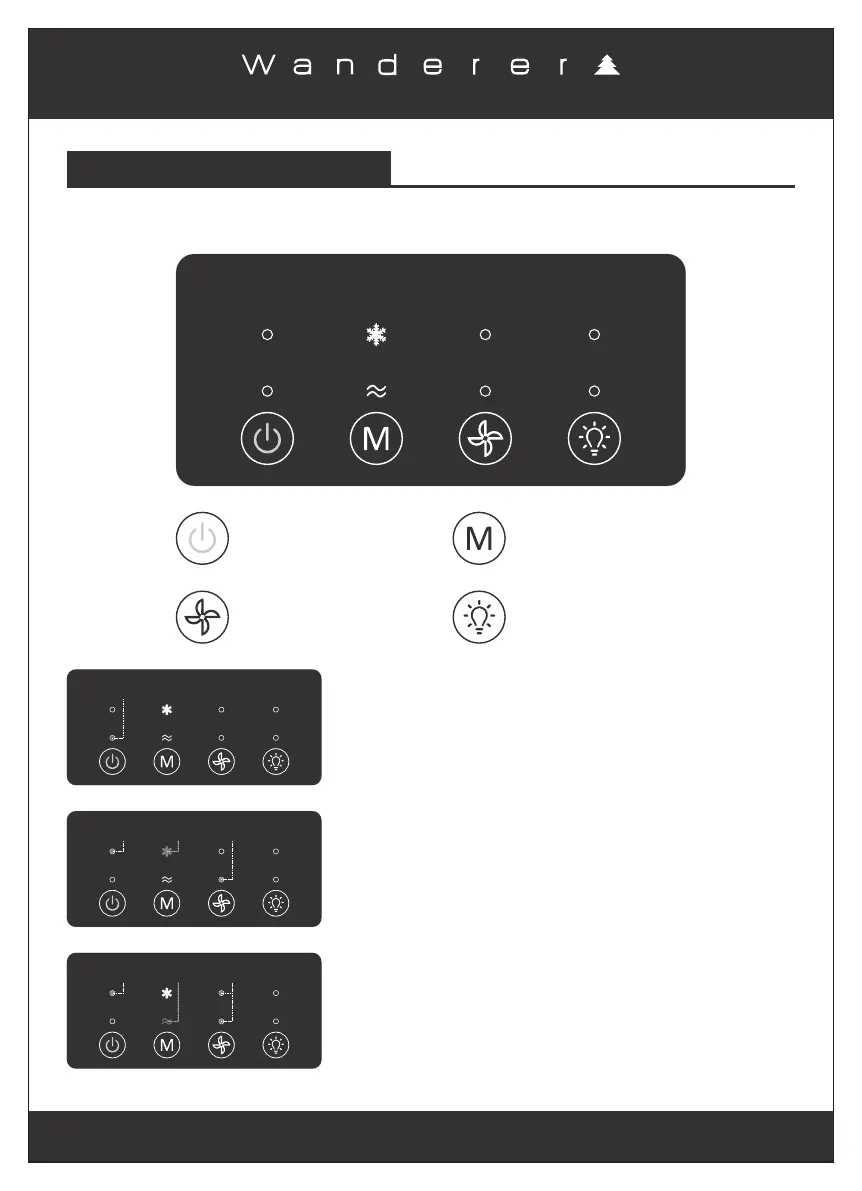
Power ON/OFF
Button
Speed Selection
Button (Low/High)
Cooling and Fan
Selection Button
Lighting Selection
Button (High/Low/Off)
TOUCH SWITCH CONTROL PANEL
When the air conditioner is turned ON, it will automatically
switch the Cooling mode with Low Speed setting, the
corresponding blue indicators will light up on the digital
screen as shown.
Once the air conditioner is connected to one of the power
supplies, the red power indicator will light up on the digital
screen indicating that the air conditioner is in STANDBY
mode as shown.
Press the Power ON/OFF Button to turn the unit ON and OFF.
Blue
Indicator
(Cooling mode)
Blue
Indicator
(Low Speed mode)
Blue
Indicator
(Power ON)
Red
Indicator
(STANDBY mode)
Blue
Indicator
(Fan mode)
Blue
Indicators
(High Speed mode)
Blue
Indicator
(Power ON)
Press the Cooling and Fan Selection Button to cycle through
the Cooling and Fan modes.
Press the Speed Selection Button to cycle through the Low
Speed and High Speed settings.
The corresponding blue indicators will light up on the digital
screen as shown.


 To Next Page