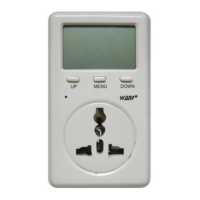
1. Connect the ammeter to an outer power supply, it starts working; the red indicator and
the LCD backlight are lightened immediately.
2. Insert the detection-waiting appliance into the ammeter, the ammeter starts real-time
detection for operation condition of the appliance.
3. Connect the ammeter to the power supply only, but disconnect it with any other
appliance, the following operations are still working:
Voltage of power supply can be measured;
Records of the former accumulated electricity consumption and cost can be read;
Relative functions and data can be set, including: electricity price, ratio of operation
condition, standby power.
4. Adaptable voltage: 220V/50Hz or 110V/60Hz (for different versions)
Peak load: 15 A
5. Limit to indoor use. Environmental Conditions: Temperature: -10 ~ 60 °C; Humidity:
10~95% RH
6. New functions:
1) Two ways for calculating operation time: time in single operation period and
accumulated time in all operation periods; can be manually cleared to 0.
2) Two ways for calculating power consumption and power cost: electricity
consumption and electricity cost in single operation period and accumulated electricity
consumption and electricity cost in all operation periods; can be manually cleared to 0.
3) Ratio of operation condition and standby power can be pre-set.
Display
ⅠDisplay scope:
1. AC Voltage: 160~280V/50Hz or 90~150V/60Hz (for different versions)
2. Power: 1~3000W (can display running power less than 1W.)
3. Electricity consumption: 0.0001 ~ 999.9 KWh
4. Electricity cost: 0~9,999 $
5. Ratio of operation condition: 0~100%
Units


 To Next Page