Chapter 5 Settings and Functions
5.1 Share with Family
Before proceeding the sharing, please ask your family to download Wansview Cloud APP to his
phone and register a new account with their own email information to access APP firstly.
Warm tips:The shared link is valid for 30mins only, please delete the record and share again if
it expires).
User can share access to other people, up to 3 people(devices). But the invitee can’t have a full
access to this camera, they only can view the live stream, use the two-way audio, replay the alert
video and the Cloud alarm video.
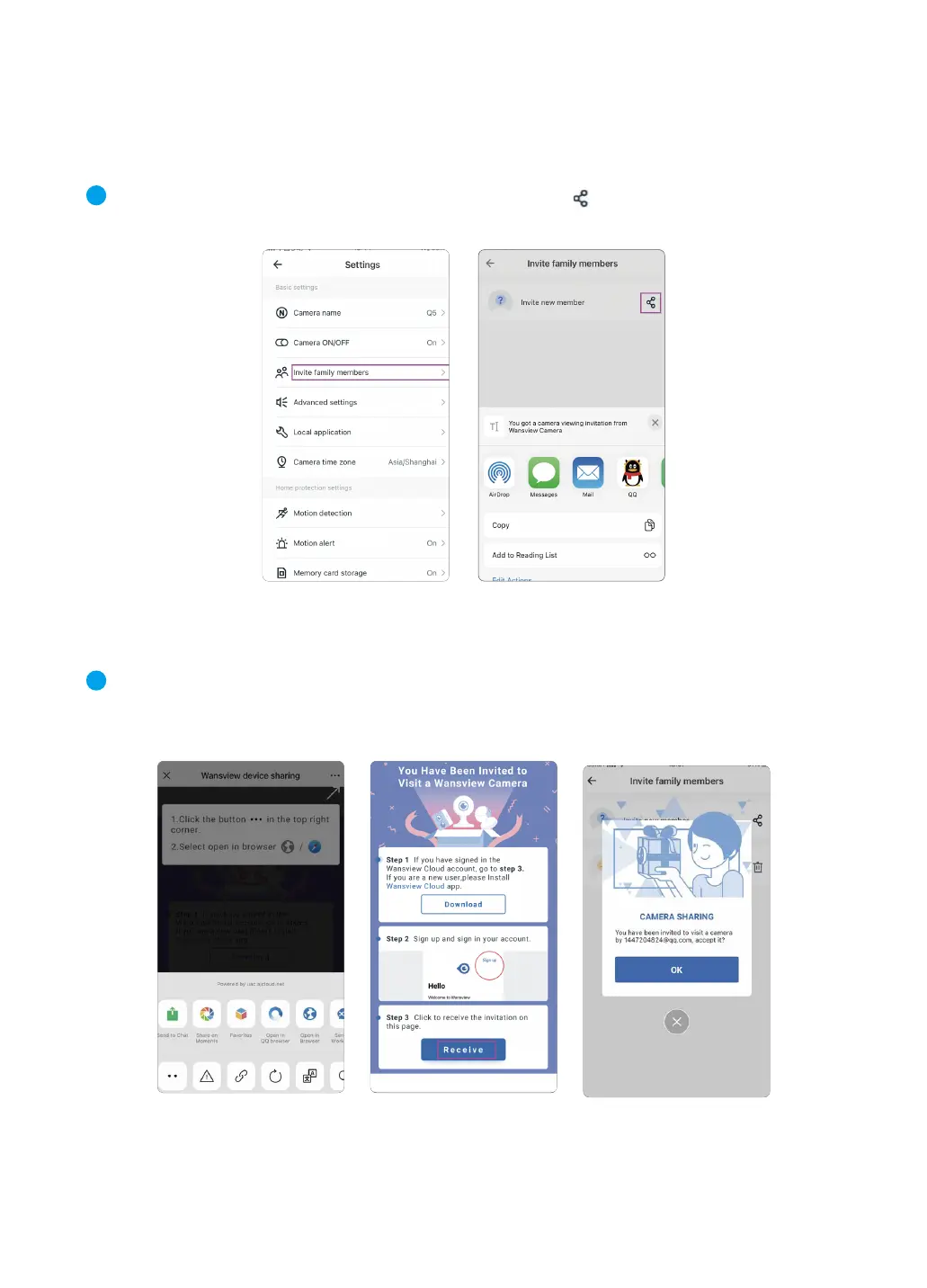
① Tap Settings icon-【Invite family members】 then press to enter share device, you can
share camera feed with family members, camera is up to be shared with 3 devices at a time.
② Send the invitation link to your family’s phone and then ask him to click the link and open it via
browser. Tap“Receive”to accept this invitation and confirm that the camera is added to the list
successfully.
1
2
12



 To Next Page