EasyManua.ls Logo

Wansview W7 - Camera Setup; WiFi Setup

Wansview W7
12 pages
Print Icon
To Next Page IconTo Next Page
To Previous Page IconTo Previous Page
Loading...
«
Camera
setup.
«
WicFisetup,
PCamerTest
245,
YS——r—
Camera
Setup
@
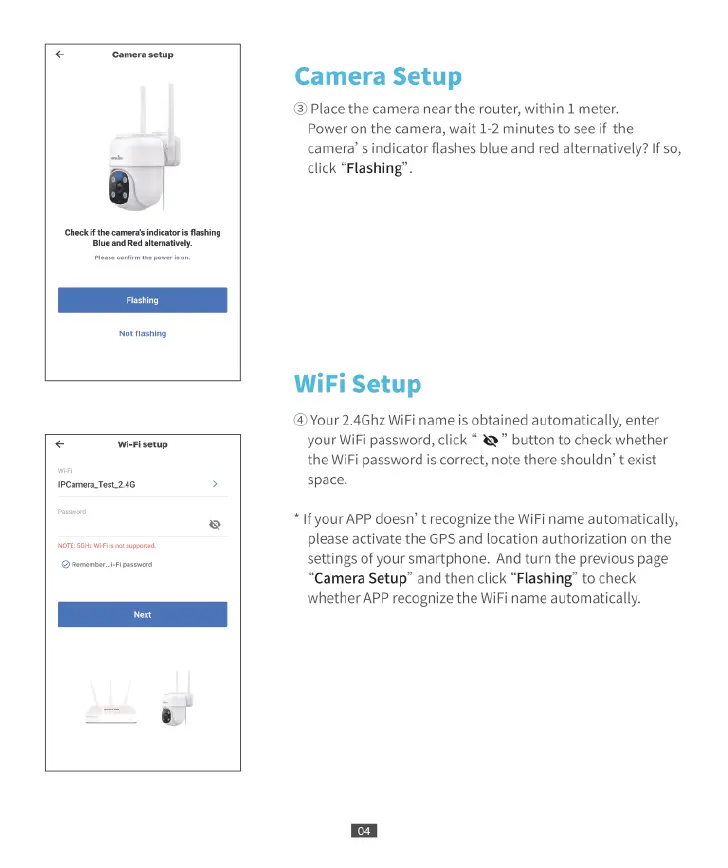
Place
the
camera
near
the
router,
within
1
meter.
Power
on
the
camera,
wait
1-2
minutes
to
see
if
the
camera’
s
indicator
flashes
blue
and
red
alternatively?
If
so,
click
“Flashing”.
WiFi
Setup
@
Your
2.4Ghz
WiFi
name
is
obtained
automatically,
enter
your
WiFi
password,
click
&
button
to
check
whether
the
WiFi
password
is
correct,
note
there
shouldn’
t
exist
space.
*
If
your
APP
doesn’
t
recognize
the
WiFi
name
automatically,
please
activate
the
GPS
and
location
authorization
on
the
settings
of
your
smartphone.
And
turn
the
previous
page
“Camera
Setup”
and then
click
“Flashing”
to
check
whether
APP
recognize
the
WiFi
name
automatically.

Related product manuals