3
866082_h•en•2016-01-01 We reserve the right to carry out improvements
Learning in a master channel
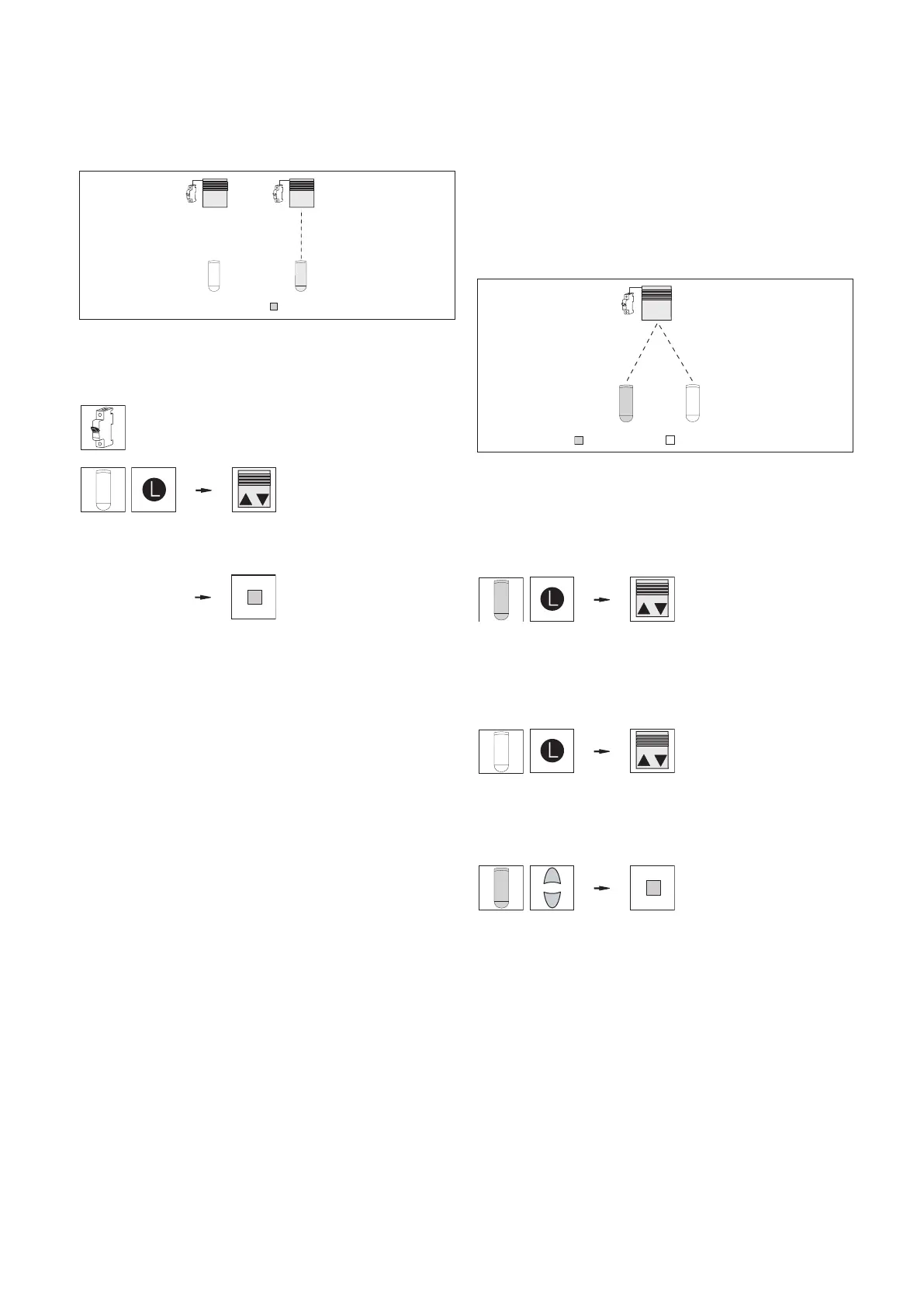
In this section, a channel will be learned into a receiver
(shown using the example of an EWFS Plug receiver).
When you perform a power-up procedure on the receiver,
the receiver learns in the first channel it receives as the
master channel:
= master channel
?
Fig. 5 The receiver does not "know" any channels yet (left).
A new channel is learned in and becomes the master
channel (right).
Perform the steps below in the order shown:
Put receiver in learn mode:
Perform the power-up proce-
dure on the receiver.
Learn in master channel: On
the hand-held transmitter,
press and hold the learn but-
ton. When the sun shading
system waves once, release
the button.
Receiver automatically
exits learn mode. The hand-
held transmitter is now the
master channel on the recei-
ver.
Result: The receiver now knows a master channel.
OTEN All channels learned into the receiver after the
first channel are learned as auxiliary channels.
If the receiver already knows a master channel,
the power must not be cut off to enter the learn
mode again for the auxiliary channels, since
this master channel must be used to start the
learn mode.
¸
Learning in an auxiliary channel
Now an auxiliary channel will also be learned into the
receiver. Auxiliary channels can be used for the following
purposes:
To allow multiple people to operate the sun shading system
with their own wall-mounted or hand-held transmitters.
To enable operation of the sun shading system using differ-
ent transmitters, e.g. manual operation with a wall-mounted
or hand-held transmitter, automatic control mode with a time
switch.
An important feature of auxiliary channels is that they can be
used to build groups.
1
ΙΙ
Ι
= master channel = auxiliary channel
Fig. 6 Operating a receiver with a master channel (I) and
auxiliary channel (II). To enter the learn mode, use the
hand-held or wall-mounted transmitter on the master
channel.
Perform the steps below in the order shown:
Put receiver in learn mode:
On the hand-held or wall-
mounted transmitter that was
just used to learn in the mas-
ter channel (I), press and
hold the learn button. When
the sun shading system
waves once, release the but-
ton.
Learn in wall-mounted
transmitter (II) as an auxil-
iary channel: Using the
hand-held transmitter (II),
press and hold the learn but-
ton. When the sun shading
system waves once, release
the button.
Exit learn mode: Using the
hand-held or wall-mounted
transmitter on the master
channel (I), press the UP or
DOWN button. When the sun
shading system moves, the
learn mode is no longer ac-
tive.
Result: The sun shading system can now be operated
using both hand-held transmitters (or one wall-
mounted and one hand-held transmitter. The
hand-held transmitter (II) is the auxiliary chan-
nel.
Ι
ΙΙ
Ι
¸



 To Next Page
 Loading...