NOW LET'S GET STARTED!
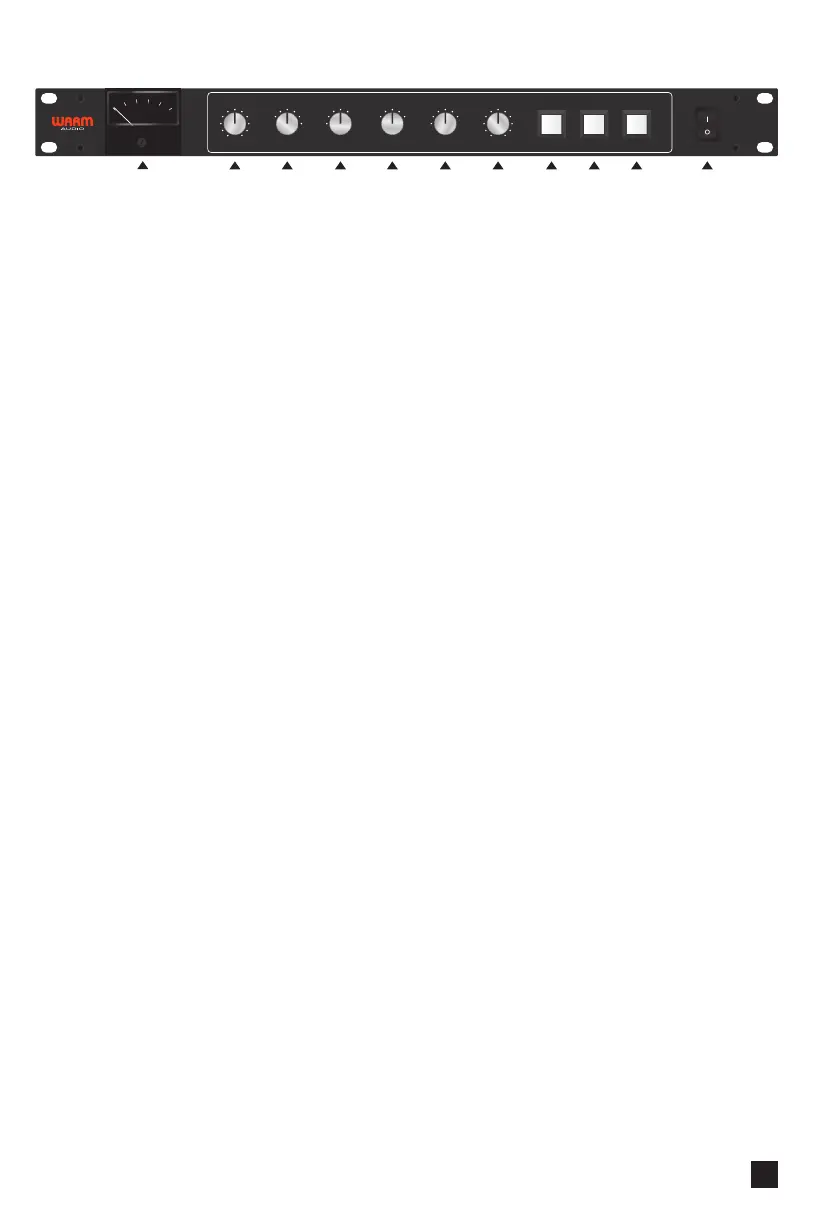
1. ANALOG dB METER with Needle Calibration
This meter indicates the amount of compression being applied to your audio.
The meter needle may be easily calibrated to zero by slowly turning the small,
flathead adjustment screw directly below the meter.
2. THRESHOLD
The threshold setting determines at what level the compressor will begin working.
For example, when the signal level exceeds the threshold setting, it will be compressed;
below the threshold, the signal will be passed unprocessed. Carefully setting the
threshold allows you to precisely control when compression is being applied to
a signal.
3. ATTACK - mS (mS = milliseconds)
Attack refers to when the compression effect is engaged after the signal crosses the
threshold. Attack is measured in milliseconds (ms). You might adjust it from .1
(engages immediately), 3 or 4 milliseconds (waits 3 to 4 milliseconds to engage),
or all the way up to 30 (waits 30 milliseconds to engage). And, of course, anywhere
in between.
The majority of volume spikes come at the beginning, or attack, of a note.
For example, if you want the sound of your plucking, pick attack, loud vocal, or drum
hit to come through more, you could increase the attack time to let it pass through.
4. RATIO
The compression ratio selects the amount of compression to apply on signals above
the threshold. The ratio might be something like 3:1 (3 to 1). That means for every 3
dB you send to the compressor beyond the threshold, only 1 dB comes out.
For example, a 1:1 ratio would not compress anything. You really have to listen closely
when adjusting the ratio; it is often subtle. Experiment by starting at the highest amount
of compression and you’ll hear the dynamics get squashed. Then, slowly lower the
compression amount until it suits your taste. A little compression can go a long way.
Your dB meter will also give you a visual reference of how much compression is taking
place. However...one golden rule to recording and mixing is to... “Mix with your ears,
and not with your eyes.”
THRESHOLD ATTACK - mS RATIO RELEASE - S HPF-Hz
-20 +20
.1
.3
.6
3
10
30 1.5
2
3
4
10
.1
.3
.6
30
60
105
125
185
1.2
Auto
OFF
MAKE-UP COMPRESSOR POWER ON
OFF
EXTERNAL
SIDE - CHAIN
ENGAGE
TRANSFORMERS
0 +20
2 CHANNEL VCA
BUS COMPRESSOR
BUS
-
COMP
20
16
12
8
4
dB
COMPRESSION
0
2 3 4 5 6 7 8 9 10 11
1
5


 To Next Page