The Washtech CD120L is a commercial rack conveyor dishwasher designed for high-volume washing of crockery, cutlery, containers, and food preparation/manufacturing equipment. It is intended for professional use in kitchens and food service establishments.
Function Description
The CD120L operates as a rack conveyor system, where racks of washware are fed into an inlet zone and conveyed through various washing and rinsing stages. The machine is designed to remove fresh food waste, emphasizing the importance of pre-rinsing or scraping loose soil before items are placed in the machine, as it is not a waste disposal unit. The system includes wash and rinse zones, with specific components for effective cleaning and hygiene.
Important Technical Specifications
Dimensions and Services:
- Overall Dimensions: Approximately 1500mm (length) x 815mm (width) x 1395-1455mm (height, including bench height of 850-910mm).
- Hot Water Supply (A): 65°C, 200-350 kPa pressure, 3/4" connection. A pressure limiter valve (LPV) is recommended if pressure exceeds 350 kPa.
- Waste - Tank Drainage Point (B): 2" BSP, 50mm connection. An S-trap must be fitted.
- Electrical Connection (C): 400-415V, 50Hz, 3P+N+E, 25A 3-phase supply. An accessible electrical isolation switch must be within 1m of, and not directly behind, the machine.
- Extraction (F): Requires 15 m³/min (250 l/sec) extraction rate for steam, with connections for ducts or an overhead canopy.
Water Quality Requirements:
- Hardness: Minimum 20 ppm, Maximum 100 ppm.
- pH: 7-8.
- Ions (Max mg/L): CL- 100, SO4 400, Fe 0.1, Mn 0.5, Cu 0.05, Cl2 0.1.
- Water filtration and/or softening are recommended, especially if supply quality or hardness is poor, to prevent scale buildup and increase component lifespan.
Water Consumption:
- Flow Rate: Minimum 20 litres per minute.
- Water Consumption: 5 litres per minute.
- The machine relies on incoming water pressure for the rinse cycle as it does not have a standard rinse booster pump.
Power:
- Electrical supply is 3p/25A 415V 50Hz via a switched outlet adjacent to the machine.
Usage Features
Start-up:
- Turn on the wall power.
- Fit the Wash Pump Inlet Filter, Drain Upstand, and Scrap Trays.
- Close all doors and turn on the machine power.
- The machine will begin filling. An amber "Full" light indicates the tank is full, and a "Ready" light glows amber when the required temperature is reached.
Operation:
- Press the "Start" button to operate the machine; the button will glow green.
- Stack items in a rack and push it into the inlet zone.
- Idle Stop: Pumps and the conveyor will stop if the machine is idle for 2 minutes. To restart, feed a new rack into the inlet.
Shut-down (End of Each Day):
- Press the "Stop" button.
- Remove the Drain Upstand to gravity drain the machine.
- Once the tank is visibly empty, switch off the power button.
- Proceed with daily cleaning instructions for the wash zone.
Suggested Best Practice:
- Pre-rinse: Scrape and/or rinse trays, plates, and glasses in cool water to remove waste.
- Chemicals: Use a good quality non-foaming commercial detergent and drying agent. Avoid domestic detergents, which can cause foaming.
Troubleshooting (Operator Level):
The manual provides a comprehensive troubleshooting guide for common issues, indicating "likely cause" and "possible cause" for problems such as:
- Dishes not clean (poor pre-scraping, overloading racks, blocked jets/arms, poor machine care, incorrect curtains, low water pressure, low rinse temperature, poor water quality, pawl drive not operating, crashing sound against door).
- Staining, foaming, protein bloom, dirty machine, food residue on ware, film/spots on ware, detergent residue, greasy film/no fizz, wet washware.
- Scale buildup in machine (often due to poor water quality).
- Filters on other equipment.
- Limit switch activated.
- Wash arm not fitted properly.
- Machine stops and refills constantly (curtains not fitted, scrap trays missing).
For chemical-related issues, consulting a chemical supplier/expert is recommended. For water quality issues, a water specialist should be consulted.
Maintenance Features
Daily Cleaning (Wash Zone):
- Remove Scrap Trays (10) and clean them with a brush and water.
- Remove the Wash Pump Inlet Filter (12) and clean it with a brush and water.
- Return the Drain Upstand (11), Wash Pump Inlet Filter (12), and Scrap Trays (10) to the machine.
Weekly Cleaning (Wash Zone):
To be performed in conjunction with daily cleaning:
- Remove Lower Wash Arms (8) by lifting to unhook and withdrawing.
- Remove Upper Wash Arms (7) by pushing the clip up and withdrawing.
- Check arms for obstructions; remove end caps if necessary.
- Flush Arms (7 & 8) with water, using a toothpick or paper clip to clear jets.
- Return the Wash Pump Inlet Filter (12), Drain Plug (11), Scrap Trays (10), Lower Wash Arms (8), and Upper Wash Arms (7) to the machine.
Curtain Care:
- Purpose: Curtains maintain heat within zones and prevent water splashing/mixing, which could reduce water quality. They must be correctly positioned.
- Types:
- Long anti-splash curtain 600 x 475 (Part number: 840 90011).
- Medium anti-splash curtain 600 x 335 (Part number: 600 90071).
- Short anti-splash curtain 600 x 150 (Part number 840 90013).
- Weekly Cleaning: Remove curtains from hooks, place them in a dishrack, and wash them through the machine. Broken curtains should be replaced promptly.
Installation and Servicing:
- Must be carried out by qualified, skilled personnel in compliance with all local codes and standards (e.g., AS/NZS 3500.1).
- Machine panels should only be removed by qualified personnel due to internal hazards (live electrics, hot surfaces).
- Regular servicing is emphasized for optimal machine performance and longevity.
Accessories:
The manual lists several accessories, including:
- C660508 Cutlery Basket CP8 for 500mm
- 600 70029 2 x Cuprack CB 500mm X 75mm high
- 600 70028 2 x Dishrack P12/18 500mm 18 Dish
- C660503 2 x Cutlery Container G
The Washtech CD120L is a robust and efficient commercial dishwasher designed for demanding environments, with clear instructions for operation, maintenance, and troubleshooting to ensure reliable performance and longevity.

 Need help?
 General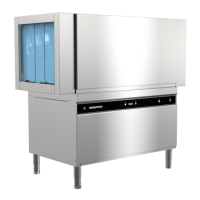

 To Next Page